Skip to content

Select your region & language

Global

Region

Sound and Vibration Analysis System
NEW
O-Solution DS-5000

The loss coefficient and Young's modulus (longitudinal elastic modulus) of the damping material itself are calculated from the measurement results of the multi-layered test specimen using the formula described in JIS K7391.

The loss coefficient is one of the indicators used in the fields of mechanical vibration and polymer materials to show vibration damping performance. Damping materials with a large loss coefficient are used by being attached to the surface of structures for the purpose of reducing vibration and radiated noise. This tool calculates the loss coefficient and Young's modulus of the damping material itself from the frequency response function of a multi-layered test piece (a test piece with damping material attached to a base material) measured with the frequency response measurement software OS-4100, thereby clarifying the vibration damping performance of the damping material.

Features

Conceptual diagram of O-Solution, which integrates ESUFEEL and Oscope.

software

O-Solution integrates the real-time measurement software ESUFEEL and the time-series data analysis software Oscope.
It features a measurement mode for use with the DS-5000, and an analysis mode for editing recorded data and performing detailed analysis, allowing you to switch between modes with a single click.

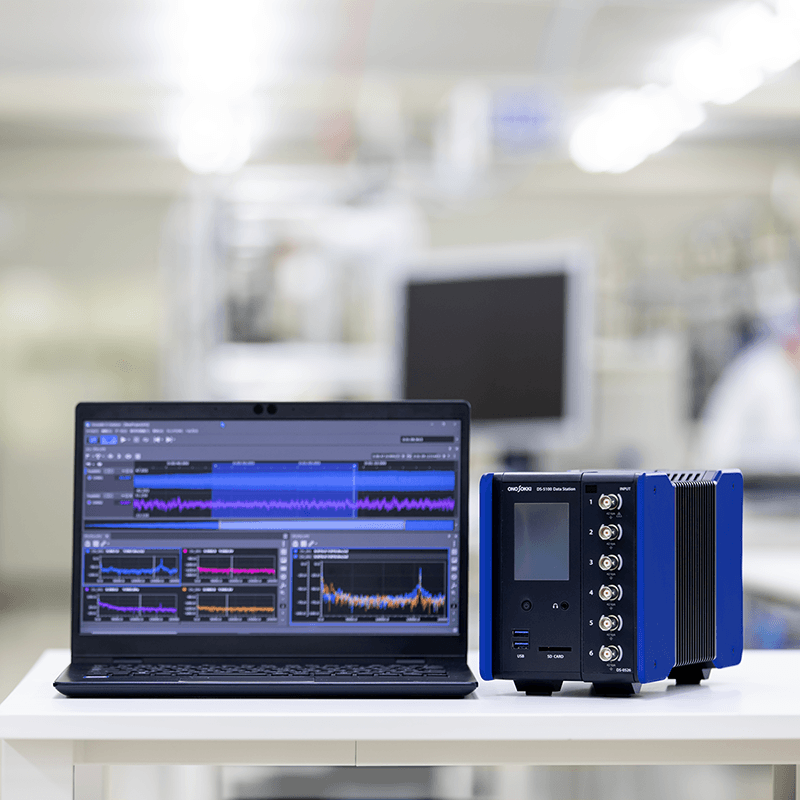
From DS-3000 (top) to DS-5000 (bottom)

Hardware

The DS-5000 is a more compact version of the previous DS-3000 model and supports multi-channel measurement (up to 240 channels).
This hardware features full channel isolation, making it highly resistant to noise.

O-Solution (software)

1. Features of O-Solution

Integrated measurement and analysis software

O-Solution is equipped with a "measurement mode" and an "analysis mode."
You can switch modes with just one click, allowing you to smoothly perform everything from experiments and measurements to post-recording analysis, reducing operational errors.

  • Left: O-Solution measurement mode Right: O-Solution analysis mode
    Left: O-Solution measurement mode Right: O-Solution analysis mode
Measurement Mode

It connects to the DS-5000 to record time-series data of vibration and noise, and perform frequency analysis and tracking analysis in real time.
It is suitable for measuring natural frequencies using vibrators and impulse hammers, as well as for measuring rotating machinery.

Analysis Mode

We will edit and analyze the recorded time-series data.
You can freely manipulate large amounts of time-series data and data in different formats, such as displaying them simultaneously or overlaying them.
This is suitable for situations where you want to perform a more detailed analysis after real-time measurements, or for analyzing transient phenomena.

A wide range of applications

Basic data processing functions are available on the platform, and you can combine the main options to suit your needs.
The external control function allows for device integration.
You can check with anyone, anywhere with the license-free viewer function, O-Solution Lite.

Applications available in each mode

The available functions of the application vary depending on the mode.

Specification comparison with Oscope (time series data analysis software)

  Oscope O-Solution Remarks
Supported sampling frequencies 0.01 Hz~20 MHz 10 μHz~100 GHz Supports a variety of data
Number of analyzed data Up to 4 data points Up to 1,000 data points Number of data points that can be analyzed in one operation
Number of output files 1 file Up to 1,000 files Number of files that can be output in one operation
Data size 2 GB 1 TB Handling large amounts of data
Multithreading Parallelization of analysis tasks
External Control Function Automating analysis tasks

2. Application

Viewer O-Solution Lite

This is a license-free viewer function that anyone can use.

  • Viewer O-Solution Lite Usage Image
Feature 1: Easy data sharing

By providing files containing measurement data and analysis results saved in O-Solution to relevant parties, data can be easily shared using O-Solution Lite.

Feature 2: Data acquisition using DS-5000

By using O-Solution Lite and DS-5000 (data station), it can be used as a "data logger".

Feature 3: Downloadable from Ono Sokki 's website.

Anyone can download it and start using it right away.

Platform OS-5100

This software allows you to freely edit and analyze large volumes of time-series data. By adding optional functions, you can obtain a variety of analytical results.

The layout of various windows can be freely changed.
Freely customize the screen layout

The docking window allows you to change the display position of various windows to your preferred layout.

A data manager image for viewing, searching, and filtering multiple data lists.
Data management made easy

O-Solution centrally manages measurement and analysis conditions and acquired data within a project. The data manager allows you to view data lists, and the search and sorting functions make it easy to compare multiple conditions and channels.

Measurement Mode

A screen showing a time waveform in the monitor window to check the measurement status.
The reassurance of being able to see the waveform. A monitor window that lets you understand the measurement status.

A new monitor window is provided to display the time waveform (for 10 seconds).
You can set and measure while viewing the time waveform.

Small channel and multi-channel level monitor screens
Don't miss out on range

The level monitor screen can be changed depending on the number of channels and units.

Multi-analysis reduces work time

Two simultaneous analyses are possible while recording.

  • Examples of combinations of multi-analysis methods

*The following combinations cannot be analyzed simultaneously.
・Octave + Tracking + REC

Operational image of the automatic calibration function
Reduce calibration time

Auto-calibration saves you time.

Screen for the numerical magnification display function
Enlarged numeric display

By enlarging the measurement value you want to focus on, you can check the numbers more clearly.

Quick Access Window
Quick Access Window

Frequently used operations such as trigger start and measurement start can be displayed as large shortcut buttons on the screen. Keyboard shortcut keys can also be registered to the buttons. If you have the external control function (OS-0510), you can also assign repeated operations to one button.

Replay analysis involves changing the analysis conditions and analysis interval and re-analyzing.
Replay Analysis

Recorded time series data can be reanalyzed in measurement mode. This allows repeated preliminary analysis before switching to analysis mode, improving the efficiency of determining analysis conditions.

Measurement condition list/Analysis condition list

Measurement conditions registered in advance in a list can be switched with one click. This improves work efficiency when there are multiple fixed measurement methods, such as in standard tests. Multiple analysis conditions for post-analysis can also be switched with one click.

Adding graph settings to favorites

O-Solution offers a variety of settings for graphs, such as scale settings and auxiliary units. Frequently used settings can be registered as favorites, preventing operational errors and improving the efficiency of analysis work.

Analysis Mode

Data comparison makes it easier to understand physical phenomena

You can freely "simultaneously display, arrange, and overlap" data with different physical quantities (vibration, rotational speed, torque, temperature, etc.), formats, and sampling frequencies.

  • An example screen showing data with different formats side-by-side in analysis mode.
  • An example screen showing data with different sampling frequencies overlaid in analysis mode.
An example screen showing how to add markers to long-duration recorded data and specify the analysis range.
Analyze only the areas of interest with the marker function

Markers can be added to points of interest in long-term recorded data, and the analysis range can be set based on those markers.
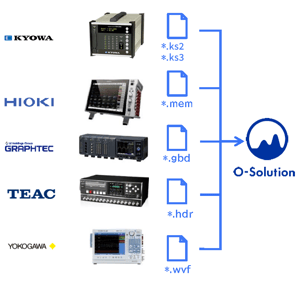
This diagram shows that data files from various data loggers can be imported into O-Solution for analysis.
Directly read files from Logger Maker

Data from various logger manufacturers and Excel data can be imported and analyzed.

Importing an Oscope project file

Oscope has been used to compare multiple time series data when checking data on measurement control benches in automotive development. With O-Solution, you can import the huge amount of measurement data in an Oscope project directly into O-Solution (only time series waveform restoration is supported).

  • Importing an Oscope project file
Importer

You can choose to copy time-series data files to the project file or reference them without copying. Referenceing them reduces file import time and the size of the project file.

For a 96-channel file with a recording time of 10 minutes:

Time series data import method Import Time
Copy to project 296 seconds
Do not copy to project (reference) 120 seconds *

*Only applies to orfx files.
*If the path of the referenced file changes, you will need to import it again.

File merging function

You can aggregate only the desired channels of multiple recorded data into a single file. By integrating only the data you want to analyze into a single file, you can efficiently compare sounds and data.

Optional Software

Optional software is available to support a variety of applications.

Digital filter function: OS-0521

Quickly find the frequency band of abnormal noise

This function allows you to quickly identify the frequency band causing unusual noises or vibrations by applying IIR or FIR filters to the recorded data and listening to it. It can also generate new time-series data with the filters applied.
It can filter both the order and frequency simultaneously, making it useful for investigating abnormal noises in rotating machinery.

FIR Filter

  • FIR filter screen

IIR Filter

  • IIR filter Parametric equalizer screen
  • IIR filter graphic equalizer screen

FFT analysis function: OS-0522

I want to understand the frequency components and resonance frequencies of vibrations and sounds from structures such as machines and parts.

This is the most basic function used to observe vibrations, sound intensity, and resonance phenomena in detail by decomposing a time-domain waveform into its frequency components. It can calculate power spectra, frequency response functions, coherence functions, and more.
In addition to FFT analysis, octave analysis and tracking analysis can also be measured in real time.
*Simultaneous measurement requires the tracking analysis function (OS-0523) and the octave analysis function (OS-0524).

  • Time axis waveform, power spectrum, frequency response function, coherence
  • Power Spectrum
I want to check the amplitude of displacement and velocity from acceleration data (Tripartite graph)

It can display a tripartite graph *1, allowing you to simultaneously read frequency (Hz) and three amplitude values (acceleration (m/ ), velocity (m/s²), and displacement (m)) in real time. This is convenient for evaluating floor vibrations when installing precision equipment.

By displaying the VC curve *2, you can quickly determine the permissible vibration standards and installation environment evaluation for vibration-sensitive precision equipment such as semiconductor manufacturing equipment, AFM (atomic force microscope), electron microscope, and laser interferometer.

*1 A tripartite graph is a graph that allows you to simultaneously read the amplitude of acceleration (m/ ) and displacement (m) on the frequency (Hz) axis, with velocity (m/s) as the basis.

*2 VC curves (Vibration Criterion Curves) are the vibration tolerance reference lines for floors where precision equipment such as semiconductor manufacturing equipment and electron microscopes are installed. They are proposed as a standard for the micro-vibrations that can be tolerated when installing precision machinery. When using VC curves, evaluation is performed in a 1/3 octave bandwidth, and the standard is divided into 7 stages (VC-A, VC-B, VC-C, VC-D, VC-E, VC-F, VC-G) in 6 dB increments, and is divided into guidelines for applications ranging from optical microscopes to laser devices with long optical path lengths.

  • Power spectrum diagram of a trypatite graph
  • 1/3 octave diagram of the tripartite graph

Tracking analysis function: OS-0523

I want to understand the acoustic and vibration characteristics of rotating equipment.

This function identifies the rotational speeds at which each order component of sound and vibration generated by rotating bodies such as motors and generators becomes amplified. In addition to constant ratio and constant amplitude tracking analysis, offset tracking is also possible.
Tracking analysis and FFT analysis can be measured in real time simultaneously.
* Simultaneous measurement requires the FFT analysis function (OS-0522).

  • Tracking diagram
  • Stoichiometric tracking analysis diagram
  • Constant-width tracking analysis diagram
I want to check the order trend of a rotating machine that cannot be swept.

Tracking analysis data can be created by combining multiple data points measured at constant rotational speeds (rotational speed-based data integration). Even without sweep operation, sequential measurements at constant rotational speeds allow for efficient identification of problematic orders within the rotational speed range.

  • Analysis data is grouped based on rotation speed to create tracking analysis data

Octave analysis function: OS-0524

I want to measure environmental noise and vibration

The human ear has a logarithmic (Log) characteristic with respect to frequency, and octave analysis is well-suited to this characteristic. It is often used when determining noise levels, vibration levels, etc., and for measurements in accordance with ISO and JIS standards.
The multi-analysis function allows you to simultaneously measure FFT analysis and octave analysis.
In measurement mode (real-time measurement), octave analysis is possible for 1/1, 1/3, 1/6, 1/12, 1/16, and 1/24.

  • Octave analysis result image No. 1
  • Octave analysis result image No. 2
  • Octave analysis result image No. 3
  • Octave analysis result image No. 4

Sound power level: OS-0541

Compliant with standards applicable to various objects

While general noise levels vary depending on the distance to the noise source and the test environment, sound power levels are uniquely determined in relation to the noise source. Therefore, it is a global indicator used in environmental labels (Eco Mark, Blue Angel) and noise regulations. Measurement methods are defined by international standards. The O-Solution DS-5000 enables efficient noise control by allowing measurement in accordance with standards and easy identification of sound sources and frequency peaks.

Radiated sound measurement option (information technology equipment): OS-0542

Compliant with individual standards for office equipment

The measurement of radiated sound from computers, printers, and multifunction devices is defined by the specific standard ISO 7779. This specific standard is referenced when obtaining environmental labels. In addition to sound power levels, radiated sound pressure levels at the operator's or bystander's position, and significant discrete sound are calculated as needed.

Sound quality evaluation function: OS-0525

Sound quality evaluation that takes into account human hearing characteristics

Generally, sound countermeasures and evaluations for equipment are based on sound pressure levels, FFT analysis, 1/3 octave analysis, and other methods.
However, such analyses do not take into account the characteristics of human hearing, and the same results may result in different listening impressions.
Furthermore, when people hear sounds, they experience various sensations related to the sound, such as "loudness," "sharpness," and "roughness."
The OS-0525 sound quality evaluation function allows you to obtain sound quality evaluation indicators that take into account human auditory characteristics and correspond to various perceptions of sound, such as "loudness," "sharpness," "roughness," "variability intensity," and "tonality."

Fluctuation sound analysis function: OS-0526

Evaluating time-varying sounds

There are many sounds in the world that are bothersome even if they aren't particularly loud. Examples include the occasional rattling or buzzing sounds from interior components heard while driving, or the buzzing noise mixed in with the rotation of small motors. Sounds with significant temporal fluctuations are often irritating even if their volume (level) isn't very high. The OS-0526 variable sound analysis function can extract only the components with large temporal fluctuations, regardless of level, allowing for the quantification of various temporal fluctuation characteristics that were difficult to detect with roughness or fluctuation intensity alone. It also includes a function to compare sounds with and without fluctuations. (Variable Sound Simulator)

Time-frequency analysis function: OS-0527

Evaluating transient phenomena

It can evaluate transient phenomena that are difficult to capture with FFT analysis. It can clearly display the time changes of frequency components while maintaining the frequency resolution of the characteristic quantities (frequency). It is equipped with short-time Fourier transform and wavelet transform.

Statistical analysis function: OS-0531

Various statistical analyses in one window

Various statistical analyses can be performed in one window, such as calculating correlation coefficients by performing bivariate analysis of command values and feedback values.

Statistical analysis function

Basic statistical analysis
Histogram, autocorrelation function, normal probability plot

Bivariate analysis
Scatter plots, cross-correlation functions, stereograms, interval statistics

Trivariate analysis
3D scatter plot, 3D interval statistics

Video playback function: OS-0532

I want to understand the phenomenon while observing the behavior of the target object.

Video files recorded with video cameras or smartphones can be imported into O-Solution and played back along with analysis results such as sound and vibration. By displaying the video alongside time-series data and FFT analysis results, it helps in understanding the phenomena of problematic parts in the movement of the object.
Since it can also analyze audio data from smartphones, it can be used, for example, to analyze the frequency of video files sent by field workers.

*Audio data obtained from a smartphone cannot be calibrated or converted to accurate decibel (dB) values unless calibration data is available. Please treat amplitude values as reference values only.

  • Motor speed command, arm vibration, large vibration when motor decelerates
Importable video file formats

AVI files / MP4 files / MOV files / WMV files / M4A files

*Video data can be rotated vertically or horizontally (fine adjustments are also possible) for display.
* If the start positions of the data recorded with the DS-5000 and the video data are misaligned, you can use the time series alignment function to align the positions of each data.
*For details on supported codecs, specification Please check.

Changes in road noise due to different road surfaces

External control function: OS-0510

Want to save time by automating repetitive tasks?
I want to use it as a product inspection device

By using O-Solution's external control library (O-Step API), you can communicate with your own software (*) via TCP/IP.

Image of TCP/IP communication between the O-Step API and the user application.

Usage example 1:
Large amounts of data can be automatically measured, analyzed, and stored, saving time.

Usage example 2:
To be incorporated as an NV evaluation function for the test equipment.

*Supported languages
C#, Python, MATLAB, LabVIEW, C++, VBA

External control demonstration

DS-5000 Hardware Control Library: DS-0511

I want to control the DS-5000 directly.

Time series data can be acquired in real time from the DS-5000 hardware without going through O-Solution.
If you are interested, please contact us.

Hardware connection function: OS-0512

I want to measure in real time

By using the hardware connection function (OS-0512), you can connect to the DS-5000 and use the FFT analysis function, tracking analysis function, and octave analysis function in measurement mode.

  • This shows real-time analysis being performed, such as FFT analysis and tracking analysis.

3. License Type

4. Operating environment

The DS-5000 series data station can be connected to a personal computer that meets the following specifications (specification conditions).

Specifications

Common specifications
Required Interface LAN terminal 1000base-T, TCP/IPv6
OS Microsoft® Windows® 10 Pro (64 bit version)
Microsoft® Windows® 11 Pro (64 bit version)
Microsoft® Windows® 11 Enterprise LTSC (64 bit version) *
  • For details on the version, please refer to Software Environment [Windows].
  • If you start a compatible OS using compatibility mode or Microsoft® Virtual PC, we cannot guarantee that the software will work properly.
  • Even if our software products are compatible with your operating system, they may not function properly due to the influence of your environment or peripheral devices.
  • Windows 11 Enterprise * has been tested for operation in a standard Windows environment with standard settings (standard policy settings).
    Operation in environments where security settings, group policies, or third-party security software have been modified from the standard settings is not guaranteed. Therefore, support may be limited.
Required software

.NET Core 3.1 Desktop Runtime(〜Ver. 2.1.7)
.NET 6.0 Desktop Runtime(Ver. 3.0.0〜)
.NET 8.0 Desktop Runtime(Ver. 4.6.0〜)

  • Included in the O-Solution installer
Optical drive

DVD-R

  • When installing or updating using a DVD
Recommended specifications ① For measurement and data recording of 96 channels or less
CPU

Intel Core i7 8th Generation or later Intel® Core™ processor

  • 4 cores, 8 threads or more, base clock frequency 1.8GHz or more
memory 16 GB or more
Storage

32 GB or more of free disk space

  • If you are using an external HDD or SSD as the storage destination, a USB3.2 (Gen1) / USB3.1 (Gen1) / USB3.0 port is required.
display 1920 x 1080 or higher
Recommended specifications ② For measurement and data recording of 96 channels or more
CPU

Intel Core i7 8th Generation or later Intel® Core™ processor

  • 6 cores, 12 threads or more, base clock frequency 2.5GHz or more
memory 16 GB or more
Storage

32 GB or more of free disk space

  • If you are using an external HDD or SSD as the storage destination, a USB3.2 (Gen1) / USB3.1 (Gen1) / USB3.0 port is required.
display 1920 x 1080 or higher
Minimum specs
CPU

Intel Core i5 8th Generation or later Intel® Core™ processor

  • 4 cores, 8 threads or more, base clock frequency 1.6GHz or more
memory 8 GB or more
Storage

16GB or more of free disk space

  • If you are using an external HDD or SSD as the storage destination, a USB3.2 (Gen1) / USB3.1 (Gen1) / USB3.0 port is required.

*The minimum required specifications are those that allow recording and measurement of up to 18 channels. When measuring a large number of channels, be sure to use a personal computer that meets the recommended specifications.

Recommended specifications for server PC (network license)

Recommended Hardware
CPU 1.6 GHz or higher (Intel Xeon series recommended)
memory 16 bit OS 8GB or more
hard disk 100 GB or more of free space
DVD drive For installation from DVD
Software Requirements
OS(64bit) Windows Server 2019
Windows Server 2016
Required software .NET Core 6.0 Desktop Runtime

DS-5000 (hardware)

Features of the DS-5000

  • Small but easy to connect

    Small but easy to connect

    The pitch allows for easy cable connection, even with a compact body.

  • Measurement errors are easy to notice

    Measurement errors are easy to notice

    Arc-shaped LEDs are used on both sides of the connector,
    You can immediately notice channels that are out of range.

  • Easy to carry

    Easy to carry

    The bottom has a recess for easy carrying. Its shape makes it easy to place on tables, carts, and in narrow spaces.

  • Battery-powered for measurements anywhere

    Battery-powered for measurements anywhere

    It can be used in various locations where power is not available, such as outdoors or in factories. The 6-channel input unit allows for approximately 4 hours of measurement.
    *Battery unit is optional.

    By incorporating the power supply interlocking function (DS-0502), the power supply of the control panel itself can be interlocked with the power supply of the DS-5000 main unit.
    *Battery unit (DS-0501) must be installed.

  • Measurement can be performed while listening to the sound

    Measurement can be performed while listening to the sound

    The main unit is equipped with a headphone monitor output connector, allowing you to check the measurement signal from the input unit by sound.

  • Less susceptible to external noise

    Less susceptible to external noise

    Each signal input channel employs isolation technology. This allows for reliable measurements even in environments and with objects prone to ground loops, noise, and potential differences.

Measurement system configuration can be tailored to your needs

The stacked structure allows for unit configurations tailored to specific applications. A single unit can measure up to 48 channels. Up to five units can be connected to achieve multi-channel measurement.

  • Measurement system configurations tailored to your specific application are possible. No. 1
  • Measurement system configurations tailored to specific applications are possible. No. 2

High-precision measurement without a PC; standalone recording function (from O-Solution Ver.3.0)

High-precision measurement without a PC. Standalone recording function (O-Solution Ver.3.0 and later)

By importing a condition file (calibration values, voltage range, etc.) prepared in advance with O-Solution into the DS-5000, the DS-5000 can be used as a high-precision recorder without a PC.

It is useful for in-vehicle measurements where there is not enough space for equipment, sites where a PC cannot be brought in, and sites where the time available for on-site measurements is limited.

  • Start recording immediately with the touch panel

    Start recording immediately with the touch panel

    You can easily start and stop recording using the DS-5000 touch panel.

  • Operate from a smartphone or tablet

    Operate from a smartphone or tablet

    A remote control app for smartphones and tablets is provided to make it easier to check and change recording and settings when recording independently.

    The remote control app does not require installation and can be used with just a web browser.

Lineup

The DS-5000 series data station is a modular measurement system that allows you to configure a measurement system tailored to your application and purpose by adding various units such as inputs, signal outputs, and batteries to the basic DS-5100 main unit in the required quantities.

  • Lineup
Model name Product name Remarks
DS-5100 Main Unit It comes with a touch panel LCD, which allows you to select the channel you want to listen to through headphones.
DS-0501 Battery unit The DS-5100 and DS-0526 configuration can be used for approximately 4 hours.
DS-0502 Power supply interlock function The DS-5000 starts up when the power supply to the equipment is introduced. *The DS-0501 battery unit is required.
DS-0523 3ch 40 kHz input unit  
DS-0526 6ch 40 kHz input unit A 3-axis accelerometer can be connected without crossing the unit.
DS-0532 2ch 100 kHz input unit  
DS-0534 4ch 100 kHz input unit  
DS-0542 2ch external input unit  
DS-0543 2ch external input & 1ch signal output unit This convenient unit combines trigger input, rotation input, and signal output.
DS-0544 4ch external input unit  
DS-0545 2ch signal output unit  

Outline drawings

  • Outline drawings

Specification comparison with DS-3000 (ESUFEEL)

  DS-3000 DS-5000 Remarks
Maximum number of measurement channels 128 ch 240 ch Multi-channel measurement
Maximum number of channels per cabinet 32 ch 48 ch Multi-channel measurement
Maximum number of input channels for rotation pulses 2 ch (2 ch: when connecting between units) 4 ch (10 ch: when connecting between units)  
Maximum number of hard connections 4 cabinets 5 cabinets  
Chassis connection method Star type Daisy Chain Units can be connected using only cables
Recording Performance 128 ch - 10 kHz 240 ch - 10 kHz  
Real-time rate performance 64 ch - 20 kHz 96 ch or more - 20 kHz  
Dynamic Range 110 dB 130 dB  
Channel-to-channel phase accuracy ±0.4 ° ±0.1 ° @~20 kHz  
Temperature range 0~40 °C -10~50 °C  
DC power supply 15 V 10~24 V  
AC adapter 2 types 1 type  
fan Equipped with 5 or more stages Equipped (quiet)  

Inter-chassis connection

By utilizing connections between units, you can temporarily build a multi-channel measurement system, allowing you to make effective use of your existing assets.
Up to five units can be connected.

Case 1: Inter-chassis connection

When a measurement analysis that requires multiple channels suddenly occurs, the DS-5000 units that are usually placed in each laboratory can be connected to each other to create a multi-channel measurement analysis system.

  • Inter-chassis connection incident 1 No.1
  • Inter-enclosure connection incident 1 No.2
  • Inter-enclosure connection incident 1 No.3
Inter-enclosure connection incident, Case 1, No. 4
  • Inter-enclosure connection incident, Case 1, No. 5
  • When you want to increase measurement efficiency with multiple channels

  • When you want to perform measurements that are different from normal operations when a problem occurs

  • When simultaneous multi-channel measurements are required for transient phenomena

Case 2: Inter-chassis connection

The sounds and vibrations generated when closing a door are transient phenomena and cannot be reproduced. Inter-chassis connection is effective when simultaneous measurement of transient phenomena is required. With 48 channels per chassis, it is possible to connect up to 5 chassis to achieve a maximum of 240 channels of measurement.

Model name Product name quantity
DS-5100 Main Unit 5
DS-0526 6ch 40 kHz input unit 8x5
OS-5100 Platform 1
OS-0522 FFT analysis function 1
OS-0512 Hardware connection function 8x5
  • Inter-enclosure connection, Case 2, No. 1
  • Inter-enclosure connection, Case 2, No. 2

Case Studies

Measurement of sound power levels of office equipment in a semi-anechoic chamber

Measurement of sound power levels of office equipment in a semi-anechoic chamber

Sound power level is used in various industries, primarily in products equipped with motors and inverters. It's used to indicate the operating noise of air conditioners and office equipment, and in recent years, its use has expanded to the automotive parts and home appliance industries. Measuring according to standards allows for a more accurate understanding of the overall sound level of a product.

Model name Product name quantity
DS-5100 Main Unit 1
DS-0526 6ch 40 kHz input unit 2
OS-5100 Platform 1
OS-0524 Octave analysis function 1
OS-0541 Sound Power Level Tool 1

Natural frequency and damping ratio measurement

Natural frequency and damping ratio measurement

To understand the inherent vibration characteristics of structures such as machinery and automobile parts, we can measure the frequency response function using an impulse hammer or a vibrator. We can also calculate the damping ratio and logarithmic damping factor using the half-width method or Hilbert transform.

Model name Product name quantity
DS-5100 Main Unit 1
DS-0526 6-channel 40kHz input unit 1
OS-5100 Platform 1
OS-0522 FFT analysis function 1
OS-0512 Hardware connection function 1

*The above configuration is a "6ch FFT set."

Identifying the frequency band of abnormal noise from motors and office equipment

Identifying the frequency band of abnormal noise from motors and office equipment

When an abnormal noise problem occurs, it is necessary to identify the frequency band. By applying an IIR or FIR filter to the recorded data and listening to it, you can quickly find the frequency band of the abnormal noise.

Model name Product name quantity
DS-5100 Main Unit 1
DS-0523 3-channel 40kHz input unit 1
OS-5100 Platform 1
OS-0522 FFT analysis function 1
OS-0521 Digital Filter Function 1
OS-0512 Hardware connection function 1

*The above is an example.

Identifying the cause of abnormal vibrations using a portable vibration meter

The VW-3100 Portable Vibration Meter allows you to record while taking measurements and performing inspections on-site. Upon returning to the office, you can import the recorded data into O-Solution, allowing you to listen to the sound with filters applied and identify the cause of anomalies using FFT analysis.

  • Identifying the cause of abnormal vibrations using a portable vibration meter
Model name Product name quantity
OS-5100 Platform 1
OS-0521 Digital Filter Function 1
OS-0522 FFT analysis function 1

Tracking analysis measurement of rotating equipment

Tracking analysis measurement of rotating equipment

It is possible to measure the noise and vibration generated by rotating objects such as motors, generators, and transmissions to understand at what rotation speed each order component becomes large. It is also possible to perform tracking analysis (offset tracking) of carrier noise originating from the switching signal emitted by the inverter.

Model name Product name quantity
DS-5100 Main Unit 1
DS-0526 6-channel 40kHz input unit 1
DS-0542 2ch external input unit 1
OS-5100 Platform 1
OS-0522 FFT analysis function 1
OS-0523 Tracking analysis function 1
OS-0512 Hardware connection function 1

*The above configuration is a "6ch tracking set."

Torsional vibration measurement for motors, engines, etc.

Torsional vibration measurement for motors, engines, etc.

Torsional vibrations in engine crankshafts, propeller shafts, etc. can cause shaft damage and noise and vibration problems. Therefore, it is important to measure torsional vibrations and understand the phenomenon of torsional resonance.

Model name Product name quantity
DS-5100 Main Unit 1
DS-0526 6-channel 40kHz input unit 1
DS-0542 2ch external input unit 1
OS-5100 Platform 1
OS-0522 FFT analysis function 1
OS-0523 Tracking analysis function 1
OS-0512 Hardware connection function 1

*The above configuration is a "6ch tracking set."

Offset Tracking Analysis

As automotive parts manufacturers increasingly electrify their components, they are taking measures to prevent unpleasant noises by intentionally changing the inverter's carrier frequency to avoid areas where the component's natural frequency and order components are high. Offset tracking analysis is a method of analyzing the order ratio by tracking the changes in carrier frequency in response to this rotation.

Measurement result image (constant width tracking analysis)

Measurement result image (constant width tracking analysis)

By specifying the offset frequency and the upper and lower limits of the rotation speed, it is possible to analyze a specific order even if the carrier frequency changes stepwise at a certain rotation speed.

Model name Product name quantity
DS-5100 Main Unit 1
DS-0526 6-channel 40 kHz input unit 1
DS-0542 2-channel external input unit 1
DS-0501 Battery unit 1
DS-0502 Power supply interlock function 1
OS-5100 Platform 1
OS-0522 FFT analysis function 1
OS-0523 Tracking analysis function 1
OS-0512 Hardware connection function 1

Ultrasonic vibration measurement

Ultrasonic vibration measurement

By using a 100 kHz unit and a laser Doppler vibrometer, it is possible to measure ultrasonic vibrations in inverters, piezoelectric elements, MEMS, ultrasonic heads of bonding machines, ultrasonic cleaning tanks, etc.

Model name Product name quantity
DS-5100 Main Unit 1
DS-0532 2-channel 100 kHz input unit 1
DS-0545 2-channel signal output unit (*) 1
OS-5100 Platform 1
OS-0522 FFT analysis function 1
OS-0512 Hardware connection function 1

*Required for measurements using a vibrator.

Outdoor/factory measurements, vehicle measurements

Outdoor/factory measurements, vehicle measurements

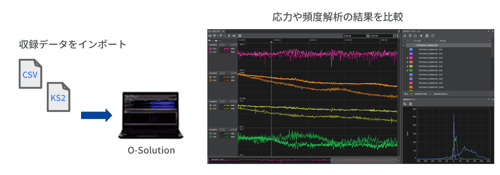
With the battery unit, vibration and sound measurements can be made even in places where power is not available, such as outdoors or in factories.

Model name Product name quantity
DS-5100 Main Unit 1
DS-0526 6-channel 40 kHz input unit 1
DS-0501 Battery unit 1

*If you have the viewer function of O-Solution Lite, you can record on-site without needing a license.

Visualization of structural vibration status

Visualization of structural vibration status

By combining O-Solution with ME'scope, it is possible to visualize the natural vibration frequencies and vibration shapes of structures such as motors and automobile bodies. A multi-channel configuration allows for simultaneous measurement at multiple points, significantly reducing measurement time.

Model name Product name quantity
DS-5100 Main Unit 2
DS-0526 6-channel 40 kHz input unit 7x2
DS-0545 2-channel signal output unit 1
OS-5100 Platform 1
OS-0522 FFT analysis function 1
OS-0512 Hardware connection function 7x2
AX-9055 Inter-chassis connection cable (3 m) 1
- LAN cable (for connecting between units) 1

*This is necessary when using a vibrator for measurements, as shown in the example on the right.
*To perform modal analysis and operational analysis, the experimental modal analysis system software ME'scope is required. ME'scope is a product of System Plus Co., Ltd.

Measuring floor vibration and micro-vibration using tripartite graphs and VC curves

Measuring floor vibration and micro-vibration using tripartite graphs and VC curves

Using multiple sensors, floor vibration can be measured simultaneously at multiple locations on the floor. Measurement results are displayed as a tripartite diagram, and the VC curve is also displayed, allowing for quick reading of vibration values.

Model name Product name quantity
DS-5100 Main Unit 1
DS-0526 6-channel 40 kHz input unit 1
OS-5100 platform 1
OS-0522 FFT analysis function 1
OS-0512 Hardware connection function 1
NP-7320N10 Ultra-high sensitivity and low noise
TEDS compatible 3-axis acceleration sensor
2

Vehicle dynamics and ride comfort evaluation

An IMU (Inertial Measurement Unit) is connected to the GPS speedometer to synchronously measure vehicle speed and vehicle behavior.
It can be used to evaluate vehicle dynamics and ride comfort, which are gaining attention due to the spread of autonomous driving.

Main measurement items

  • Vehicle dynamics and ride comfort evaluation
  • Horizontal speed (vehicle speed)

  • 3-axis acceleration

  • 3-axis angular velocity

  • Pitch angle

Model name Product name quantity
LC-8300A gps speedometer 1
LC-0092 or
LC-0855
Inertial Measurement Unit (IMU) or
High precision IMU
1
LC-0836 IMU data output function for LC-8300A 1
LC-0827/LC-0831 Main unit acceleration test function/acceleration/deceleration test software 1
CT-6710 Motor & Engine Tachometer 1
IP Series Engine rotation detector 1
Model name Product name quantity
DS-5100 Main Unit 1
DS-0526 6-channel 40 kHz input unit 1
DS-0501 Battery unit 1
OS-5100 O-Solution Platform 1
OS-0522 FFT analysis function 1
OS-0527 Time-frequency analysis function 1
NP Series Accelerometer 1

Actual vehicle NV testing

We perform real-world NV testing using a combination of an FFT analyzer and a GPS speedometer.
The digital output of the LC-8300A is input to the DS-5000 to trigger synchronous recording. By using the LC-8300A's extensive functions to automatically start and stop recording, tests can be performed with good reproducibility.

  • Actual Vehicle NVH Test No. 1
  • Actual vehicle NVH test No. 2
Model name Product name quantity
DS-5100 Main Unit 1
DS-0526 6-channel 40 kHz input unit 1
DS-0542 2-channel external input unit 1
DS-0501 Battery unit 1
OS-5100 O-Solution Platform 1
OS-0522 FFT analysis function 1
OS-0523 Tracking analysis function 1
OS-0512 Hardware connection function 1
NP Series Accelerometer 1
MI Series Microphone 1
LC-8300A gps speedometer 1
LC-0866 General-purpose input/output cable 1
OM-1500 Motor/Engine Rotation Sensor 1
CT-6710 Motor & Engine Tachometer 1

Multi-channel multi-comparator for efficient NV inspection on production lines

Multi-channel multi-comparator for efficient NV inspection on production lines

This software features a comparator function for anomaly diagnosis based on acoustic and vibration analysis. It can simultaneously perform data measurement, frequency analysis/tracking analysis using two rotation inputs, and pass pass/fail judgment. It is ideal for inline 100% inspection, such as vibration analysis of CVTs (continuously variable transmissions) and carrier noise analysis of motors.

Model name Product name quantity
DS-5100 Main Unit 1
DS-0526 6-channel 40 kHz input unit 1
DS-0542 2-channel external input unit 1
DS-0501 Battery unit 1
DS-0502 Power supply interlock function 1
GN-1200 Noise Testing Software 1

Specification

DS-5100 (hardware) specifications list

  • Main unit (DS-5100)
    System Configuration
    Maximum Input Channels 40 kHz system: 48 ch *1
    100 kHz system: 4 ch
    Maximum number of external input channels (rotation/trigger) 40 kHz system: 4 ch *2
    100 kHz system: 4 ch
    Maximum number of output channels *3 40 kHz system: 6 ch
    100 kHz system: 2 ch
    Maximum number of input/output units *4 40 kHz system: 8 units
    100 kHz system: 3 units
    Number of connections between cabinets 40 kHz system: 5 units
    100 kHz system: None
    Interface
    LCD with touch panel Status Display
    Battery status etc.
    LAN
    RJ45 connector
    2 connection terminals
    ・For connecting to a computer
    ・For connecting between chassis
    Inter-chassis connector Connect two or more main units
    IN × 1 / OUT × 1
    Headphone monitor output connector Stereo ⌀3.5 connector

    *1 When all installed units are input units
    *2 When connecting between cabinets, up to channel 10 from the first cabinet connected to the PC.
    *3 Only the enclosure connected to a PC
    *4 Excluding the main unit and battery unit

  • 40 kHz input unit (DS-0523 / 0526)
    100 kHz input unit (DS-0532 / 0534)
    Number of input channels 【40 kHz】
    DS-0523:3 ch※5
    DS-0526:6 ch
    【100 kHz】
    DS-0532:2 ch※5
    DS-0534:4 ch
    Input terminal BNC
    Input Impedance 1 MΩ ±0.5% 100 pF or less
    Input Coupling DC or AC
    - -3 dB at 0.5 Hz ±10%
    - When using CCLD, it automatically switches to AC.
    Isolation 42.4 Vpk
    ・Between BNC ground and chassis and between each BNC ground
    Constant current drive (CCLD) for sensors +23 V~26 V / 4 mA ±25 %(25℃)
    TEDS function ・IEEE 1451.4 Ver.0.9, 1.0 Accelerometer, microphone
    ・Compatible with IEEE 1451.4 Ver.1.0 force sensors
    Input voltage range -30 / 0 / +30 dBVrms (3 ranges)
    Absolute Maximum Input Voltage 50 Vpk(DC~100 kHz)
    Input Level Monitor Red LED lights up when excessive input occurs (lights up when in FS range)
    Frequency range 【40 kHz】
    DC~40 kHz
    【100 kHz】
    DC~100 kHz
    Sampling Frequency 2.56 times the frequency range
    A/D converter 24-bit ΔΣ type
    Dynamic Range
    [40 kHz]
    130 dB 40 kHz range, 0 dBVr range, 4096-point analysis, above 1 kHz
    [100 kHz]
    120 dB 100 kHz range, 0 dBVr range, 4096-point analysis, above 1 kHz
    Inter-channel phase accuracy Channels inside the enclosure
    • Below 20 kHz ±0.1 °
    - 20 kHz or higher ±0.7° when connected between chassis (40 kHz only)
    • Below 20 kHz ±0.6 °
    ・20 kHz or more ±1.2 °

    *5 DS-0523 and DS-532 cannot be equipped with more than two units.

  • External input unit (DS-0542 / DS-0544)
    Number of input channels DS-0542:2 ch
    DS-0544:4 ch
    Maximum number of external input channels *6 (rotation/trigger) Up to 4 channels for both 40 and 100 kHz.
    ・DS-0542 x 2 units are not compatible.
    - Can be used interchangeably with DS-0543.
    Maximum Input Voltage 30 Vrms(42.4 Vpk)
    Absolute Maximum Input Voltage 50 Vpk
    Hysteresis Level Optional settings
    Initial value: 0.5 V
    • Range: 0.02 V to 80 V
    Input pulses/revolution 0.5~3600 P/R
    Input pulse division function 1 to 3600 minutes
    - Input frequency of 4 kHz or higher is required.
    Input Coupling AC or DC
    Input Impedance 100 kΩ ±0.5 %
    Isolation 42.4 Vpk
    ・Between BNC ground and chassis and between each BNC ground
    Input Frequency Up to 300 kHz (with out-of-band filter)

    *6 When connecting between cabinets, up to channel 10 from the first cabinet connected to the PC.

    External input/signal output unit (DS-0543)
    Number of input channels 2 ch※7
    Maximum Output Channels
    1 ch※8

    *7 External input 2-channel configuration. Specifications are the same as DS-0542 and DS-0544.
    *8 Signal output 1 ch configuration. Specifications are the same as DS-0545.

  • Signal output unit (DS-0545)
    Number of Output Channels 2 ch
    Maximum Output Channels Up to 40 kHz 6 channels
    DS-0545 supports up to 3 units.
    - Can be used interchangeably with DS-0543.
    - When connecting between chassis, only the chassis connected to the PC can be used.
    Up to 100 kHz 2 ch
    ・DS-0545 is limited to 1 unit.
    ・Cannot be mixed with DS-0543
    Output Signal Type
    ・Sine wave
    ・Swept Sign
    - Random (no correlation between channels)
    ・Pseudo-random
    Impulse
    - Octave band noise
    Pink noise
    ・Record data
    Adaptive FFT analysis length 64 to 16384 (powers of 2)
    Burst function Yes (continuous, single)
    Taper Function Yes
    Output terminal shape BNC
    Output Impedance 0 Ω or 50 Ω ±10%
    D/A converter 24-bit ΔΣ type
    Isolation
    42.4 Vpk
    ・Between BNC ground and chassis and between each BNC ground
    Output Voltage Swing ±1 mV~±10 V
    Offset Voltage ±10 V
    Maximum Output Current 10 mA
    Frequency range
    40 kHz:0~40 kHz
    100 kHz:0~100 kHz
    External input/signal output unit (DS-0543)
    Number of input channels 2 ch※7
    Maximum Output Channels
    1 ch※8

    *7 External input 2-channel configuration. Specifications are the same as DS-0542 and DS-0544.
    *8 Signal output 1 ch configuration. Specifications are the same as DS-0545.

  • Battery unit (DS-0501)
    External DC power input voltage DC10~28 V
    Battery pack (accessory) Lithium-ion battery pack
    ・RRC2020 99.6 Wh x 1
    Operating time Approximately 4 hours
    - At an outside temperature of 25°C
    - When using DS-5100 & DS-0526
    Charging time Approximately 4 hours
    - When the main unit is turned off
    - When the battery pack is at 0% charge
    Dedicated charger (sold separately) RRC dedicated charger
    External DC power cable (sold separately) 5 m (with alligator clip and fuse)
  • General specifications (minimum to maximum configuration)
    Outline drawings 130–450 mm (W) × 160 mm (H) × 220 mm (D) (excluding protrusions)
    * The external dimensions drawing is Here Please take a look.
    Power consumption 67 W or less
    Operating temperature range -10°C to 50°C (humidity 20-80%RH, non-condensing)
    Storage temperature range -20°C to 60°C (humidity 20-80%RH, non-condensing)
    Weight Minimum configuration 2,800 g (DS-5100&DS-0526)
    Maximum configuration 8,900 g (DS-5100&DS-0501&DS-0526 × 8)
    Cooling fan Yes (silent fan)
    With a DS-5000 48-channel configuration, the sound power level (Lw A-weighted) is 38 dB or less.
    Operates only when the internal temperature rises.
    Conforming standards (CE marking) Low Voltage (LVD) Directive 2014/35/EU EN61010-1
      EMC Directive 2014/30/EU EN61326-1
      RoHS Directive 2011/65/EU EN IEC 63000
    Accessories
    AC power adapter: 1
    Power cable for AC adapter: 1
    LAN cable (3 m): 1
    Cable for connecting the DS-5000 series data station to a personal computer
    Instruction manual: 1 copy
    AC adapter
    Input voltage/current AC100~240 V 50-60 Hz / 1.2A MAX.
    Output Voltage/Current DC19 V / 4.74 A
    Recommended products for standalone recording function
    Model name Product name Item Code*
    TL-WN725N Wireless LAN module PE19B2375

    * Code used by our company

    *For the latest information on recommended SDHC cards, please click here.

O-Solution (software) specifications list

  • Viewer (O-Solution Lite)
    Time-series data recording (measurement mode only)
    Recording performance
    (The number of channels includes external input channels *1 *2)
    1~20 ch:40 kHz
    21~40 ch:25 kHz
    41~120 ch:20 kHz
    121~240 ch:10 kHz
    Channels 1-4 (when using the 100 kHz input unit): 100 kHz

    *1 For standalone recording, only one unit is supported (maximum number of channels is 48).
    *2 For standalone recording, the maximum number of channels at 40 kHz is 18. The maximum number of channels at frequencies other than 40 kHz is as shown in the table above.

  • Platform (OS-5100)
    Supported Data
    Sampling Frequency
    Measurement Mode
    This is time-series data that can be acquired with the DS-5000 series data station.
    • 40 kHz input unit (DS-0523 / DS-0526): 2.56 Hz to 102.4 kHz (Frequency range: 1 Hz to 40 kHz)
    • 100 kHz input unit (DS-0532 / DS-0534): 2.56 Hz to 256 kHz (Frequency range: 1 Hz to 100 kHz)
    Analysis Mode 10 μHz to 100 GHz (Frequency range: 3.9 μHz to 39 GHz)
    Time Series Data Import
    Number of files Up to 1000 files
    Number of Channels Up to 65,536 channels
    Number of data points up to 1 TB
    File import format
    (Time-series data)
    ORFX file
    UFF file
    ASCII files
    WAVE file
    - MDF file
    ORF file
    FAMS file
    Graphtec GBD files
    TEAC TAFFmat file
    • HIOKI MEMORY HiCORDER file
    Yokogawa Measurement WDF / WVF files
    File import format
    (Analysis data)
    DATX file
    ・DAT file
    ・TEXT file
    TRC file
    File export format
    (Time-series data)
    ORFX file
    UFF file
    CSV file
    WAVE file
    • PNG file (image)
    File export format
    (Analysis data)
    ・DATX file
    ・UFF file
    ・CSV file
    ・TEXT file
    ・PNG file (image)
    Time axis preprocessing
    Overview Function to perform calculations on the acquired time waveform before executing FFT analysis
    Digital Filter - LPF, HPF, and BPF are all 6th-order Butterworth filters.
    Because the BPF also uses a 6th-order filter coefficient, the slope is -18 dB/oct, not -36 dB/oct.
    Absolute value
    Time axis calculus First derivative, second derivative, single integral, double integral
    Pre-integration DC removal function
    trigger
    sauce
    Measurement Mode Inside, outside, level
    Analysis Mode Item
    mode Repeat、OneShot
    operation Start, stop, start and stop
    others
    Features include double hammer cancellation, average undo, pre-recording function (recording possible from a few seconds before trigger detection), data acquisition using the trigger function during recording, and display functions (time monitor and time waveform).
    Recording (measurement mode only)
    Simultaneous analysis and recording Analysis while recording
    *Optional functions are required to perform analysis.
    Pre-recording function A function that allows you to start recording a few seconds before the trigger occurs
    Trigger stop function Stopping recording using the trigger function
    Statistical Processing Window
    Statistics Difference value / Sum value / Average value / Median value / Maximum value - Minimum value / Maximum value / Minimum value / Standard deviation / RMS value / Maximum value - Minimum value / Maximum value / Minimum value / Skewness / Kurtosis / Form factor / Crest factor / Absolute mean value / Area / Area + / Area - / Leftmost value / Rightmost value
    File Output CSV output
    others Link with the selection in the scope window
    Replay analysis (measurement mode only)
    Overview A function that uses collected time series data to reproduce real-time measurement conditions in measurement mode.
    others The time series data section for replay analysis can be set
    Replay analysis playback speed can be set between 0.25 and 2.0x
    The scope window cursor can now follow the playback position during replay analysis.
  • Digital filter function (OS-0521)
    FIR filter (analysis mode only)
    Processing section All sections or any section you specify
    Preview Settings Frame Length 128 / 256 / 512 / 1024 / 2048 / 4096 / 8192 / 16384 /32768 / 65536
    Averaging Additive averaging (number of times)
    Smooth function Type1 / Type2
    Frequency range The lower and upper limits of the filter can be set arbitrarily.
    Level Settings Can be increased or decreased at any level
    - Upper and lower limits are ±100 dB
    It is possible to add a slope to the filter by linear interpolation.
    IIR filter Parametric equalizer (analysis mode only)
    Filter Applicable Frequency and Order
    Number of Filters up to 20 pieces
    Filter Type PE / HPF / BPF / BRF / LPF
    Adjusting the filter shape Level Adjustment Can be adjusted arbitrarily
    The upper and lower limits are ±40 dB.
    Q Factor You can set any value.
    The upper and lower limits are 0.01 to 100.
    Harmonic Simultaneous processing possible for Nth frequency (order)
    Adjusting the filter shape
    (BPF, BRF)
    Pole 1~10
    1/NOCT 0.1~24
    Adjusting the filter shape
    (HPF, LPF)
    Pole 1~10
    Rotation Speed Range ~38,400 r/min
    IIR filter Graphic equalizer (analysis mode only)
    Filter Applicable [Frequency band of 1/3 octave]
    20 / 25 / 31.5 / 40 / 50 / 63 / 80 / 100 / 125 / 160 / 200 / 250 / 315 / 400 / 500 / 630 / 800 / 1k / 1.25k / 1.6k / 2k / 2.5k / 3.15k / 4k / 5k / 6.3k / 8k / 10k / 12.5k / 16k / 20kHz
    Number of Filters 31 pieces
    Adjusting the filter shape Level Adjustment Can be set arbitrarily
    - Adjustable range is ±40 dB
    - Can be set in 0.1 dB increments
  • FFT analysis function (OS-0522)
    Number of measurement channels [Measurement mode]
    3 to 240 channels
    [Analysis mode]
    Run on imported time series data
    Maximum analyzable frequency range 1~20 ch:40 kHz
    21~120 ch:20 kHz
    121~240 ch:10 kHz
    Channels 1-4 (when using the 100 kHz input unit): 100 kHz
    FFT sampling points
    (Number of spectral lines)
    [Measurement Mode]
    512 points (200 lines) to 32768 points (12800 lines)
    - You cannot select 32768 points (12800 lines) for 97 channels or more.
    [Analysis Mode]
    512 points (200 lines) to 524,288 points (204,800 lines)
    Analysis frequency range Measurement Mode 1 Hz to 40 kHz (40 kHz unit)
    1 Hz to 100 kHz (100 kHz unit)
    Analysis Mode 3.9 μHz to 39 GHz (depending on the sampling frequency of the imported file)
    Audio sampling range: 1.56 kHz to 37.5 kHz (sampling frequency: 4.0 kHz to 96 kHz)
    Frequency Zoom Analysis Limited to the analysis frequency range that can be set on the DS-5000 series data station
    Window Function Rectangular
    Hanning
    Hamming
    Flat-Top
    Blackman-Harris
    Exponetial
    Force
    Calculus Function First derivative, second derivative, single integral, double integral
    density calculation PSD、ESD
    Averaging function Time-based averaged and exponential averaged.
    Power spectrum summation and exponential averaging
    Power Spectrum Peak Hold
    Power Spectrum Sweep
    Power spectrum MaxO.A.
    Fourier spectrum summation and exponential averaging
    Fourier spectrum MaxO.A.
    Arithmetic functions (time axis) Time waveform (1 frame)
    autocorrelation function
    Cross-correlation function
    Impulse Response
    Hilbert transform
    Calculation function (frequency axis) Power Spectrum
    Fourier spectrum
    Cross Spectrum
    Frequency Response Function
    Coherence Function
    Bundled octave analysis (1/1, 1/3)
    Frequency Weighting A-weighting, C-weighting, user-defined
    Overlap settings
    (Percentage specification)
    90 % / 75 % / 66.7 % / 50 % / 25 % / 0 %
    Overlap settings
    (Specify the number of samples)
    Optional settings
    Specifying a time interval
    (A function to specify overlap by time)
    0.1 s / 0.2 s / 0.5 s / 1 s / 2 s / 5 s / 10 s / 20 s / 30 s / 1 min / 2 min / 5 min / 10 min
    Special graphs Nyquist diagram, orbit diagram, mode circle, tripartite graph
    Frequency response function calculation function Function type (H1 / H2) / Loop function (closed ⇔ open loop) / Reciprocal operation
    others Phase unwrap / Noise reduction filter / Inter-channel delay / Inter-analysis result calculation function
  • Tracking analysis function (OS-0523) *9
    Common specifications
    Tracking Methods Rotation, fixed time
    Rotation Speed Range 30 to 260,000 rpm
    The upper and lower limits depend on the number of base sample clocks you set.
    Rotating ramp Upward/Downward/Continuous Upward/Downward
    Display tracking number of lines 24 (Up to 24 can be registered during calculation)
    Tracking 3D array display Three-dimensional array display (monochrome/color)
    Color map display
    Other features Arbitrary unit setting (horizontal axis)
    FFT tracking (OS-0522 & OS-0523)
    Data Type Power spectrum, Fourier spectrum, cross spectrum
    Sampling points
    (Number of spectral lines)
    512 points (200 lines) to 32768 points (12800 lines)
    analysis order Order can be set arbitrarily from 6.25th to 3200th (6.25 / 12.5 / 25 / 50 / 100 / 200 / 400 / 800 / 1600 / 3200)
    Maximum number of blocks 5,000
    Other features Supports multi-analysis (constant width and constant ratio simultaneous analysis)
    Campbell diagram
    Offset Tracking
    File averaging function
    Restart function
    Mode circle
    Octave tracking (OS-0523 & OS-0524)
    Data Type Measurement Mode 1/1 octave, 1/3 octave
    Analysis Mode 1/1 octave, 1/3 octave, 1/6 octave, 1/12 octave, 1/24 octave
    Maximum number of blocks 10,000

    *9 The OS-0523 tracking analysis function requires either the OS-0522 or OS-0524.

  • Octave analysis function (OS-0524)
    Measurement channel *10 3-40 channels (frequency range 25 kHz)
    3 to 48 channels (frequency range 20 kHz) (when used as a single unit or with inter-unit connections)
    Octave types *11 1/1, 1/3, 1/6, 1/12, 1/24 octaves (filter: 6th-order Butterworth)
    JIS C 1513-1:2020 (IEC 61260-1:2014) Class 1 filter
    JIS C 1514:2002 Class 1
    time constant
    None / 10 ms / 35 ms / 125 ms(FAST) / 630 ms / 1 s(SLOW) / 8 s / IMPULSE
    Analysis frequency range
    1–16 kHz (1/1 octave)
    0.8–20 kHz (1/3 octave)
    0.75 Hz to 21.1 kHz (1/6 octave)
    0.73 Hz to 21.8 kHz (1/12 octave)
    0.72 Hz to 22.1 kHz (1/24 octave)

    In measurement mode, there is a limit to the number of channels per 1/N octave.
    30 channels (1/1 octave)
    24 channels (1/12 octave)
    ・12 channels (1/24 octave)

    *The channel counts listed above include both input and external channels.
    Frequency Weighting
    A, C, G, Vv, Vh, Vhand, user-defined filters (csv format)
    Display calculation value
    Instantaneous value / Maximum value hold / Minimum value hold / Average power / Total power
    Power Calculation Time 0~24 h
    Time rate level calculation function (Lx) L1、L5、L10、L50、L90、L95、L99
    Other features
    Time trend display, inter-channel calculation

    *10 Includes external input channels. If performing 1/N octave analysis, it must be set to 25 kHz.
    *11 1/N octave is only available in analysis mode.

  • Sound quality evaluation and analysis function (OS-0525)
    Data Type
    ISO532-1 Steady Sound Loudness
    ISO532-1 Non-stationary sound loudness
    Non-stationary sound loudness
    Roughness
    Fluctuation Intensity
    tonality
    Sharpness [DIN45692, Aures, Bismarck]
    CI (Comfort Index)
    TNR (Tone-to-Noise Ratio)
    PR (Prominence Ratio)
    Percentile loudness 5 %、10 %、95 %
    Time Percentage Sharpness 50 %
    Sound field Freedom, diffusion
  • Fluctuation sound analysis function (OS-0526)
    Fluctuation sound analysis
    Data Type Fluctuation sound Core, Fluctuation sound Mask, Loudness fluctuation Core, Loudness fluctuation Mask
    Variable Frequency 0.5~200 Hz
    Overlap [Percentage specification] 0% / 25% / 50% / 75%
    [Time Specification] Depends on the lower limit of the fluctuating frequency (maximum 3998 ms)
    Sound field Freedom, diffusion
    Fluctuation sound simulator
    Output Type Processing (removing fluctuating parts), extraction (extracting only fluctuating parts)
    Modulation Magnification 0 to 5 times
    Fluctuation sound standard value 0~1
  • Time-frequency analysis function (OS-0527)
    Short-time Fourier transform
    frequency resolution 0.001~100000 Hz
    Window Function Rectangular
    Hanning
    Hamming
    Flat-Top
    Blackman-Harris
    Window Function Length 512-1048576 points
    Calculus Function First derivative, second derivative, single integral, double integral
    Frequency Weighting A, C, user-defined
    Wavelet Transform
    Gabor Function 1/3 octave, 1/6 octave, 1/12 octave, 1/24 octave
    Analysis frequency range 1 octave to 12 octaves
  • Time-frequency analysis function (OS-0531)
    Data Type histogram
    autocorrelation
    Normal probability plot
    Scatter plot (regression analysis)
    Cross-correlation
    stereogram
    Section Statistics
    3D Scatter Plot
    3D interval statistics
    histogram
    Slice Level Autoscale -1.797693e+308~1.797693e+308
    Specify by number of divisions 2~1000000(10 / 20 / 30 / 40 / 50 / 60 / 70 / 80 / 90 /100)
    Specify by division size A value that results in a partition size of 2 or more
    density calculation Probability density, cumulative density
    autocorrelation
    Sample score 2~1000000(10 / 50 / 100 / 500 / 1000 / 5000)
    Overlap percent 0~99 %(90 % / 75 % / 66.7 % / 50 % / 25 % / 0 %)
    Number of samples Less than sample score
    Maximum Lag 1 to sample points/2 or less
    DC Cancellation
    Confidence interval (95%)
    Cross-correlation
    Sample score 2~1000000(10 / 50 / 100 / 500 / 1000 / 5000)
    Overlap percent 0~99 %(90 % / 75 % / 66.7 % / 50 % / 25 % / 0 %)
    Number of samples Less than sample score
    Maximum Lag 1 to 2 or less (sample score/2)
    DC Cancellation
    Confidence interval (95%)

    Option

    Scatter plot (regression analysis)
    Regression analysis least squares method
    stereogram
    X-axis slice level Autoscale -1.797693e+308~1.797693e+308
    Specify by number of divisions 2~1000000(10 / 20 / 30 / 40 / 50 / 60 / 70 / 80 / 90 / 100)
    Specify by division size A value that results in a partition size of 2 or more
    Y-axis slice level Autoscale -1.797693e+308~1.797693e+308
    Specify by number of divisions 2~1000000(10 / 20 / 30 / 40 / 50 / 60 / 70 / 80 / 90 / 100)
    Specify by division size A value that results in a partition size of 2 or more
    Section Statistics
    Slice Level Autoscale -1.797693e+308~1.797693e+308
    Specify by number of divisions 2~1000000(10 / 20 / 30 / 40 / 50 / 60 / 70 / 80 / 90 / 100)
    Specify by division size A value that results in a partition size of 2 or more
    Statistical Type Total value, average value
    3D interval statistics
    X-axis slice level Autoscale -1.797693e+308~1.797693e+308
    Specify by number of divisions 2~1000000(10 / 20 / 30 / 40 / 50 / 60 / 70 / 80 / 90 / 100)
    Specify by division size A value that results in a partition size of 2 or more
    Y-axis slice level Autoscale -1.797693e+308~1.797693e+308
    Specify by number of divisions 2~1000000(10 / 20 / 30 / 40 / 50 / 60 / 70 / 80 / 90 / 100)
    Specify by division size A value that results in a partition size of 2 or more
    Statistical Type Total value, average value
  • Video playback function (OS-0532)
    Data Import Format AVI files / MP4 files / MOV files / WMV files / M4A files
    Supported frame rates 〜1000 fps
    Maximum Number of Monitors 1 window, 4 screens (up to 2 windows)
    Supported codecs*
    Extension Codec
    AVI Video DV(Digital Video) / Microsoft Video 1 / Motion JPEG / MPEG-4 part 2 / H.263 / H.263+ / H.264 / AVC
    audio AAC / MP2 / MP3 / PCM
    WMV Video Windows Media Video 7 / Windows Media Video 8 / Windows Media Video 9(VC-1)
    audio Windows Media Audio 1 / Windows Media Audio 2
    MOV Video Apple ProRes / MPEG-4 part 2 / H.263 / H.263+ / H.264 / AVC
    audio AAC / ALAC / MP3 / PCM
    MP4 Video AV1 / MPEG-2 video / MPEG-4 part 2 / H.264 / AVC / VP8 / VP9 / VC-1
    audio AAC / AC-3 / MP3
    M4A audio AAC / AC-3 / MP2 / MP3

    *Some files may not be supported depending on the video format (codec, encoding method, etc.).

  • Sound pressure method acoustic power level (OS-0541)*1
    Supported standards [Free field, semi-free field on a reflecting surface]
    ISO 3744: 2010
    ISO 3745: 2012
    ISO 3746: 2010
    JIS Z 8732: 2021
    JIS Z 8733: 2000
    [Diffuse sound field (comparison method only)]
    ISO 3741: 2010
    JIS Z 8734: 2021
    [High frequency (only supports broadband sound sources that do not include discrete sounds)]
    ISO 9295: 2015
    Measurement surface Hemisphere, parallelepiped, etc.
    Calculated item A-weighted sound power level 𝑳 𝑾𝐀
    Directivity index 𝑫 𝐈
    Surface sound pressure level non-uniformity index 𝑽 𝐈
    Time-averaged sound pressure level 𝑳 𝒑
    Sound Pressure Level Range
    Background noise correction value 𝑲 𝟏, 𝑲 𝟏𝒊, 𝑲 𝟏𝐀
    Environmental correction value 𝑲 𝟐, 𝑲 𝟐𝐀
    (Supports absolute comparison method, direct method, double surface measurement method, and approximate method)
    Meteorological correction value 𝑪 𝟏, 𝑪 𝟐, 𝑪 𝟑
    Level difference from background noise Δ𝑳 𝒑, Δ𝑳 𝒑𝒊
    Standards for background noise (relative judgment, absolute judgment)
    Analysis frequency range 1/3 octave: 50 Hz to 20 kHz
    Low-frequency extension down to 0.8 Hz *

    1/1 octave: 63 Hz to 16 kHz
    Low-frequency extension down to 1 Hz *

    *Low-frequency extension is only supported for ISO 3744 and 3745.
    Number of analysis channels Channels 1-40
    File import format DATX
    File export formats XLSX (report file)
    LWDATX (binary file)
    Sound pressure level distribution Only hemispherical and parallelepiped measurement surfaces are supported
    Analysis type [Standard-compliant sound power level]
    Octave analysis (1/1 and 1/3 only)
    [FFT and instantaneous acoustic power level (reference value) *2]
    Octave analysis (1/1 and 1/3 only)
    FFT analysis
    FFT tracking analysis (constant width only)
    Required software Microsoft® Excel 2016, 2019, or Office 365

    *1 OS-0524 is required.
    *2 OS-0522 or OS-0523 is required.

  • Radiation sound measurement option (information technology equipment) (OS-0542)*3
    Supported standards [Acoustic power level of information technology equipment]
    ISO 7779:2018, JIS X 7779:2012
    [Sound pressure level]
    ISO 11201:2010
    [Radiation Noise Level Display Value]
    ISO 9296:2017
    Calculated item A-weighted acoustic power level L 𝑾𝐀
    A-weighted sound pressure level L 𝒑𝐀
    Operator position (maximum 2 points)
    Bystander positions (maximum 8 points)
    • Radiated noise level
    Displayed A-weighted acoustic power level L 𝑾𝐀,𝐦
    Displayed A-weighted sound pressure level L 𝑝𝐀,𝐦
    Verification statistical summation value K 𝐕
    • Prominent discrete sounds (TNR, PR) *4

    *3 OS-0541 is required.
    *4 This has the same functionality as the TNR and PR of the OS-0525.

Operating environment

Operating environment
Please refer to the O-Solution operating environment (operating environment page here).

license

O-Solution offers three types of licenses. Please choose the appropriate license type according to your purpose and usage environment.

O-Solution license type

license 1. Standalone (keyless) 2. Network License (Keyless) 3. USB license key (paid)
Sales format Perpetual License Subscription* Perpetual License
Subscription*
Trial version
(correspondence)

(Not supported)

(Not supported)

*Subscriptions are only available in Japan.

1. Standalone license (keyless)

1. Standalone license (keyless)

A method of using the product by authenticating the license to a specific PC.

Node-locked licensing scheme
The license can only be used on the authenticated PC.
It can be used even in environments disconnected from the network.
By revocation (cancellation), the license can be transferred to another PC.

2. Network License (Keyless)

2. Network License (Keyless)

This method manages licenses on a server PC and allows the product to be used on multiple PCs up to the maximum number of authenticated licenses.

The server PC authenticates the license and distributes the license to multiple clients (users).
Floating license model
By activating the commuter license, it can be used even in environments disconnected from the network.

Recommended specifications for server PC
Recommended Hardware
CPU 1.6GHz or higher (Intel Xeon series recommended)
memory 16bit OS 8GB or more
hard disk More than 100GB of free space
DVD drive For installation from DVD
Software Requirements
OS(64bit) Windows Server 2019
Windows Server 2016
Required software .NET Core 2.1 Desktop Runtime
3. USB license key (paid)

3. USB license key (paid)

A method of using the product with a USB license key.

Authentication method using USB license key and license file
The USB license key can be transferred to another PC for use on that PC.

  • Feature 1: Expensive optional features are available at an attractive price, but also at a low price.

  • Feature 2: Always have access to the latest version. You can use the latest version for the duration of your contract.

  • Feature 3: Access to convenient tools that provide various services, and access to seminars and instructional videos.

Plan Basic Standard Professional
Model name OS-5340 OS-5350 OS-5360
period 12 months 12 months 12 months
List price (excluding tax)      

Subscription customers will receive a special discount on the DS-5000.

  3-channel 40 kHz system
Special price (excluding tax)
¥1,070,000
DS-5100 Main Unit
DS-0523 3-channel 40 kHz input unit
  • System assembly costs, AC adapter, AC adapter cable, and LAN cable for communication are included.
  • If you wish to change from 3 channels to 6 channels, the price will be the difference between the DS-0526 and DS-0523 models.
  • The special price for the DS-5000 requires one new O-Solution subscription per unit. (You must either order at the same time or sign up for an O-Solution subscription within one month.)
  • The hardware is for purchase.
  • If you would like to add more channels, please contact your nearest sales office.
6 ch 40 kHz FFTセット
Hardware (DS-5000) Software (O-Solution)
Model name Product name Model name Product name
DS-5100 Main Unit OS-5100 Platform
DS-0526 6-channel 40 kHz input unit OS-0522 FFT analysis function
    OS-0512 Hardware connection function
6 ch 40 kHz オクターブセット
Hardware (DS-5000) Software (O-Solution)
Model name Product name Model name Product name
DS-5100 Main Unit OS-5100 Platform
DS-0526 6-channel 40 kHz input unit OS-0522 FFT analysis function
    OS-0524 Octave analysis function
    OS-0512 Hardware connection function
6 ch 40 kHz トラッキングセット
Hardware (DS-5000) Software (O-Solution)
Model name Product name Model name Product name
DS-5100 Main Unit OS-5100 Platform
DS-0526 6-channel 40 kHz input unit OS-0522 FFT analysis function
DS-0542 2-channel external input unit OS-0523 Tracking analysis function
    OS-0512 Hardware connection function
6 ch 40 kHz SVセット
Hardware (DS-5000) Software (O-Solution)
Model name Product name Model name Product name
DS-5100 Main Unit OS-5100 Platform
DS-0526 6-channel 40kHz input unit OS-0522 FFT analysis function
DS-0543 2-channel external input & 1-channel signal output unit OS-0523 Tracking analysis function
    OS-0524 Octave analysis function
    OS-0512 Hardware connection function

We offer great value package prices that combine optional software (O-Solution) functions.
For details, please contact our sales office or your local dealer.

Pack Name FFT Analysis Pack Sound Quality Evaluation Pack Fluctuation Sound Analysis Pack
Model name OS-5120 OS-5150 OS-5160
List price      
Model name Product name license
OS-5100 Platform
OS-0521 Digital Filter Function
OS-0522 FFT analysis function
OS-0524 Octave analysis function -
OS-0525 Sound quality evaluation function -
OS-0526 Fluctuation sound analysis function - -