

In this measurement column, we will address frequently asked questions that we often receive at our customer service department and introduce the answers.
The impulse hammer is a vibration hammer equipped with a force sensor for measuring the natural frequency of structures and conducting modal analysis. By attaching vibration sensors such as accelerometers to the object being measured and striking it with the impulse hammer, the resulting force signals and vibration signals are analyzed using devices like FFT analyzers to measure frequency response functions and coherence functions. From these results, the natural frequency and damping ratio can be determined, and modal analysis can be performed.
In hammering measurement, the force signal is used as a trigger source, and data acquisition is performed in synchronization with the force signal. However, if the analysis device is not properly configured to match the actual signal, the trigger may not activate, resulting in data not being captured. Therefore, this time we will introduce the method for setting up the analysis device in hammering measurement.
Initialization of the settings of the analysis device.
Analytical devices can be used for various measurements and have different functions tailored to each measurement. If the analytical device used for a specific measurement is left with the same settings it had during that measurement, or if a setting that is not used for hammering is turned ON, correct data cannot be obtained unless it is changed for hammering measurements. Especially when other users have used the device and left the settings unchanged, it can be unclear which settings need to be reverted.
Therefore, when using analysis devices such as FFT analyzers, it is recommended to first reset the device settings and then reconfigure only the functions used for hammering measurements. After completing the settings, save them to a project file or panel condition, and for future measurements, load those saved settings.
In particular, if the following settings are unsuitable for hammering measurements, it will cause incorrect data to be captured.
auto range function
This is a function that automatically changes the voltage range (input range) according to the magnitude of the input signal. In the case of hammering, when no impact is applied, the signal is small, so the voltage range is set to its minimum value. The auto range cannot keep up with the instantaneous impact signal, so the auto range function should be set to OFF.
A/D Over (Input Overflow) Cancel
This is a setting item within the sample condition settings. It is a function that does not collect data when an input overflow occurs. While it is a useful feature during actual measurements, input overflow may occur until the adjustments of the analytical device are completed, so it should be kept OFF until the adjustments are finished.
Y-axis scale of the graph
"Set to 'default'. When set to 'default', the Y-axis scale of the graph is linked to the values of the voltage range. If the voltage range is inappropriate, or if the impulse hammer or sensor is not functioning properly and only outputting a minimal signal, the data will not be displayed, making it easier to notice abnormalities."
calculus function
This is a function that integrates acceleration signals to convert them into velocity or displacement signals. When checking signals from an impulse hammer or sensor, the calculus function should be turned off. Once the settings are complete and it is confirmed that the raw signals from the hammer or sensor are being measured correctly, the calculus function can be set as needed.
Pre-setting of hammering measurement
First, connect the impulse hammer and the accelerometer to the analysis apparatus.
After that, we will temporarily set up the analysis device for hammering measurements. Initially, we will configure it under conditions that ensure a reliable trigger, and later we will adjust the settings to match the actual signals and conditions.
Input settings
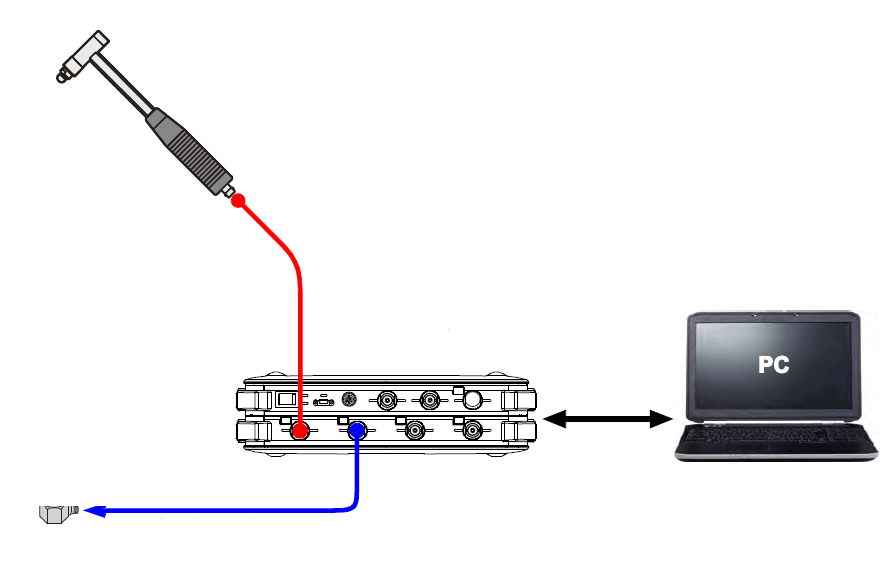
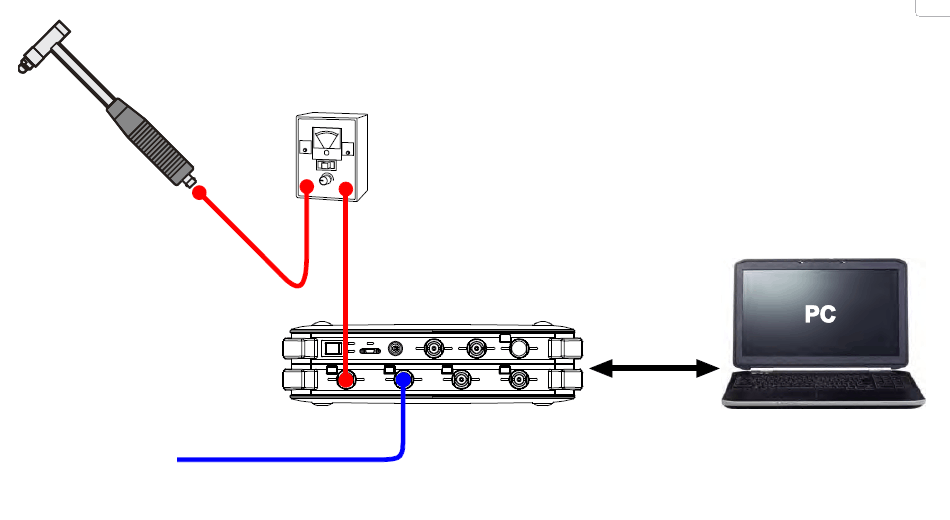
Set the item CCLD (whether to supply power to the built-in preamplifier in devices such as hammers) in the input settings. If the impulse hammer is directly connected to the analysis device as shown in Figure 1-1, set it to ON; if it is connected via a power unit as shown in Figure 1-2, set it to OFF. The same settings apply to channels connected to acceleration detectors.

GK Series
DS-3000 Series
図1-1 インパルスハンマと解析装置の接続(電源ユニット・センサアンプを使用しない場合)

GK Series
for the GK series
DS-3000 Series
図1-2 インパルスハンマと解析装置の接続 (電源ユニット・センサアンプを使用した場合)
unit calibration
Check the sensitivity of the impulse hammer in the shipping characteristics table and set the unit and sensitivity for the channel connected to the hammer. Here, input the sensitivity when using the hardest chip. If there is an extender, input the sensitivity when the extender is attached. If the hammer's sensitivity is 2.3mV/N, set the unit name to "N", the EU type to "V/EU", and input the sensitivity value converted to V/N, which is "0.0023", in the EU value. Keep the 0 dB reference value at 1 and the offset at 0 dB. Also, adjust the channel connected to the acceleration detector to match the detector's sensitivity.
Window function
Set the window function for all channels to a rectangular window. If you are using exponential or force windows, please change them after completing the initial settings. Hanning windows and flat-top windows are not used in hammering measurements.
frequency range
Set the frequency range initially to higher values such as 20 kHz or 5 kHz. While confirming the operation of the impulse hammer and trigger functions, gradually lower the frequency range to the actual values that will be used.
Trigger settings (Figure 2-1, Figure 2-2)
Set the channel connected to the impulse hammer as the input channel, with a detection level of 5% and hysteresis of 2%. The trigger position can remain at the default value of "-32."
-

Figure 2-1 Trigger Settings (DS-3000 Sound and Vibration Analysis System) -

Figure 2-2 Trigger Settings (CF-9000 Series FFT Analyzer)
Adjustment of voltage range
Attach the hardest tip to the end of the impulse hammer. If an extender is included with the hammer, attach the extender. If you are using a power unit or sensor amplifier, turn on their power.
Set the voltage range of the measuring device to the smallest range. For the DS-3000 series, the smallest range is 10 mVrms. For the CF-9000 series, the smallest range is 1 Vrms.
Strike the object to be measured with an impulse hammer. The impulse hammer is struck by dropping it onto the object under its own weight. By keeping the drop height constant, a consistent force can be applied. If the input over LED on the main analysis device lights up red, increase the voltage range by one level and strike again. Continue to increase the voltage range until the input over LED no longer lights up.
Similarly, adjust the voltage range for other channels connected to the acceleration detector.
Operation check of the impulse hammer.
On the screen of the analysis device, display the time axis waveform and power spectrum of the channel connected to the impulse hammer. Turn ON the TRIG (trigger) button on the analysis device, and after pressing the START button, strike the target object with the impulse hammer. The trigger should activate, and the waveform should update. Once the trigger is activated, stop the measurement with the STOP button.
If the trigger does not activate, try striking harder from a higher position or using a harder object than the target for impact. If the trigger still does not activate under these conditions, there may be a possibility of a broken cable or a malfunctioning hammer.
Adjustment of trigger detection level
Open the trigger condition setting dialog and set the trigger detection level. For the DS-3000 series, press the Open button under [Input/Output Setting Menu] ⇒ [Trigger Condition Setting] ⇒ [Internal Trigger]. For the CF-9000 series, navigate through [HOME] ⇒ [Input] ⇒ [Trigger] ⇒ [Int Trigger].
Set the trigger detection level to about 1/2 to 1/3 of the maximum value of the force waveform from the impulse hammer. The hysteresis value is usually around 2%, but if the trigger detection level is less than 5%, set the hysteresis value to slightly less than half of the detection level.
Clicking on the waveform displayed in the trigger condition setting dialog will change the trigger detection level and position. The trigger position is usually set to values like -32 or -100 for better visibility of the waveform, so if the position changes due to clicking on the waveform, please revert it to the original value.
Close the dialog, restart the analysis device, strike with the impulse hammer, and confirm that the trigger is activated.
Adjustment of the chip and extender.
Adjust the chip attached to the tip of the impulse hammer.
Check the power spectrum of the force signal from the impulse hammer. If the spectrum extends to frequencies higher than the desired measurement range, change to a softer chip for the impulse hammer and measure again. Then, check the maximum value of the force waveform in the trigger condition setting screen and readjust the trigger detection level according to the maximum value of the force waveform.
If you have decided on a chip to use, you may change to that chip; however, if the change causes the trigger to not activate, please change the chip to a softer one step by step as described above, and readjust the trigger detection level each time.
If you are not using the extender, check if the trigger is activated when the extender is removed. If the trigger does not activate, readjust the voltage range. If the trigger still does not activate, try lowering the trigger detection level and hysteresis.
When changing the chip or extender used, check the shipping characteristics table of the impulse hammer and adjust the sensitivity of the unit calibration settings.
Adjustment of Frequency Range
The frequency range will be adjusted according to the desired frequency band for measurement, but if the frequency range is suddenly lowered, it may result in the trigger not activating. In that case, revert the frequency range back to its original setting, then lower the frequency range by 2 to 3 steps (approximately half of the original range) and measure again to readjust the trigger detection level. After that, continue to lower the frequency range by another 2 to 3 steps and repeat the measurement and adjustment. Additionally, when changing the trigger detection level, please also reset the hysteresis.
Other adjustments
If the waveform visible in the trigger condition setting screen is small, try lowering the voltage range by one level. If there is no input over during the measurement, you can measure in that range. After changing the voltage range, please set the trigger detection level and hysteresis in the trigger condition setting screen.
If the force waveform visible on the trigger condition setting screen is relatively small, changing the chip of the impulse hammer to a softer one may improve the situation. Using a softer chip will lower the frequency range of the generated force, so please check the actual measurement results of the frequency response function and coherence function to determine if changing the chip is appropriate.
(Excerpt from the email newsletter published on April 23, 2015)


