

Torque Meter Frequently Asked Questions
Question number FAQ-1331
TS-2700 "The torque value is abnormal" - How to check if the torque detector is malfunctioning.
One way to determine if the torque detector is malfunctioning is to check whether the zero correction value has not changed significantly from the factory setting. When the torque detector is in a no-load state and the zero correction operation is performed, the zero value is automatically set. After that, the set zero correction value is read, and it is confirmed whether it differs by ±100 or more from the factory zero correction value (as stated in the test report included with the shipment).
If the discrepancy is large, the following causes may be considered. If the discrepancy is small, it is believed to be within normal ranges due to factors such as temperature and aging; however, for long-term use, calibration (for a fee) is recommended. Please note that the zero correction value may differ depending on the CW/CCW settings.
Factors of Change in Zero Correction Value
-
The power of the torque detector is not on.
-
Zero correction was performed on the torque detector while it was powered off.
-
Zero correction was performed on the torque detector while it was under load.
-
The torque detector and the CW/CCW settings of the TS-2700 do not match with respect to the rotation direction of the axis being tested.
-
The CW/CCW settings do not match between the detector side and the TS-2700 side.
(The CW/CCW key on the TS-2700 switches the stored CW and CCW zero correction values.) -
Torque detector failure
If the above points 1 to 5 do not apply, calibration of the detector is necessary, and detailed checks such as linearity need to be confirmed. Please verify the following again and use this as a basis for deciding whether to send it for inspection and repair.
-
Turn on the power of the torque detector. Ensure that it is in a no-load state and perform zero correction again.
-
Perform a zero correction again after removing the coupling from at least one axis of the torque detector.
-
Align the rotation direction of the axis as viewed from the "drive side" sticker on the detector with the rotation direction setting of the detection auxiliary motor. (Reference: Confirming the rotation direction of the SS series)
-
Align the rotation direction settings of the detector side with those of the TS-2700 side.
-
Perform calibration by weighing.(Reference: Calibration of torque detectors)
-
Consider requesting inspection, calibration, and repair from the manufacturer Ono Sokki.
Zero correction value confirmation operation
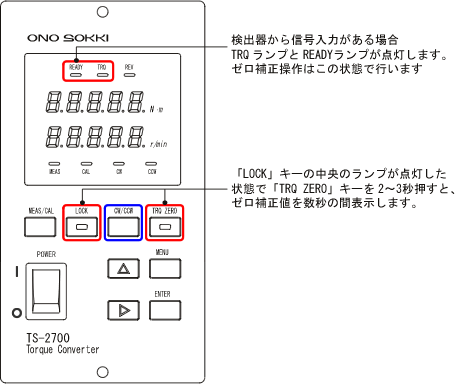
Press the 'LOCK' key to turn on the lamp, then press the 'TRQZERO' key. The currently set zero correction value will be displayed in the torque display window for a few seconds, after which it will return to the torque display. Release the 'LOCK' and press the 'CW/CCW' key to toggle the rotation direction setting between CW and CCW. Please check each zero correction value.
|
<Note on switching between CW/CCW> When the 'LOCK' key light is on, various settings cannot be adjusted. To unlock, please press the 'LOCK' key again to turn off the light. |
related information
Last updated date: 2009-05-25