

Torque Meter Frequently Asked Questions
Question number FAQ-1329
TS-2700: The torque value does not become zero even under no load.
As a possible factor
(1) The torque detector is not powered on (the switch is in neutral)
(2) The zero correction operation has not been performed correctly
(3) Torque is actually being applied
(4) Incorrect setting of the rotation direction
(5) Possibility of malfunction
There is.
(2) is often seen, especially when using it for the first time. After setting the menu options to match the torque detector, such as 'Capacity (detector torque capacity)' and 'FACTOR', it is necessary to perform a zero correction operation. The following are the main cases where the zero correction operation may not be performed correctly.
-
The torque detector is not powered on (the switch is in neutral)
The SS type and MD type torque detectors can switch between three positions: neutral (power OFF), CW, and CCW. The central position of the switch is neutral. In the neutral state, no signal is generated, so the correct zero correction cannot be set. During measurement, please set the CW and CCW settings according to the test rotation direction. (For detectors without a switch for switching between CW/CCW, please refer to the manual of the relevant detector.) -
The zero correction value is not being applied correctly.
2-1 Improper setting of CW and CCW
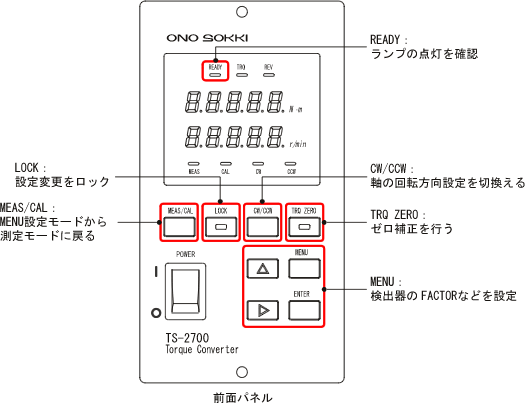
The zero correction value differs depending on the rotation direction of the torque detector's axis, CW (clockwise) or CCW (counterclockwise). Therefore, it is necessary to perform zero correction operations for each rotation direction. CW and CCW are defined by looking at the axis from the side where the torque detector's "drive side" seal is applied; when the axis rotates clockwise, it is defined as CW, and when it rotates counterclockwise, it is defined as CCW. The setting of CW and CCW is done by switching the switch on the torque detector, and on the TS-2700 side, it is set using the "CW/CCW" key. Please ensure that the settings for CW and CCW are consistent on both the detector side and the display side before performing the zero correction operation.
2-2 Correct Zero Calibration Operation
Please refer to the following 【Zero Calibration Operation Procedure】 to perform the zero calibration and confirm.
-
Zero correction is not performed in a no-load state
If a coupling is connected, there may be cases where it is not in a no-load state even if the rotation has stopped. Performing zero correction under such conditions will set the correction value to zero, taking into account the actual torque applied. Please confirm that the shaft can be lightly turned by hand to ensure it is in a no-load state, or perform the zero correction operation with the coupling on the load side of the torque detector removed. -
Incorrect setting of rotation direction
After zero correction operation, please set both the torque detector and TS-2700 correctly to the desired rotation direction for testing CW and CCW settings, and perform the measurement. Please note that the power will be OFF when the detector switch is in neutral.
The overview of zero correction operations is described below, so please refer to it.
Zero Correction Operation Procedure
For first-time use, the overview of the zero calibration operation and measurement flow is as follows. Please refer to the TS-2700 manual for detailed operations.
-
Connect the torque detector to the TS-2700 using a dedicated cable.
-
Connect the power supply for each torque detector, TS-2700.
-
Press the 'MENU' key on the TS-2700 for more than 2 seconds to enter the menu setting mode. Adjust settings for the torque detector, such as 'capacity (detector torque capacity)' and 'FACTOR'. Please refer to the TS-2700 manual for operation.
-
Press the 'MEAS/CAL' key on the TS-2700 to return to measurement mode.
-
Set the CW (lamp on) using the "CW/CCW" key on the TS-2700.
-
Set the torque detector switch to CW (→ indicates the clockwise direction). The power of the torque detector will turn ON, and the attached motor will start rotating. Please note that the switch has three positions: neutral (power OFF), CW, and CCW.
-
Confirm that the torque detector is in an unloaded state. Also, check that the 'READY' lamp on the TS-2700 is lit (indicating that the signal is being received correctly). If the 'READY' lamp is not lit, it may be due to the detector's switch being in the neutral position or the power to the detector being off.
-
Press and hold the 'TRQ ZERO' key on the TS-2700 for more than 2 seconds. The zero correction value will be set automatically, and the torque display will show zero. This completes the zero correction operation in the clockwise direction (CW).
-
Similarly, set to CCW and perform the operations 1 to 8 mentioned above.
-
Align the torque detector, TS-2700, with the rotation direction of the axis to be tested, set it for both CW and CCW, and start the measurement.
Use as a confirmation of malfunction
One way to determine if the torque detector is malfunctioning is to check whether the zero correction value has not significantly changed from the factory setting. For more details, please refer to this FAQ "How to check the zero correction value set for TS-2700".
Last updated date: 2009-05-25