

sound level meter Frequently Asked Questions
Question number FAQ-1204
Operation of MAN Memory
1. Overview
MAN memory is an independent general-purpose memory with addresses ranging from 01 to 80. All data being measured at the time of storage (displayable measurement or calculated values) is saved in MAN memory. The data stored in MAN memory will remain until another piece of data is stored at the same address in MAN memory.
Data storage procedure
◆ Operation
- Measure the data to be stored.
- Select MAN memory mode.
Press the panel switch [Mem Mode] of function 2 to activate the memory mode. Furthermore, press the panel switch [MemMode] several times until the MAN memory mode is selected. - Specify the store address number (01 to 80).
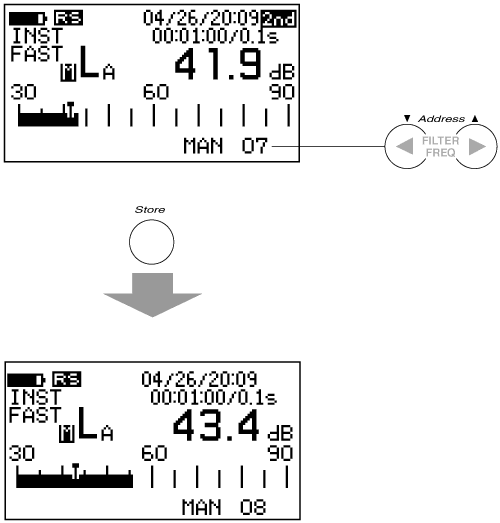
Each time you press the panel switch [Address ▲・▼] of Function 2, the address will increase or decrease. Also, if you press the panel switch [Address ▲] after address number 80, it will return to address number 01. A mark (*) is displayed after the address number where data has already been stored. Next is an example specifying address 07. - Run the store.
Press the panel switch for function 2, [Store], to store the displayed data in MAN memory address 07. Note that once the store is complete, the address number will automatically increment by one.
<Memo>
- The address number will not increment even if the storage is completed, but only when stored at address number 80.
- If the calculation data is real-time data, data cannot be stored. Please note.
2. Store Data Recall Procedure
<Memo>
- When the recall data is displayed on the screen, pressing the panel switch [Address ▲・▼] will switch the recall data in accordance with the increase or decrease of the address.
- Addresses where data is stored are marked with an asterisk (*), while addresses where data is not stored are not marked with an asterisk (*).
◆ Operation
Press the panel switch [Mem Mode] for function 2 to activate memory mode. Additionally, press the panel switch [Mem Mode] several times until MAN memory mode is selected.
Each time you press the panel switch for Function 2 [Address ▲・▼], the address will increase or decrease. Also, a mark (*) is displayed after the address number where data has already been stored.
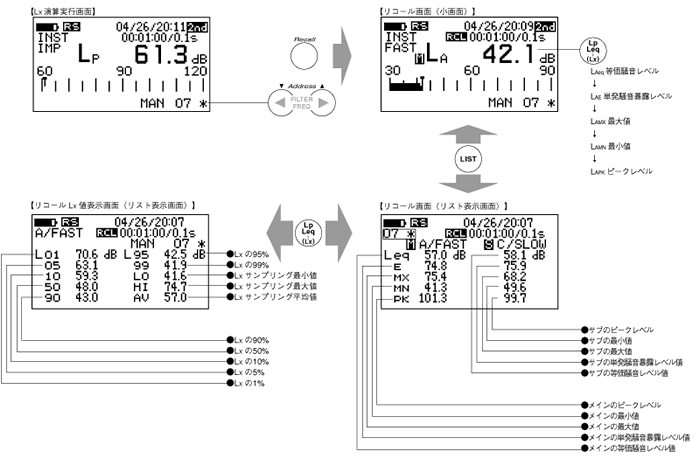
Press the panel switch [Recall] for function 2 to recall the data 07 stored in MAN memory. Also, if you want to turn OFF (release) the recall, please press the panel switch [Recall] again.
3. Switch display of the recall screen list.
When the recall screen is displayed and the panel switch [LIST] is pressed, the equivalent noise level, single event noise exposure level, maximum value, minimum value, and peak level will be listed. Furthermore, if data storage is executed at the point when the calculations are completed, pressing the panel switch [Lp/Leq…] will display all LX values in a list.
4. Recall screen and panel switch
During the recall screen display, only the following panel switch can be operated. If you need to operate a panel switch that is not allowed, please press the panel switch [Recall] of Function 2 again to deactivate the recall.
| [LIGHT] | Backlight ON/OFF switch |
| [Main / Sub] | Main/Sub switch However, only during dual operation data recall |
| [Recall] | Switching ON / OFF of the recall |
| [2nd] | Function switching of the panel switch |
| [Address] | Switching of address numbers. |
| [LIST] | Switching between the normal screen and the list screen. |
| [Lp/Leq …] | Switch to time rate noise data display. |
Last updated: 2001-10-12