

sound level meter Frequently Asked Questions
Question number FAQ-1166
Panel Condition Function
Panel Condition Function
Overview of the Panel Condition Function
The LA-1240/1250/1350/4350 has a panel condition resume function that allows it to start in the same condition (measurement conditions) as when it was last turned off. (In addition to the panel condition, the calculated value data from the last measurement is also saved).
Additionally, at startup, you can also arbitrarily select the panel condition to start from the 9 types of panel conditions (COND1 to COND9) stored via the RS-232C interface from a personal computer.
The initial setting values for the panel condition memory are shown in the table below.
| Setting items | panel switch | Panel condition (Resume) | COND1 | COND2 | COND3 | COND4 |
|---|---|---|---|---|---|---|
| Frequency correction characteristics | [A/C/FLAT] | A | A | A | A | A |
| dynamic characteristics | [FAST/SLOW/IMP *1] | FAST | FAST | FAST | FAST | FAST |
| level range | [LEVEL▲▼] | 30~100dB | 40~110dB | 40~110dB | 40~110dB | 40~110dB |
| measurement time | [MESA TIME] | 000:00:00 | 000:10:00 | 000:10:00 | 000:01:00 | 000:10:00 |
| measurement cycle | [Period] | 000:00:00 | 001:00:00 | 000:10:00 | 000:01:00 | 000:00:00 |
| total measurement time | [Total Time] | 000:00:00 | 024:00:00 | 024:00:00 | 024:00:00 | 000:00:00 |
| Measurement Start Time | [START h/Start min] | --:-- | 06:00 | 06:00 | 06:00 | --:-- |
| Timer setting*2 | [Timer] | OFF | ON | ON | ON | OFF |
*1: The dynamic characteristics of LA-4350 are FAST/SLOW/IMP
*2: LA-1240 does not have a Timer measurement function.
Notice
The panel condition memory does not store measurement items, and it always displays instantaneous values at startup. To measure calculated values under the panel condition memory's measurement conditions, press the panel switch [START] to begin measurement, then press the panel switch [Lp, Leq, ... (Lx)] to switch to the desired item for display.
Loading Procedure for Panel Condition Memory
At startup, selecting a panel condition from the nine types of panel conditions (COND1 to COND9) that you have set is referred to as loading the panel condition memory.
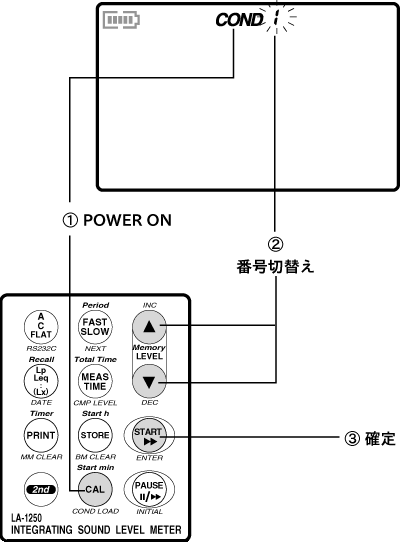
- Press the panel switch [CAL (COND LOAD)] while turning on the power. The memory number COND* of the panel condition will flash on the LCD screen.
- Press the panel switch [LEVEL (▲・▼)] to display the panel condition memory number (1 to 9).
- Press the panel switch [START (ENTER)]. The sound level meter will activate with the selected panel condition memory.
Release of Panel Condition
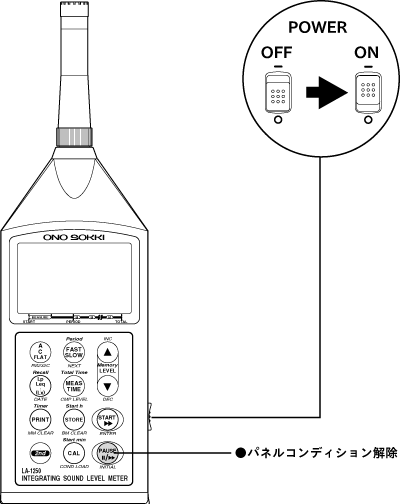
By pressing the panel switch [PAUSE (INITIAL)] while turning the power ON, you can disable the panel condition function and start the device in its factory default state (initialization). However, even if you start in the factory default state, the contents of the panel condition memory will not be initialized.
Last updated date: 2002-02-15