

XN-8000 Frequently Asked Questions
Question number FAQ-1102
What is the order of calculus operations in both XN-0821 and DS-0221 software when at 1/H?
In the DS-0221 general-purpose FFT analysis software, calculus operations are performed on the frequency response function "H" followed by the calculation of its inverse. In contrast, the XN-0821 FFT analysis software first calculates the inverse of the frequency response function "H" (1/H) and then performs calculus operations.
For example, if we measure the frequency response function H = A/F with acceleration = A and force = F, and we want to find the stiffness using the inverse operation (1/H) and calculus, the stiffness = F/X where "X" is calculated by double integrating acceleration A to get displacement X = A*{1/jω} 2. However, since A is included in H, the order of operations for 1/H and the calculus becomes an issue. Since A is in the numerator of H, double integrating H gives us "X/F", and we can find "F/X" through this inverse operation. If we execute 1/H first, it becomes "F/A", placing A in the denominator, which means that "1/X" will be the second derivative of "1/A", ultimately resulting in "F/X" (Equation 1).
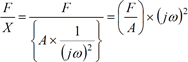
Formula 1
In the case of DS-0221
To calculate stiffness (F/X), enable the inverse operation function of the frequency response function (A/F) and set up double integration.
In the case of XN-0821
To calculate stiffness (F/X), set the inverse operation feature of the frequency response function (A/F) to on and configure the second derivative.
| -- | (jω) | (jω)2 | 1/(jω) | 1/(jω)2 | |
| -- | first derivative | second derivative | single integral | double integral | |
| H | A/F Inatance | -- | -- | V/F Mobility | X/F Compliance |
| 1/H | F/A Apparent mass | F/V machine impedance | F/X rigidity (stiffness) | -- | -- |
F: Force (N), A: Acceleration (m/s 2), V: Velocity (m/s), X: Displacement (m)
■XN-0821 Frequency response function A/F to calculate rigidity
(Frequency response - inverse operation and calculus)
- Double-click the graph of the frequency response function to open the graph properties.
- Click the [Detailed Settings] button on the [Display Data] page to open the [Frequency Response Function] page.
- Check the 'Reciprocal operation: on' option on the 'Frequency Response Function' page and click the OK button (Figure 1).
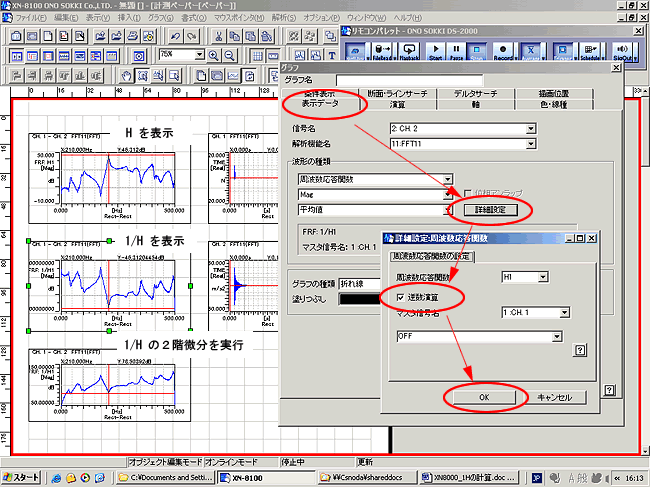
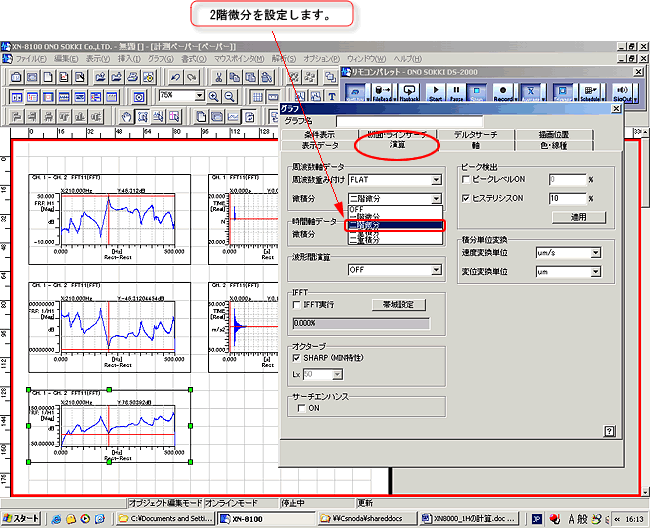
Figure 1 - Click on the [Calculus] tab and set the 'Calculus: Second Derivative' page (Figure 2).
Last updated date: 2006-11-20