

Digital Gauge Frequently Asked Questions
Question number FAQ-0066
DG-4240 rear panel terminal block, connection of signal wires
I will explain the signal connections of the back panel.
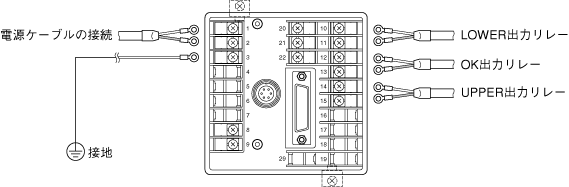
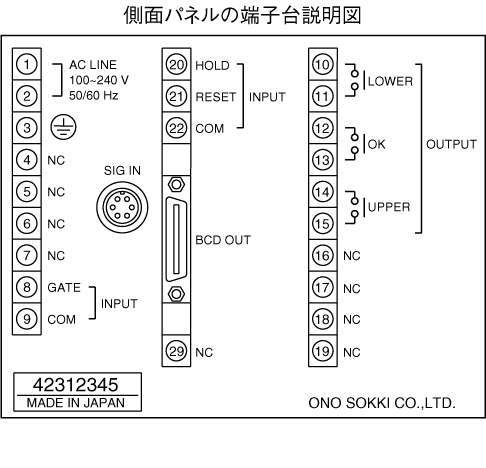
Connection to the cable
The terminal block uses M3.5 screws. It is recommended to use round crimp terminals that match these screws.
Grounding
For safety and noise reduction, please ensure that the grounding terminal (no.3) is grounded. Grounding should be done at one point at the grounding terminal, and do not perform any bridging with latitude lines.
Grounding type: Type 3 or higher (below 100Ω)
Ground wire: Soft copper wire of 2mm2 or more (AWG14)
Ground extension: Up to 20m
Connection of relay output
When connecting inductive loads (such as relays) to the relay output (No. 10 to 15) on the back panel, please use protective circuits to keep back electromotive force low and prevent damage to the relay contacts.
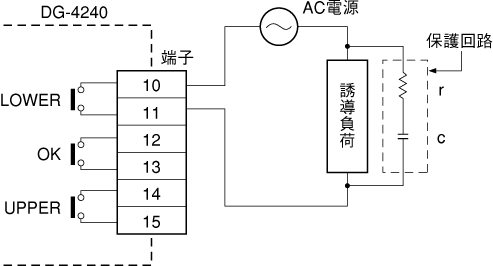
The guideline for c and r is
c: Contact current 1A corresponds to 0.5–1μF
r: Contact voltage 1V corresponds to 0.5–1Ω
However, due to the nature of the load and the variation in relay characteristics, it may not necessarily be as stated above.
c is responsible for the discharge suppression effect when the contacts are open, and r plays the role of current limitation during the next activation, so please verify this through experiments. Please use a capacitor with a voltage rating of 100V to 300V. In AC circuits, use capacitors for AC (non-polarized). If the load is a relay, solenoid, etc., the recovery time will be delayed.
Connection of external devices
When inputting the comparator gate signal, hold signal, and reset signal from external devices, connect the signals to the terminal block on the rear panel.
<Refer to the separate document for input circuits and timing charts>
(5) Installation of terminal block cover (optional)
A terminal block cover (model DG0420) is available.
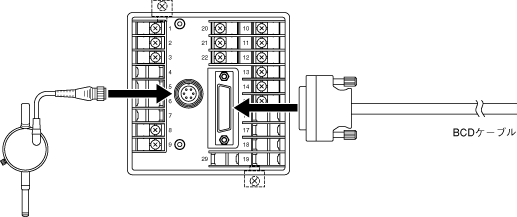
(6) Connection of GS sensor and BCD signal cable
Connect as shown in the figure below. The signal cable for the BCD connector is available as an option in model AA8107 (3 meters long, one side open).
Last updated: 2000-12-08