| Model name |
Contents |
Category |
| VW-3100 |
[About Vibration Meter Mode]
①Addition of Bar Graph Scale Setting Function
A function has been added to set the display scale of the bar graph.
For each measurement band, you can select either "No Setting (1/1)", "1/10", "1/100", or "1/1000".
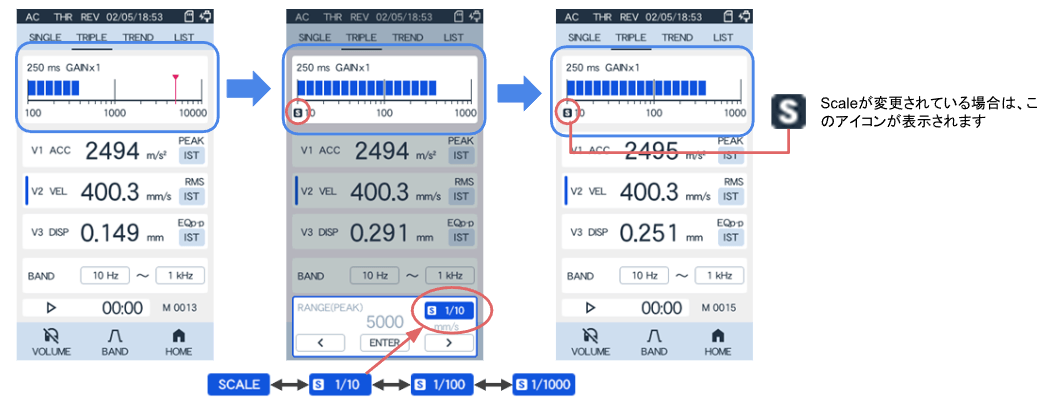
For detailed instructions on how to change the bar graph scale, please refer to the manual "3.3.6 Change Bar Graph Scale."
|
Function added |
| VW-3100 |
②Improvement of Average Display
During average calculations, the display operation item switches to "AVE," and the displayed value becomes the average value.
Additionally, the selectable items will be restricted based on conditions.
For detailed specifications and limitations, please refer to the user manual "3.4.3 Starting/Ending Measurements ■ About Automatic Switching of Display Calculation Items and Setting Restrictions."
|
improvement |
| VW-3100 |
③Volume adjustment improvements
It has been improved to achieve sufficient volume with fewer taps.
*There is a possibility of producing a louder sound at lower settings than in previous versions. Please be careful when adjusting the volume.
|
improvement |
| VW-3100 |
④Improved display of maximum value (HLD) reset
When the maximum value (HLD) is reset using the ESC key, "----" is now displayed to indicate that it has been reset.
|
improvement |
| VW-3100 |
⑤Improvement of Displacement Measurement Accuracy
Improved measurement accuracy in the low frequency band during displacement (DISP) measurements.
* The measurement values and characteristics obtained in previous versions are different. Please be careful when comparing data before and after the version upgrade.
|
improvement |
VW-0310
Equalizer function |
[About the Equalizer Function (Optional)]
① Automatic adjustment of vertical axis scale
The display scale of the octave graph is automatically adjusted according to the measurement range setting. (The upper limit of the vertical axis is converted to 1/100 of the measurement range)
|
improvement |
VW-0310
Equalizer function |
②Fix for the vibration meter mode display update issue
We have fixed an issue where the measurement value display would not update and remain fixed only when the equalizer mode was in use and the following steps were performed.
- HOME > Menu > Execute Current Condition Initialization
- After execution, transition directly to either vibration measurement mode or listening comparison EX mode.
This issue does not occur with any operation sequence other than the one mentioned above, or under normal measurement conditions.
|
bug fix |
VW-0340
ISO evaluation and judgment |
[About ISO Evaluation and Judgment Function (Optional)]
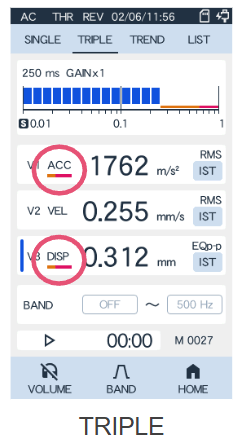
① Added Indicator Display at Judgment
When the "Evaluation Valid Setting" is set to "ON", a function has been added to display an indicator (icon) on the measurement screen to show that the evaluation function is active.
|
Function added |
VW-0340
ISO evaluation and judgment |
②Forced display of measurement items for judgment
When the "Evaluation Valid Setting" is set to "ON", the measurement items set as "Evaluation Target" will automatically be set as "Displayed Measurement Items" (not changeable). However, switching between "CF" and "RMS" is only possible when the "Evaluation Method" is set to "Optional (CF&RMS)".
|
improvement |
VW-0340
ISO evaluation and judgment |
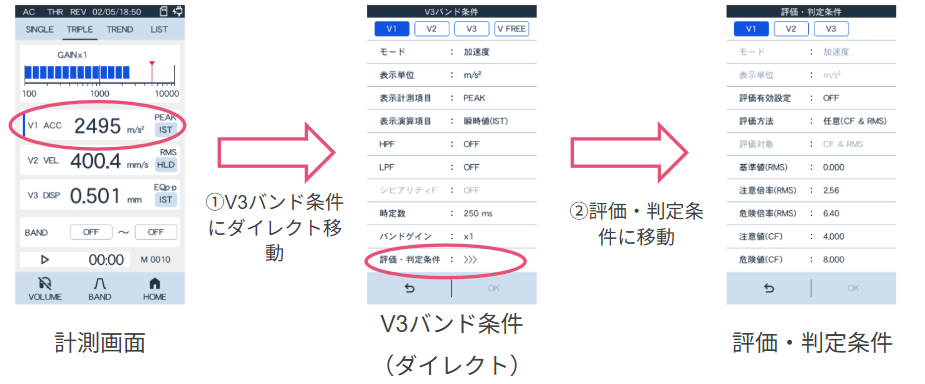
③ "Evaluation and Judgment Conditions" Direct Setting
It has become possible to move directly from the "V3 Band Conditions" screen to the "Evaluation and Judgment Conditions" screen.
|
Function added |

