

Vibration Comparator Frequently Asked Questions
Question number FAQ-1397
Connection of headphones
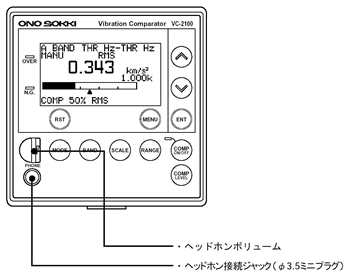
The VC-2100 allows you to confirm measured vibrations through sound by connecting headphones. Please connect commercially available headphones to the headphone jack.
| headphone jack terminal | Specification | suitable plug |
|---|---|---|
| 3.5 mm stereo mini jack | Rated impedance of 24 Ω with an output of 15 mW or more. | 3.5 mm mini plug |
<Attention>
Please use headphones that are compatible with the headphone jack. Before connecting the headphones, ensure that the headphone volume is set to the minimum position.
Also, when changing various settings such as band gain, set the headphone volume to the minimum position. Gradually increase the volume from the minimum position. Turning it suddenly to a high position can cause a sudden shock to the sound, which is dangerous.
Last updated: July 15, 2002