

Vibration Comparator Frequently Asked Questions
Question number FAQ-1392
About Voltage Output (THR, AC, DC)
The voltage output of VC has three types: THR, AC, and DC, and they are output simultaneously.
THR and AC outputs can be used as analysis signals such as for FFT analyzers, while DC output can be used as recorder output.
| Voltage output | Back panel terminal block | output voltage |
|---|---|---|
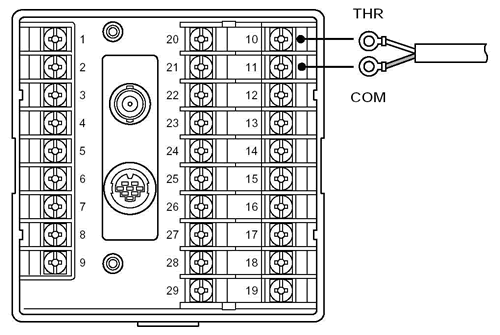
| THR | No.10: + No.11:COM | For the input signal, the gain of "THRGAIN" displayed in the COND MONI menu below is amplified and output. This gain is automatically determined by the input range and SENS sensitivity setting, and cannot be changed arbitrarily. (This is a signal output that does not pass through the bandpass.) (Example) When using an acceleration sensor of 5 mV/ms-2; THR output = 5 mV/ms-2 (for ×1) Maximum output voltage ±5 V |
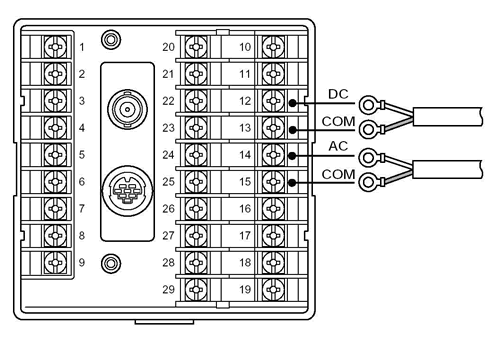
| AC | No.14: + No.15:COM | Select one from band A, B, or C. Output a band-limited AC signal from that band. The bar indicator outputs a full-scale value of ±100% (= ±5V). The maximum output voltage is ±5V. |
| DC | No.12: + No.13:COM | The device converts the band-limited AC signal displayed in bands A, B (or C) into a DC output. If integration is ON, it outputs the integrated signal. The bar indicator outputs values from 0 to full scale (when the scale is ×1) as 0 to +100% (= 0 to +5V). The maximum output voltage is +5V. When the current output option VC-0253 is installed, the 'DC' terminal will become a current output. It converts 0 to 5 V into 4 mA to 20 mA for current output. |
(Note) Even when the display scale of the bar indicator is enlarged (such as SCL X2), the full scale is 100% when the enlargement is turned off.
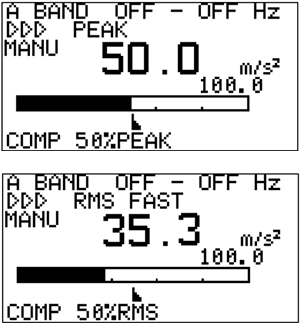
Full scale 100 m/s 2
Acceleration half amplitude 50 m/s 2 then
Whether at PEAK or RMS,
the AC output voltage is 2.5 V peak amplitude
and the DC output voltage is 1.76 V
.
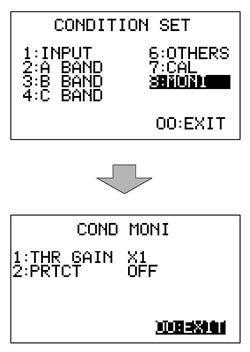
■THR output gain check
Press the MENU key to open the CONDITION SET menu,
align the cursor to 8:MONI using the ∧ and ∨ keys (inverted display), then press the ENT key,
to open the COND MONI menu.
1: Please check the multiplier displayed in the THR GAIN section.
■THR, AC, DC output terminals
Last updated date: 2018-03-01