

Acceleration Pickup Frequently Asked Questions
Question number FAQ-1364
What is the distinction in the use of the grounding switch (Case/Float) in the AU series?
By setting the "ground switching switch" to <CASE>, the signal common is connected to the ground terminal and the case of the AU series. This mode is usually used to stabilize the internal reference potential and to ground the noise (including noise that enters via cables) (N), thus stabilizing it. However, in cases such as those below (1) to (4), switching to <FLOAT> and disconnecting the internal circuit from the case may reduce the likelihood of noise affecting the output signal.
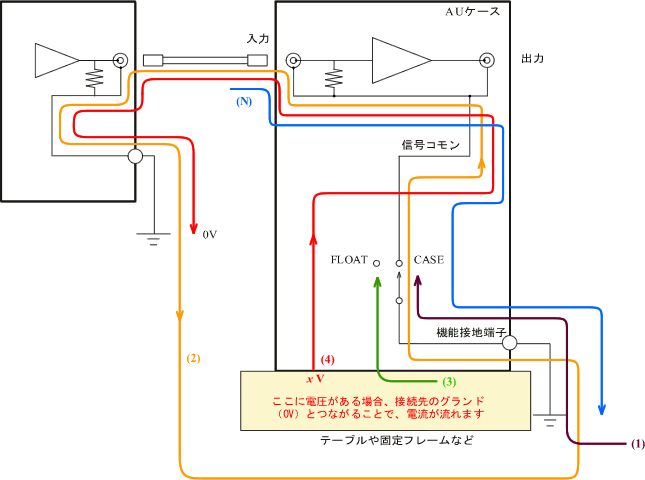
| (1) | Although grounding was performed, it conversely allows noise from other devices to flow in, resulting in noise being superimposed on the output of the AU. |
| (2) | When grounding the case, a ground loop can be created, resulting in noise. |
| (3) | If there is induced noise on the frame or table to which the AU is attached, and if noise is transmitted through the case of the AU affecting the signal. |
| (4) | If a frame or table equipped with an AU has a potential and is connected to the signal common, malfunctions such as short circuits may occur at the connection point. |
In short, when there is a potential at the mounting rack or installation site, and when there is noise in the output signal that decreases when the "ground switch" is set to FLOAT, we set it to FLOAT. In this case, it becomes more susceptible to electromagnetic noise coming from cables and other sources, so whether to choose CASE or FLOAT needs to be decided on a case-by-case basis.
Last updated: 2007-08-20