

Torque Meter Frequently Asked Questions
Question number FAQ-1341
Cannot automatically paste table display into Excel.
When our company prepares and sets up a PC for shipment, the TS-7700 is installed using an Administrator account. Therefore, it is necessary to launch and use the TS-7700 with the same Administrator account. This is because, during the installation of the TS-7700, a directory named TS7700temp is created on the computer, where temporary files required for processing are generated. If the user does not have Administrator privileges, temporary files cannot be created in the temp directory, resulting in an error.
As a countermeasure,
Reinstall the TS-7700 using a username with administrator privileges and use the same username.
Set up sharing settings for the temp folder.
Please do either one.
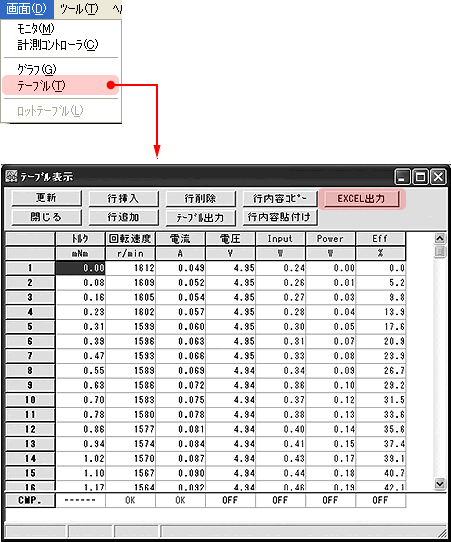
[Operation for automatic pasting of the display table into Excel]
Select [Screen] → [Table] from the menu bar, and click the [EXCEL Output] switch on the displayed "Table Display" screen.
If Microsoft EXCEL is installed on your PC, pressing this switch will launch EXCEL and paste the data. The file name is TEMP.CSV, so please save it with any file name you prefer. The version of EXCEL is compatible with EXCEL from Office XP onwards.
Last updated: January 19, 2009