

Torque Meter Frequently Asked Questions
Question number FAQ-1337
How to incorporate TS-2700 BCDout into a sequencer
There are two methods available. Please refer to the instruction manual for details regarding signal specifications and other information.
Method 1
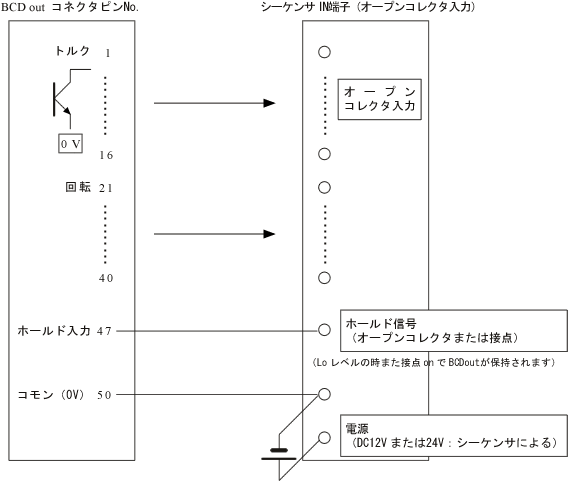
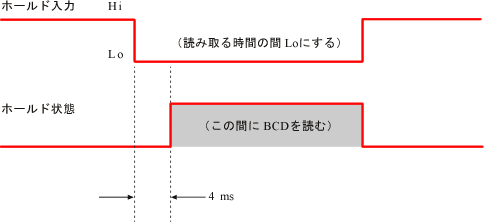
The digital display and BCD data update will remain at every 1 second (standard setting). Input a low-level signal to pin 47 (hold input) of the BCD out connector. The BCD signal will be held steady during the low level, so it can be read by the sequencer during that time. After reading, set it to high level. If the hold input signal is to be made into a contact, short pin 50 (common) and pin 47. If using an open collector, please ensure the signal input is similar to that of the contact.
Connection
● Timing chart (see manual, page 49)
■ When using the TRIG IN signal for remote functionality
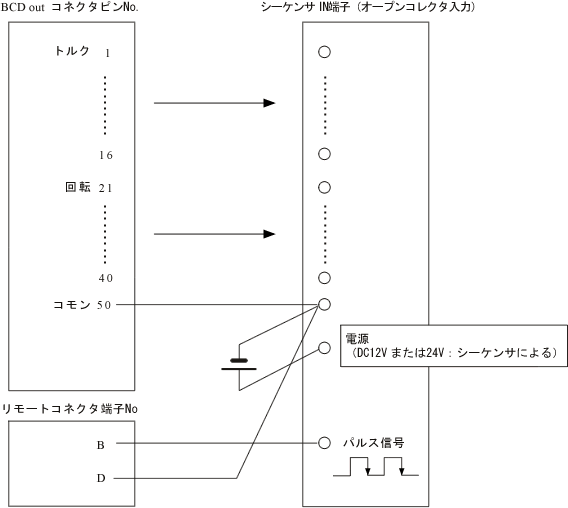
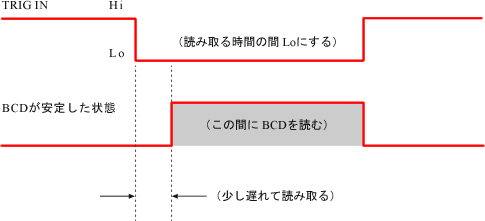
This method is typically used for fast measurements within 1 second, when reading the BCD data. Set the configuration in the manual "3.5 '10. Gate Time'" to 'EXT' to enable the TRIGIN function. The digital display and BCD out values are updated each time a TRIG IN signal is received. Please note that updates will not occur without this signal. The minimum TRIG is 0.1 seconds. Please ensure that the cycle time is longer than this. (For details on the TRIG IN signal, please refer to the manual.)
Connection
● Timing chart (refer to manual P51)
Last updated date: 2006-10-23