

Torque Meter Frequently Asked Questions
Question number FAQ-1332
How to check the zero correction value set in TS-2700
Operation Procedure
-
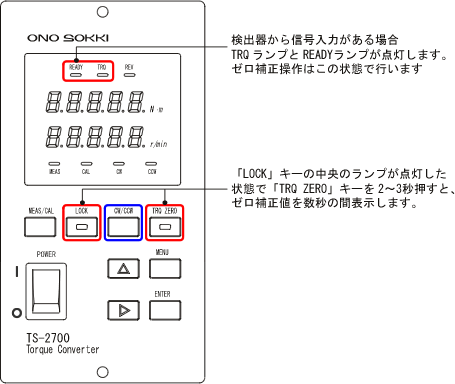
Press the "LOCK" key to turn on the key lamp. After that, press the "TRQ ZERO" key for 2 to 3 seconds, and the currently set zero correction value will be displayed in the torque display window for a few seconds before returning to the torque display.
Please be careful
When the 'LOCK' key light is on, various settings cannot be adjusted. To unlock, please press the 'LOCK' key again to turn off the light.
-
To check the reverse direction zero correction value, press the 'LOCK' key to turn off the key lamp, then press the 'CW/CCW' key for 2 to 3 seconds. Confirm that the CW LED or CCW LED has switched on. After that, press the 'LOCK' key again to turn it on, and by pressing the 'TRQ ZERO' key for 2 to 3 seconds, you can check the zero correction value for the switched direction in the torque display.
[Use as a Confirmation of Malfunction]
One way to determine if the torque detector is malfunctioning is to check whether the zero correction value has not changed significantly from the factory setting. If the zero correction value set after performing the zero correction operation differs by ±100 or more from the factory zero correction value (as stated in the test report included with the product), then
-
The power to the torque detector is off, or zero correction was performed while in that state.
-
Zero correction was performed on the torque detector under load.
-
The rotation direction of the axis being tested does not match the settings for CW/CCW.
-
The CW/CCW settings do not match between the detector side and the TS-2700 side (the CW/CCW key on the TS-2700 switches the stored zero correction values for CW and CCW).
-
Torque detector failure
If the above conditions 1 to 4 do not apply, calibration of the detector is required, and detailed checks such as linearity need to be confirmed.
related information
Last updated date: 2009-05-25