

Torque Meter Frequently Asked Questions
Question number FAQ-1328
How to reset the TS-2700 menu (settings conditions) to factory settings <Method for initializing settings conditions>
Operation Procedure
Press the "ENTER" key and the "LOCK" key simultaneously while turning the "POWER" on.
The menu (MENU) settings will be initialized and will start up.
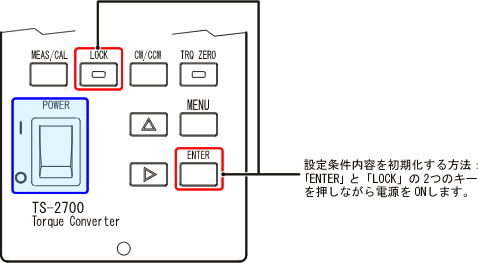
How to initialize the setting conditions.
By resetting the torque detector from scratch, you can prevent setting errors. As a preparation, first, initialize the entire 'MENU'. After that, by performing the 'MENU' settings and zero correction operation (initial matching adjustment) tailored to the torque detector from the beginning, you can prevent setting errors. This is also used for zero adjustment of the torque's analog output.
related information
Last updated date: 2009-05-25