

Torque Meter Frequently Asked Questions
Question number FAQ-1309
How to start terminal mode for TS-2600 N-0 settings (Win 95)
To set the N-0 (zero-point correction setting per rotation) on the TS-2600, connect the TS-2600 to the CPU via RS232C and use the HyperTerminal function that comes standard with Windows 95. A proprietary signal code for RS232C is required.
Next is the procedure for launching the hyper terminal.
- Prepare an RS232C cable to connect the TS-2600 to the computer.
- Start Windows 95.
- Start → Programs → Accessories → Select HyperTerminal (Hypertrm.EXE).
- Since the HyperTerminal window opens, I will start it.
- "Before connecting, you must first install the modem. Do you want to start the installation?" If this appears, press no.
- When the connection settings window opens,
Enter Name (N): TS-2600 and select an icon as desired, then press OK.
- When the phone number window opens,
Connection method (N): Select direct to Com1 or direct to Com2, and press OK.
This is a setting to select the COM port number connected to the RS232C cable. Please check the connector number of the CPU.
- The properties of COM will open, so we will configure the port.
Bits/second (B): 9600
Data bits (D): 8
Parity (P): none
Stop bits (S): 1
Flow control (F): Xon/XoffEnter or select the above and press OK.
- Select 'File (F) → Properties (R)' to open the properties window for the TS-2600, then select the 'Settings' tab and make the following configurations.
How to use function keys, arrow keys, and the Ctrl key.
Select the terminal key.
Emulation (E): VT100
- Press Encoding Method (I) to open the window for the host system encoding method.
Select Shift JIS (S) and press OK.
- Press the ASCII settings (C) button to open the ASCII settings window and make the following configurations.
[Sending ASCII]
Add a newline character at the end of the line (S)
Local echo (E)I will put a check mark on.
[Receiving ASCII]
Add line breaks to received data (A)
Wrap at the right edge (W)Check the box and press OK. Press OK again to close the currently open window.
- File (F) → Save As (A).
The file name already contains TS-2600, so I will press save.
- Turn off the power of the TS-2600 once, and then turn it back on.
This connects the CPU and TS-2600 via RS-232C.
- Type in uppercase TRM (the characters you type will not be visible on the terminal screen) to launch the N-O correction value input screen, and please follow the instructions in the TS-2600 user manual to perform the settings.
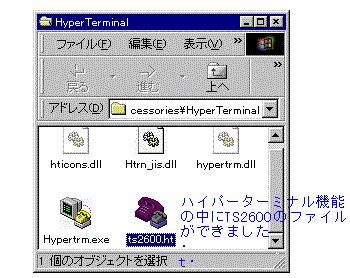
- An icon for the TS-2600 has been created, so if you need to perform N-O correction again later, launch HyperTerminal and click on the TS-2600 icon from the File (F) menu to start HyperTerminal. Perform the operation in step 14 on that screen.
Last updated date: 2026-07-15