

Torque Meter Frequently Asked Questions
Question number FAQ-1307
TS-2600 Voltage Output
I will explain the analog output. For information on parameter settings, please refer to the 'Setting Procedure Manual'.
1. Torque voltage output
The TRQ OUT connector on the back panel provides an analog voltage output for torque. Regardless of the range of the torque detector, the output voltage during full-scale measurement is ±10 V.
| output voltage | ±10 V |
|---|---|
| Output Connector | C02 type (BNC) connector |
| appropriate load | more than 10 kΩ |
| time constant | 63 ms / 500 ms switching |
Setting the parameter 1-2 of the internal settings section to ON will result in 63 ms.
By default, it is set to OFF: 500 ms.
 How to calibration torque voltage output
Please prepare the digital voltmeter (hereinafter referred to as Dijiboru) as we will proceed while looking at its display.
- Connect the TRQ OUT connector on the back panel to the DigiBol.
- Switch the MEAS/CAL switch to CAL. At this time, please adjust the ANALOG ADJ TRQ ZERO potentiometer so that the display shows 0 V.
- Press the TRQ ZERO switch until the LED lights up. At this time, the full scale value will be output, so please adjust the ANALOG ADJ TRQ FULL potentiometer to make the display of the digital voltmeter 10 V. Also, the LED will turn off immediately after lighting up.
* By pressing the TRQ ZERO switch until the LED lights up, you can repeat ZERO → FULL. - Switch the MEAS/CAL switch to MEAS.
- We will start the measurement.
2. Voltage output of rotation
<Attention>
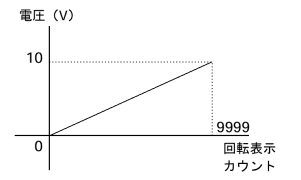
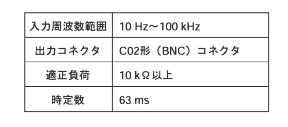
Please note that the output will only reach up to 10 V = 9999 r/min (9999 × 10 r/min) even within the input frequency range. The lower frequency limits, when converted to rotational speed, are approximately 10 r/min at 60 P/R, 5 r/min at 120 P/R, about 3.3 r/min at 180 P/R, 2.5 r/min at 240 P/R, 2 r/min at 300 P/R, and about 1.8 r/min at 360 P/R.
The analog voltage output for rotation is provided from the REV OUT connector on the back panel. Please set the P/R switch in the internal settings to match the number of teeth on the rotation detection gear. When the rotation display reaches 9999 counts, 10 V will be output.
How to calibration Rotational Voltage Output
- Connect the REV OUT connector on the back panel to the digital device.
- Switch the MEAS/CAL switch to CAL. At this time, please adjust the ANALOG ADJ REV ZERO potentiometer so that the display shows 0 V.
- Press the TRQ ZERO switch until the LED lights up. At this time, the full-scale value will be output, so please adjust the ANALOG ADJ REV FULL potentiometer to make the display of the digital voltmeter 10 V.
* By pressing the TRQ ZERO switch until the LED lights up, you can repeat ZERO → FULL. - Switch the MEAS/CAL switch to MEAS.
- We will start measuring.
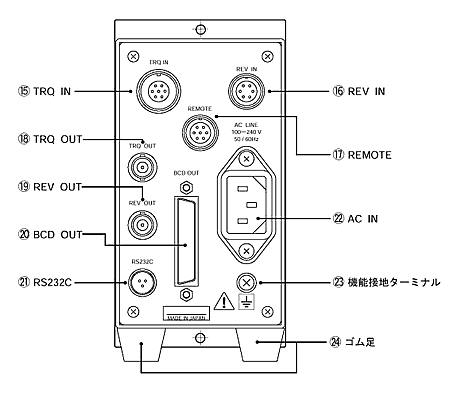
Voltage output terminal (rear panel)
Connector name
TRQ OUT: Torque output
REV OUT: Rotation output
Last updated: March 15, 2002