

Torque Meter Frequently Asked Questions
Question number FAQ-1298
Method for external switching of rotation direction (CW/CCW) for TS-2600
It is possible to input control signals from an external source using the REMOTE connector on the back panel. However, the cable connected to the REMOTE connector should be no longer than 5 meters, and shielding should be applied as necessary.
(1) REMOTE connector (rear panel)
Compatible connector (signal cable side): R03-PB8M (manufactured by Tajimi Radio Co., Ltd.) <standard included>
| pin | Signal Name | Remarks |
|---|---|---|
| A | CLR IN | Voltage-free contact input (Common is shared) |
| B | TRG IN | |
| C | CW/CCW switch | |
| D | COM | |
| E | READY OUT | Voltage-free contact output (Common is separate) |
| F | Same as above COM1 | |
| G | TRG OUT | |
| H | Same as above COM2 |
(2) Recommended input signals for signal inputs (pins A to D)
|
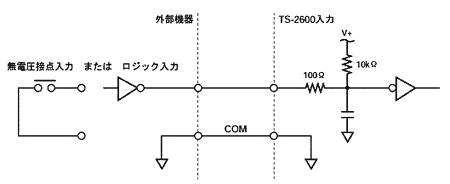
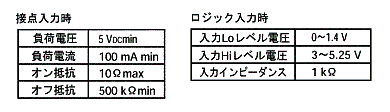
(3) How to switch CW/CCW
Switch between connector pins C and D (CW/CCW switch) by inputting the following signal.
* Effective when TS-2600 parameter settings 1-3 are ON (EXT)
| Control signal (between C and D) | function | |
|---|---|---|
| Contact signal | Open (Release) | CW |
| Close (Short Message) | CCW | |
| logic input | Hi level | CW |
| Low level | CCW |
(Note) The torque detector also needs to be switched between CW/CCW simultaneously with the switching of the TS-2600.
Last updated: March 15, 2002