

sound level meter Frequently Asked Questions
Question number FAQ-1212
How can I check the options that are currently attached?
■ Operating Procedures
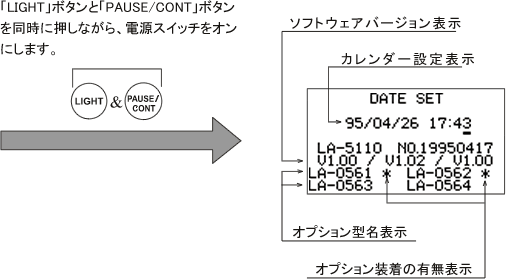
Press the "LIGHT" and "PAUSE/CONT" buttons simultaneously while turning on the power switch.
As shown in the figure below, the calendar setting screen will be displayed along with a list of optional models. Options that are installed will have a "*" mark (if the "*" is not displayed, it is not installed). Please turn off the power after confirming.
List of Options
| Model name | Product Name | Specification |
|---|---|---|
| LA-0561 | 1/1 octave filter | 31.5Hz to 8kHz, 9 bands, JIS C1513 II, IEC1260 Class 1, base 10, ANSI S1.11-1986 TYPE 1-D |
| LA-0562 | 1/3 octave filter | 20Hz to 12.5kHz, 29 bands, JIS C1513 Type III, IEC1260 Class 1, base 10, ANSI S1.11-1986 TYPE 1-D |
| LA-0563 | 1/1 real-time octave analysis | 31.5Hz to 8kHz 9 bands + ALLPASS x 2 / Leq sampling 20ms JIS C1513 Type II IEC 1260 Class 1 base 10 ANSIS1.11-1986 TYPE 1-D |
| LA-0564 | 1/3 Real-time Octave Analysis | 20Hz to 12.5kHz, 29 bands + ALLPASS x 2 / Leq sampling 20ms, JIS C1513 Type III, IEC 1260 Class 1, base 10, ANSI S1.11-1986 TYPE 1-D |
| LA-0261 | Dual mode computation functionality | Dedicated option for LA-2111 |
| LA-0565 | loudness | Loudness (N GF, N GD), Loudness (L NGF, L NGD) calculation software |
Last updated: April 20, 2009