

sound level meter Frequently Asked Questions
Question number FAQ-1206
Operation of FSCAN memory
1. Overview
The FSCAN memory is a memory that stores the calculation results of independent octave filters with addresses ranging from 1 to 200. Additionally, the stored data will remain saved unless it is overwritten.
<Note>
To store the results of the octave filter calculations in the FSCAN memory, please purchase separately the optional 1/1 octave filter (LA-0561) or 1/3 octave filter (LA-0562), real-time 1/1 octave filter (LA-0563), or real-time 1/3 octave filter (LA-0564). For memory operations of LA-0563 and LA-0564, please refer to the pages on 1/1 Real-Time Octave Filter and 1/3 Real-Time Octave Filter.
List of Precautions
Before storing 1/1 or 1/3 octave filter data to FSCAN memory using LA-0561 or LA-0562, please confirm the following items.
- Data measured by 1/1 or 1/3 octave filters is stored at a single address for one scan. After the storage is complete, the address automatically increments by one.
- The switching time for each band is automatically set to three times the waiting time defined by dynamic characteristics (FAST/375ms/SLOW/3s).
- The instantaneous values measured by 1/1 or 1/3 octave filters are stored as the last sampling data of the measured band.
2. Data storage procedure using LA-0561 and LA-0562
◆ Operation
- Set the general measurement conditions for filter operations.
Set frequency characteristics and dynamic characteristics, etc. For details, please refer to "Chapter 3 Noise Measurement Operations." - Select the measurement conditions for the octave filter.
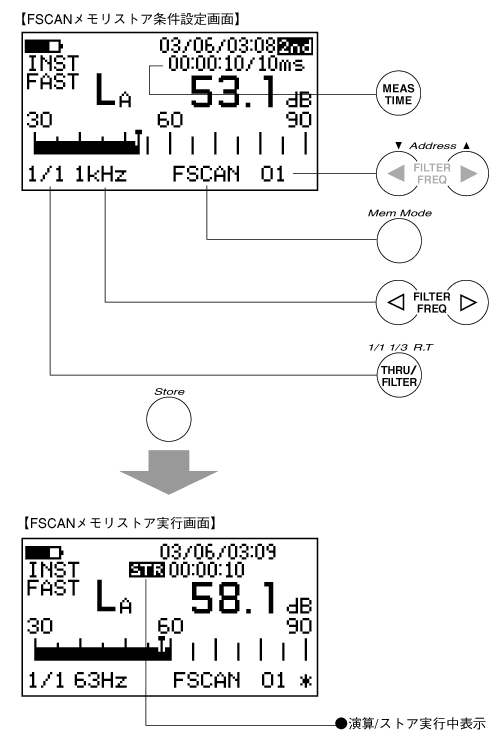
First, press the panel switch [THRU/FILTER] to enable the filter. Next, press the panel switch [1/11/3 R.T.] to set either the 1/1 or 1/3 octave filter. Finally, press the panel switch [MEASTIME] to set the measurement time. - Activate memory mode and select FSCAN memory.
Press the panel switch [Mem Mode] of function 2 to set FSCAN. - Specify the number of the address to store.
Each time you press the panel switch for Function 2 [Address ▲・▼], the address will increase or decrease. Note that a mark (*) is displayed after the address number where data has already been stored. - Select the type of data to store.
Press the panel switch [Lp/Leq…] to select the type of data to store. - Press the panel switch [Store] to start storing.
One measurement data item for each band (LP/ Leq/ LE/ LPK/ LMX/ LMN) is stored in FSCAN memory. The scanning operation varies as follows depending on the octave filter setting. - 1/1 octave filter setting
THRU A→THRU C→THRU F→31.5→63→125→250→500→ 1k→2k→4k →8k→THRU A→THRU C→THRU F - 1/3 octave filter settings
THRU A→THRU C→THRU F→20→25→31.5→40→50→63→80→100→
125→160 →200→250→315→400→500→630→800→1k→1.25k→1.6k
→2k→2.5k→3.15k→ 4k→5k→6.3k→8k→10k→12.5k→THRU A→
THRU C→THRU F
When the store ends, the address number will automatically increment. To forcibly end the store, press the panel switch [Store] again. To temporarily pause the store, press the panel switch [PAUSE/CONT], and pressing the panel switch [PAUSE/CONT] again will resume it.
3. Store Data Recall Procedure
<Memo>
- When the recall data is displayed on the screen, pressing the panel switch [Address ▲・▼] will switch the recall data in accordance with the increase or decrease of the address.
- Addresses where data is stored are marked with an asterisk (*), while addresses where data is not stored are not marked with an asterisk (*).
- An address where real-time data is stored will display a mark (#).
◆ Operation
- Activate memory mode and select FSCAN memory.
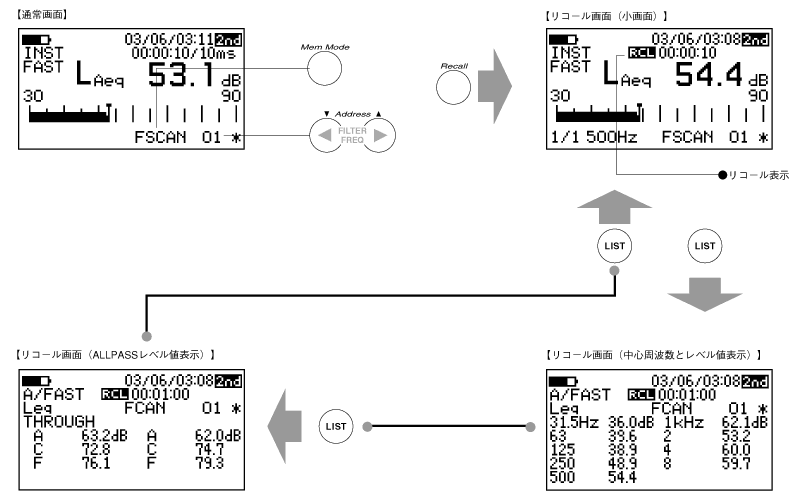
Press the panel switch [Mem Mode] for function 2 to activate memory mode. Additionally, press the panel switch [Mem Mode] several times until FSCAN memory is selected. - Specify the address number to recall.
Each time you press the panel switch for Function 2 [Address ▲・▼], the address will increase or decrease. Also, a mark (*) is displayed after the address number where data has already been stored. - Execute recall.
Press the panel switch [Recall] for function 2 to recall the data stored in FSCAN memory. Also, if you want to turn OFF (release) the recall, please press the panel switch [Recall] again.
4. Switch display of the recall screen list.
The levels of each center frequency for the 1/1 or 1/3 octave filters can be switched using the following procedure. There are a total of three screens displaying the levels for each center frequency of the 1/3 octave filter. When the FSACN memory data recall screen is displayed, pressing the panel switch [LIST] once will show a list of the levels for each center frequency of the 1/1 or 1/3 octave filters. Furthermore, pressing the panel switch [LIST] again (twice) will display the ALLPASS levels for each frequency correction characteristic, and pressing the panel switch [LIST] once more (three times) will return to the original recall screen.
5. Recall screen and panel switch
During the recall screen display, only the following panel switch can be operated. If you need to operate a panel switch that is not allowed, please press the panel switch [Recall] of Function 2 again to deactivate the recall.
| [LIGHT] | Backlight ON/OFF switch |
| [Recall] | Switching ON / OFF of the recall |
| [2nd] | Function switching of the panel switch |
| [Address] | Switching of address numbers. |
| [LIST] | Switching between the normal screen and the list screen. |
| [FILTER FREQ] | Switching the center frequency of the filter. |
Last updated: 2001-10-12