

sound level meter Frequently Asked Questions
Question number FAQ-1205
Operation of Common Memory (AUTO / AT LX / LP)
1. Overview of Common Memory
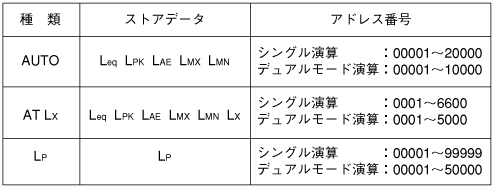
There are three types of common memory. Please use them according to their purposes and applications.
<Memo>
- Data stored in common memory will be overwritten sequentially from address number 1 on top of the data that is already stored.
If you need the data stored in common memory, please print it out or transfer the data to a personal computer via RS-232C before storing new data.
2. Store procedure to common memory
◆ Operation
- Set the measurement conditions.
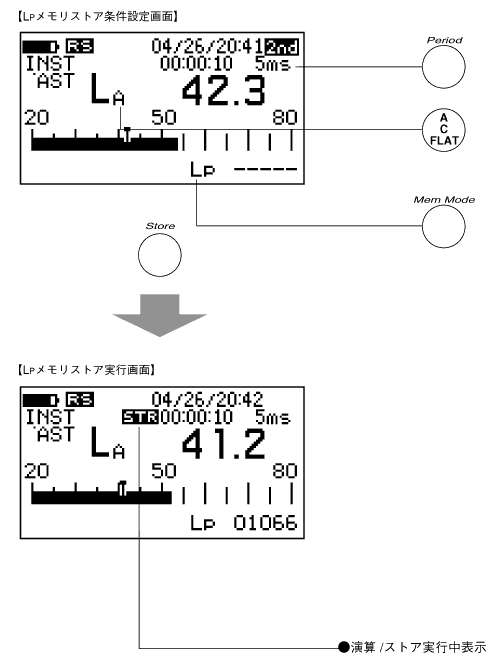
Depending on the data to be stored in memory, set the measurement conditions for normal operation or dual operation. Additionally, if L P memory is set, please also set the store interval. The store interval will switch each time the panel switch [Period] of function 2 is pressed. - Select the memory to store data.
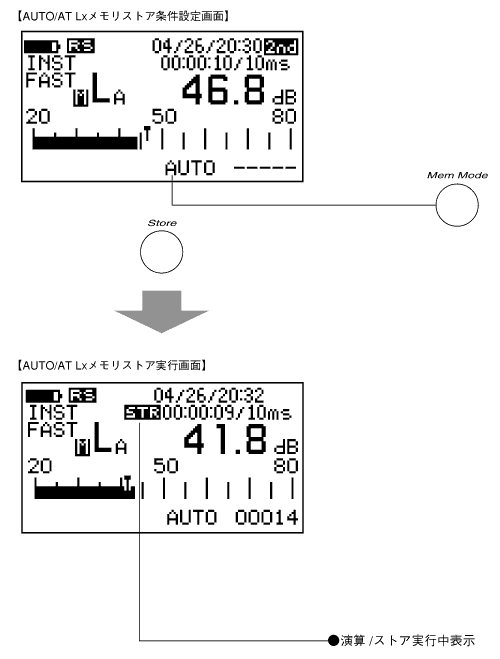
Press the panel switch [Mem Mode] of function 2 to activate memory mode. Furthermore, press the panel switch [MemMode] and select one of AUTO, AT L X, or L P. - Press the panel switch [Store] to start storing.
If you select AUTO or AT L X, the calculation results will be stored every time the calculation is completed. At this time, the address number will automatically increment. If you select LP, the instantaneous value data measured at the set store interval will be stored. Again, the address number will automatically increment at this time. Storing will continue until there is no free space in the common memory capacity, and it will automatically stop when there is no free space left. To forcibly end the store, please press the panel switch [Store] again.
■AUTO/AT L X memory store operation
■L P Memory Store Operation
3. Store Data Recall Procedure
<Memo>
- When the recall data is displayed on the screen, pressing the panel switch [Address ▲・▼] will switch the recall data in accordance with the increase or decrease of the address.
- The bar indicator on the recall screen shows displayed values not limited to common memory.
- L P record memory cannot be displayed in a list.
◆ Operation
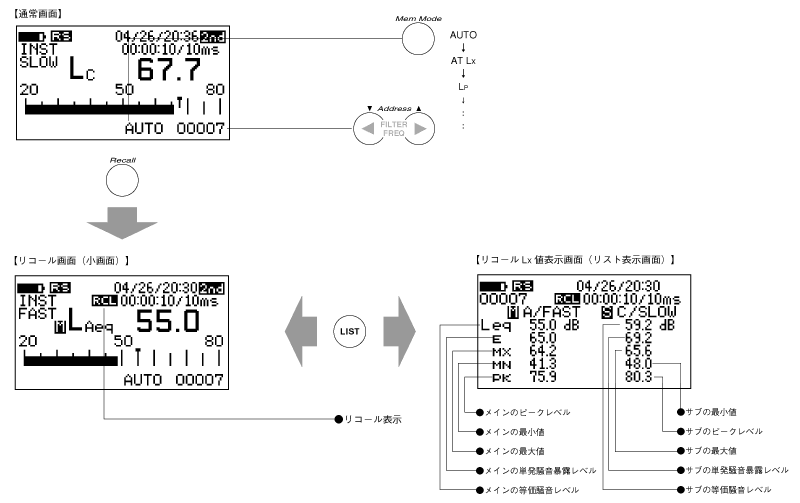
- Activate memory mode and select common memory.
Press the function 2 panel switch [Mem Mode] to activate memory mode. Additionally, press the panel switch [MemMode] several times until AUTO or AT L X, L P memory is selected. - Specify the address number to recall.
Each time you press the panel switch for Function 2 [Address ▲・▼], the address will increase or decrease. - Execute recall.
Press the panel switch [Recall] for function 2 to recall the data stored in AUTO or AT L X, L P memory.
If you want to turn OFF (release) the recall, please press the panel switch [Recall] again.
4. Switch display of the recall screen list.
When the AUTO or AT L X memory data recall screen is displayed, pressing the panel switch [LIST] will display a list of equivalent noise levels, single event noise exposure levels, maximum values, minimum values, and peak levels. Note that if dual calculation data is recalled, the equivalent noise levels, single event noise exposure levels, maximum values, minimum values, and peak levels for both main and sub will be displayed in a list.
5. Recall screen and panel switch
During the recall screen display, only the following panel switch can be operated. If you need to operate a panel switch that is not allowed, please press the panel switch [Recall] of Function 2 again to deactivate the recall.
| [LIGHT] | Backlight ON/OFF switch |
| [Main / Sub] | Main/Sub switch However, only during dual operation data recall |
| [Recall] | Switching ON / OFF of the recall |
| [2nd] | Function switching of the panel switch |
| [Address] | Switching of address numbers. |
| [LIST] | Switching between the normal screen and the list screen. |
Last updated: 2001-10-12