

sound level meter Frequently Asked Questions
Question number FAQ-1200
Measurements with 1/1 and 1/3 octave filters are
1. Important Notes
Before performing frequency analysis using 1/1 and 1/3 octave filters, please pay attention to the following points.
- To perform frequency analysis using 1/1 and 1/3 octave filters, please purchase the optional 1/1 octave filter (LA-0561) or 1/3 octave filter (LA-0562) separately.
- The 1/1 and 1/3 octave filters have a gain of 10dB. Therefore, the level range display will show a value that is 10dB lower, but the measurement display accounts for the gain, allowing for direct reading.
- 演算実行中は1/1・1/3オクターブフィルターを選択できません。
- When the dual operation mode is selected, the 1/1 and 1/3 octave filters cannot be used. Therefore, dual mode operations using the 1/1 and 1/3 octave filters are not possible. Please be aware of this.
- When a wide range is set, you cannot select the 1/1 or 1/3 octave filters. Please set an appropriate range other than wide before selecting the 1/1 or 1/3 octave filters.
- 騒音計のAC/DC信号出力端子からは設定した中心周波数帯域部分のみ出力されます。
- LA-2111においても1/3オクターブの10kHzと12.5kHzの設定は可能です。ただし、LA-2111は普通騒音計のため測定の周波数範囲外になります。
2. Procedure for measuring instantaneous values.
Please measure the instantaneous values using the 1/1 and 1/3 octave filters according to the following procedure. For the basic measurement condition settings, please refer to how to set measurement conditions.
◆ Operation
- Set the measurement conditions for instantaneous values.
Frequency correction characteristics Optional (Panel Switch [A/C/FLAT]) dynamic characteristics Arbitrary (Panel Switch [F/S/IMP]) Measurement Mode Instantaneous value (panel switch [Tact Max]) level range Except for wide range (Panel switch [LEVEL ▲ ▼]) - オクターブフィルターを選択する。
パネルスイッチ[THRU/FILTER]を押すとオクターブフィルターが選択され、画面は小画面に切り替わります。なお、1/1・1/3オクターブフィルターが装着されていないと、メッセージ[OPTION]が表示されます。 - パネルスイッチ[1/1 1/3 R.T]を押し1/1または1/3オクターブを選択する。
- Press the panel switch [FILTER FREQ] to switch the center frequency.
- 表示される瞬時値を読み取る。
通常の瞬時値は、パネルスイッチ[THRU/FILTER]を押しオクターブフィルターの選択を解除すると表示されます。
3. Measurement methods for various calculations.
Please measure the equivalent noise level and time rate noise level using 1/1 and 1/3 octave filters according to the following steps.
◆ Operation
- Set the measurement conditions for instantaneous values.
Frequency correction characteristics Optional (Panel Switch [A/C/FLAT]) dynamic characteristics Arbitrary (Panel Switch [F/S/IMP]) Measurement Mode Instantaneous value (panel switch [Tact Max]) level range Except for wide range (Panel switch [LEVEL ▲ ▼]) - Set the measurement time.
Press the panel switch [MEAS TIME] to set the measurement time.
To set FREE, switch the setting time to 00:00:00. When FREE is set, measurement will continue for up to 100 hours (99:59:60) until the panel switch [PAUSE/CONT] is pressed. However, please note that settings for more than 100 hours cannot be made. - Set the sampling interval.
Press the panel switch [Period] of Function 2 to set the sampling interval. If the sampling interval is set to 10ms, it may overflow if the measurement time is long. - Therefore, please set the measurement time to within one hour. The overflow time for when the measurement values change periodically is as shown in the following table. Please refer to the table to set the appropriate sampling interval and measurement time. However, if the time-weighted noise level is not being measured, there is no need to set this.

- オクターブフィルターを選択する。
パネルスイッチ[THRU/FILTER]を押すとオクターブフィルターが選択され、画面は小画面に切り替わります。 - パネルスイッチ[1/1 1/3 R.T]を押し1/1または1/3オクターブを選択する。
- Press the panel switch [FILTER FREQ] to switch the center frequency.
- Perform the measurement.
Press the panel switch [START] to begin the measurement. During the measurement, a measurement in progress mark will be displayed, and the elapsed time of the measurement will be shown in the measurement time setting display. - Read the measurement values from the digital display.
When the set measurement time has elapsed, the measurement will end. The measurement in progress mark will also disappear when the measurement is complete.
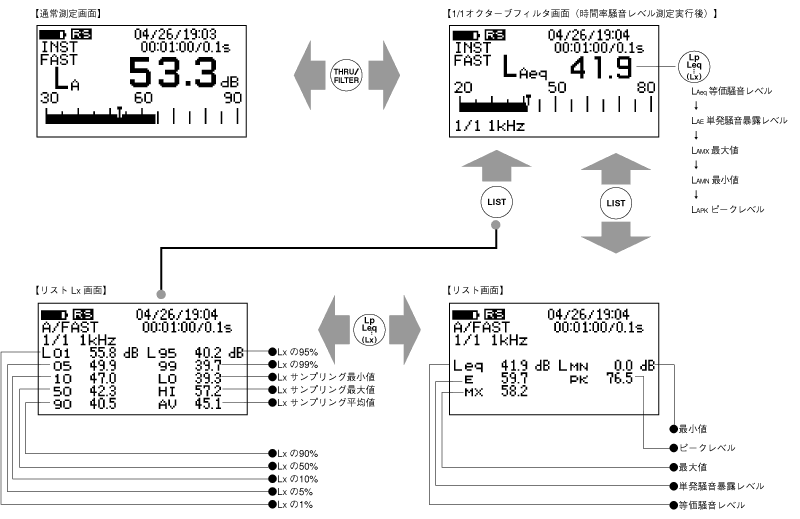
4. Reading of Measurement Values
You can switch and display the values measured with 1/1 and 1/3 octave filters using the procedure on the next page.
Last updated: 2001-10-12