

sound level meter Frequently Asked Questions
Question number FAQ-1197
Measurement of equivalent noise/single exposure noise levels is
1. Overview of each measurement value.
Equivalent noise level (L eq), single event noise exposure level (L AE), maximum noise level (MX), minimum noise level (MN), and unweighted maximum (PK) can be measured simultaneously.
- Equivalent Continuous Noise Level (L eq)
It is the noise level of a steady noise that has the same energy as this during the measurement period when the noise level fluctuates over time. - Single Event Noise Exposure Level (L AE)
It is the noise level of a steady sound with a duration of 1 second that has the same energy as the energy weighted with the A characteristic for each occurrence of noise that occurs intermittently.
By using measurements based on the single event noise exposure level, it is possible to evaluate intermittently occurring noises such as pile driving sounds. - Maximum Noise Level (MX)
The maximum level during the measurement period. - Minimum Noise Level (MN)
The minimum level during the measurement time. - Peak Level (PK)
is the value obtained by leveling the maximum value of the waveform.
List of constraints during measurement/pause
During the measurement of equivalent noise levels or single noise exposure levels, some panel switches may become inoperable as shown in the table below. Please note that turning off the power during measurement will forcibly terminate the measurement.
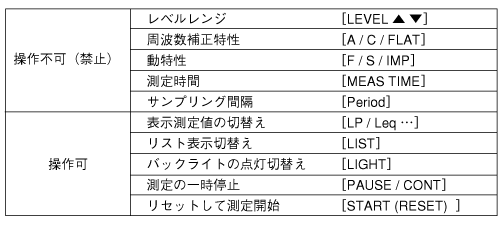
<Memo>
- Pressing [START] again during the measurement of the equivalent noise level or single noise exposure level will clear (erase) the already measured data and start a new measurement.
- Data showing excessive level warnings during equivalent noise level or single noise exposure level measurements are not reliable. Furthermore, the excessive (OVER) or insufficient (UNDER) level warnings displayed during measurements will not disappear until measurements are restarted.
- 過大レベル警告が表示された場合には、新たにレベルレンジを設定した後、再度測定を実行してください。
- When switching the level range or changing the measurement time settings while displaying equivalent noise level or single event noise exposure level measurement data, the display will switch to instantaneous values and the measurement will end. However, the data for equivalent noise level (L eq) or single event noise exposure level (L AE) will continue to be retained unless the [START] button is pressed again.
2. Measurement Procedure
For the basic method of setting measurement conditions, please refer to how to set measurement conditions.
◆ Operation
- Set the measurement conditions of this device for noise level measurement.
Display screen: Standard screen (Panel switch [LIST])
Level range: Arbitrary (Panel switch [△・▽ LEVEL])
Frequency correction: A (Panel switch [A / C / FLAT])
Dynamic characteristics: FAST or SLOW (Panel switch [F / S / IMP]) - Set the measurement time.
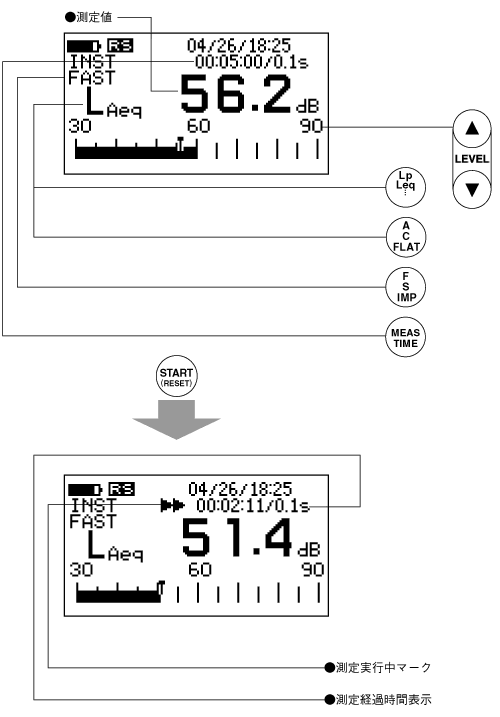
Press the panel switch [MEAS TIME] to set the measurement time. Here is an example of setting the measurement time to 5 minutes (00:05:00). To set FREE, switch the setting time to 00:00:00. When FREE is set, the measurement will continue for up to 100 hours (99:59:60) until the panel switch [PAUSE/CONT] is pressed. However, please note that settings for more than 100 hours are not possible. - Set the measurement data display to equivalent noise or single event noise exposure level measurement.
Press the panel switch [L P /L eq...] to display either the equivalent noise level (L eq) or the single event noise exposure level (L AE). - Perform the measurement.
Press the panel switch [START] to begin the measurement. During the measurement, the measurement in progress mark will be displayed, and the elapsed time of the measurement will be shown in the measurement time setting display. - Read the measurement values from the digital display.
When the set measurement time has elapsed, the measurement will end. The measurement in progress mark will also disappear when the measurement is complete.
Temporary suspension of measurement.
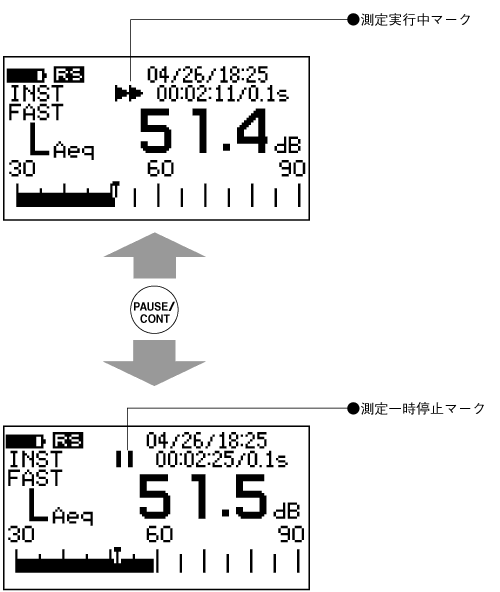
To pause the measurement, press the panel switch [PAUSE/CONT]. When the measurement is paused, the measurement in progress mark will change to a pause mark. Pressing the panel switch [PAUSE/CONT] again will resume the paused measurement.
3. Reading of Measurement Values
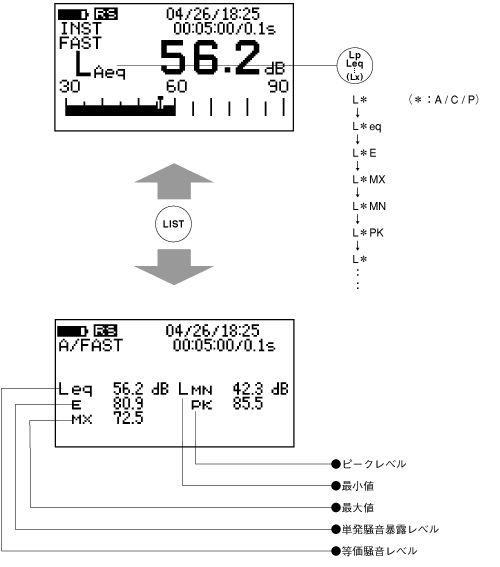
When measurements are performed, the equivalent noise level (L eq), single event noise exposure level (L AE), maximum value (MX), minimum value (MN), and peak level (PK) are measured simultaneously.
Display of measurement values by panel switch.
Each time you press the panel switch [LP /L eq …], the measured values will switch and be displayed in the following order.
List display of measurement values
By pressing the panel switch [LIST] to switch to the list display screen, you can view all the measured values. Additionally, the list display can be accessed during measurement or when the measurement is temporarily paused.
<Memo>
In the measurement of equivalent noise level or single event noise exposure level, the time-weighted noise level (L X) is also measured simultaneously. Therefore, the measured values of the time-weighted noise level can only be displayed if the sampling interval is appropriately set. For more details on the time-weighted noise level, please refer to the next section "4. Measurement of Time-Weighted Noise Level."
Last updated: 2001-10-12