

sound level meter Frequently Asked Questions
Question number FAQ-1196
Measurement of sound pressure levels (LP/LC) is
There are two types of sound pressure levels: the unweighted sound pressure level (L P) with a flat characteristic (FLAT), and the C-weighted sound pressure level (L C) which is weighted with frequency correction characteristics (C characteristic). Additionally, the sound pressure level has two measurement modes, similar to the noise level: instantaneous value and maximum value display per second.
1. Measurement procedure of sound pressure level (L P)
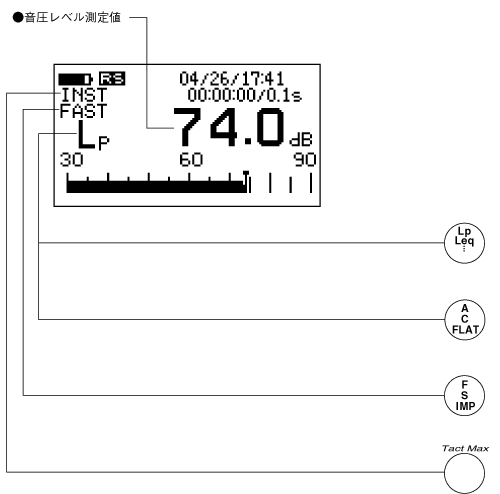
The sound pressure level (L P) should be measured using the following procedure. For the method of setting the basic measurement conditions, please refer to how to set measurement conditions.
◆ Operation
- Set the measurement conditions of this device for sound pressure level measurement.
Display screen: Standard screen (Panel switch [LIST])
Frequency correction: FLAT (Display is P) (Panel switch [A / C / FLAT])
Dynamic characteristics: FAST or SLOW (Panel switch [F / S / IMP]) - Set the measurement data display to sound pressure level (L P).
Press the panel switch [L P /L eq...] to display the sound pressure level (L P). - Set the measurement mode.
Press the panel switch [2nd] and switch the panel switch to function 2.
Next, press the panel switch [Tact Max] to set either instant mode (INST) or maximum value display mode per second (TMAX1). - Read the measurement values from the digital display.
2. C Measurement procedure for characteristic sound pressure level (L C)
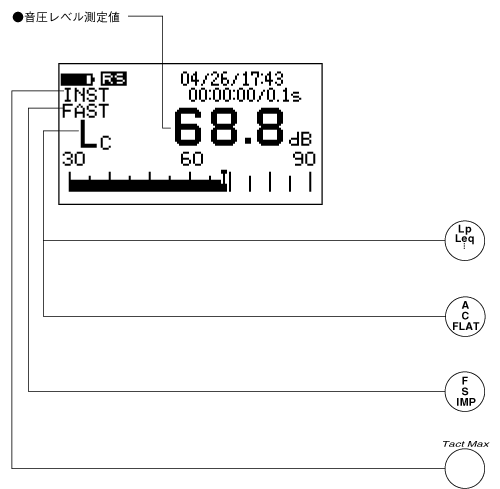
The C characteristic sound pressure level (L C) should be measured using the following procedure. For the method of setting the basic measurement conditions, please refer to the method for setting measurement conditions.
◆ Operation
- Set the measurement conditions of this device for sound pressure level measurement.
Display screen: Standard screen (Panel switch [LIST])
Frequency correction: C (Panel switch [A / C / FLAT])
Dynamic characteristics: FAST or SLOW (Panel switch [F / S / IMP]) - Set the measurement data display to sound pressure level (L C).
Press the panel switch [L P /L eq...] to display the sound pressure level (L C). - Set the measurement mode.
Press the panel switch [2nd] and switch the panel switch to function 2.
Next, press the panel switch [Tact Max] to set either instant mode (INST) or maximum value display mode per second (TMAX1). - Read the measurement values from the digital display.
Last updated: 2001-10-12