

sound level meter Frequently Asked Questions
Question number FAQ-1187
How to adjust the LCD screen (methods for turning the backlight on and off, and adjusting the display contrast)
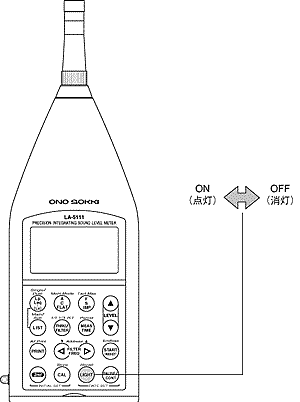
1. Turning on and off the backlight.
The backlight toggles between on and off each time the panel switch [LIGHT] is pressed. Furthermore, immediately after turning the power on, the backlight will always start in the off state, regardless of whether the panel condition memory function is enabled or disabled.
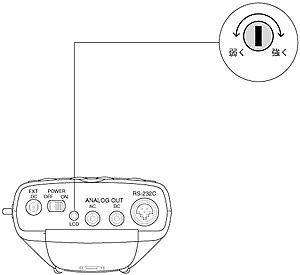
2. Adjusting the contrast of the display screen.
The contrast of the display screen can be freely adjusted. By turning the LCD contrast volume on the bottom side clockwise with the provided adjustment screwdriver, the contrast increases, and turning it counterclockwise decreases the contrast. Furthermore, once the contrast is set, it is maintained at a constant level due to the automatic correction feature, regardless of changes in ambient temperature.
<Attention>
Please do not forcibly turn or press the LCD contrast volume with strong force. It may cause malfunction.
Last updated: 2001-10-12