

sound level meter Frequently Asked Questions
Question number FAQ-1185
The free software 'Memory Read' cannot transfer data from the sound level meter to the PC / the transfer is not completed / an error occurs.
Please check the firmware version of your sound level meter LA-1440/4440 and the version of the free software "Memory Read". The version of the free software prior to Ver. 1.1 will not operate with the sound level meter LA-1440/4440 with firmware Ver. 2.10 or later. Please download the latest version (Ver. 2.1 or later) from the free software download page.
How to Check the Firmware Version
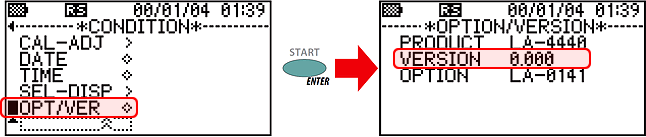
In the 'CONDITION menu' of the sound level meter, move the cursor to 'OPT/VER' and press the [ENTER] / (START) switch to switch to the OPTION/VERSION screen, which displays the firmware version of the sound level meter and the model names of the installed options.
Last updated: December 25, 2009