

sound level meter Frequently Asked Questions
Question number FAQ-1184
Transferring data recorded in AUTO 3 mode to the PC takes a very long time.
If the firmware of the sound level meter LA-1440/4440 is version 1.20 or lower, transferring large amounts of data will take time. We will perform a free firmware upgrade, so please contact your place of purchase or the nearest sales office. Please note that the sound level meter will be temporarily held during this process. Additionally, if you are using our free software "Memory Read", please download and use the latest version. Note that versions of the "Memory Read" software prior to version 1.1 are not compatible with sound level meters LA-1440/4440 with firmware version 2.10 or higher.
How to Check the Firmware Version
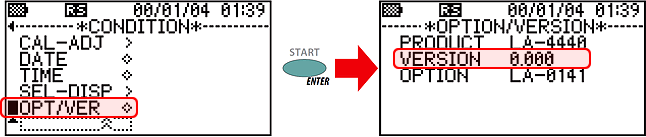
In the 'CONDITION menu' of the sound level meter, move the cursor to 'OPT/VER' and press the [ENTER] / (START) switch to switch to the OPTION/VERSION screen, which displays the firmware version of the sound level meter and the model names of the installed options.
Last updated: December 25, 2009