

sound level meter Frequently Asked Questions
Question number FAQ-1177
Setting of Level Range
Setting the level range.
level range
The level range can be set from 20dB to 80dB and from 60dB to 130dB in 10dB increments, allowing for selection from six different levels.
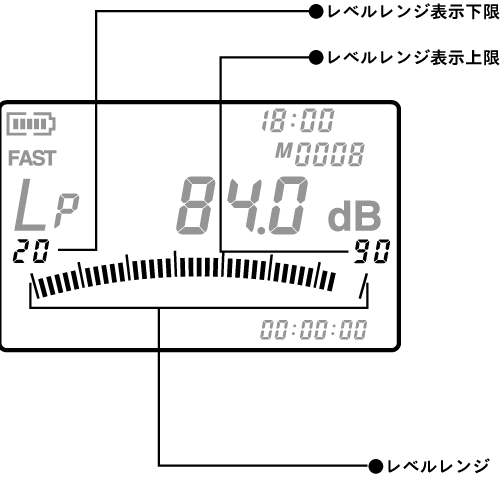
List of Level Range Value Settings
Refer to the following table and switch to the appropriate range value that includes the measurement level range. (The table is in accordance with IEC standards.)
| Level RangeFrequency Correction Characteristics | Measurement LimitCommon | detection limit | ||
|---|---|---|---|---|
| A characteristic | C characteristic | FLAT | ||
| 60~130dB | 140/137dB | 55(55) | 55(55) | 55(55) |
| 50~120dB | 130 | 45(45) | 45(45) | 45(45) |
| 40~110dB | 120 | 35(35) | 35(35) | 36(35) |
| 30~100dB | 110 | 26(25) | 31(30) | 36(35) |
| 20~90dB | 100 | 26(25) | 31(30) | 36(35) |
| 20~80dB | 90 | 26(25) | 31(30) | 36(35) |
*・・・LA-1240/1250 : 140dB
LA-1350/4350 : 137dB
( ) ... only LA4350
[Caution]
Values below the lower limit of each level range are affected by the noise inherent in the sound level meter itself. When measuring, please set the level range value so that the measured sound falls within the range from the upper limit to the lower limit of measurement.
Switching of level range
The level range is switched using the panel switch [LEVEL (▲・▼)] so that the instantaneous value is near the center of the bar indicator. Each time the panel switch [LEVEL (▲・▼)] is pressed, the level range increases or decreases in 10dB increments.
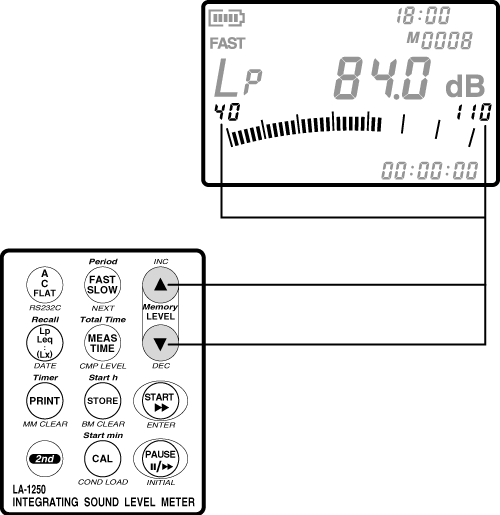
Warning display function for excessive/insufficient levels
The over/under level warning display function indicates OVER when the level is more than 10dB above the upper limit of the level range display, and UNDER when it is more than 5dB below the lower limit of the level range display.
If an over or under level warning is displayed, please switch the level range using the panel switch [LEVEL (▲・▼)].
Notice
The LA-1240/1250/1350/4350 checks for excessive levels even at the stage of the signal before it reaches the display level.
Therefore, depending on the frequency and waveform of the sound, the OVER mark may be displayed even if the display level is not more than 10dB above the upper limit of the level range. However, this is not abnormal. In such cases as mentioned above, please switch the level range to avoid excessive level warning displays.
Last updated: 2002-01-09