

sound level meter Frequently Asked Questions
Question number FAQ-1173
How to set the time
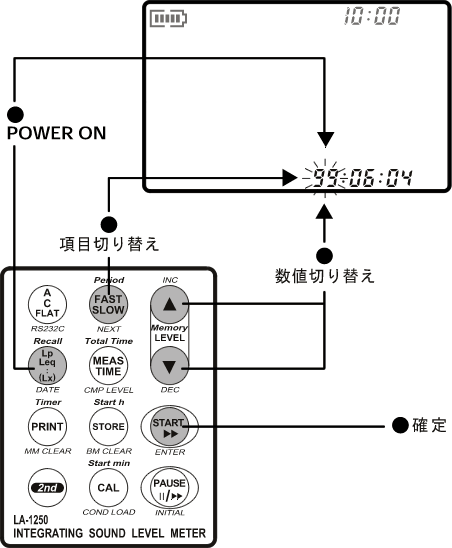
- Press the [Lp/Leq (DATE)] button while turning on the power. The "year:month:day" will start blinking.
- Use the LEVEL△ and ▽ buttons to set the numerical value.
To move through the digits, press the [FAST/SLOW (NEXT)] button. It will switch in order from "year → month → day → hour → minute."
Year:Month:Day 99:06:04
Hour:Minute:Second 08:00:00After setting, pressing the [START] button will return you to the measurement screen.
Last updated: June 18, 2007