

sound level meter Frequently Asked Questions
Question number FAQ-1172
To erase memory data.
There are two types of memory: 'MANUAL' and 'BLOCK'. To erase the data from each, please follow the steps below. Please note that erasing one will not erase the other.
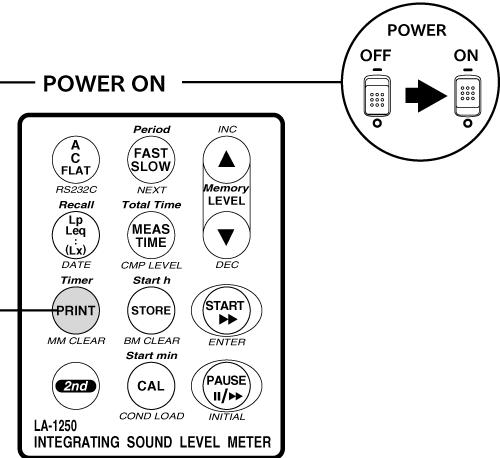
Erasure of Manual Memory Data
By pressing the panel switch [PRINT (MMCLEAR)] while turning on the power, you can clear (delete) all data at once.
Notice
- Stored data cannot be cleared on an individual address basis. It will all be cleared at once.
- Before clearing the store data, please print out or save any necessary data by other means.
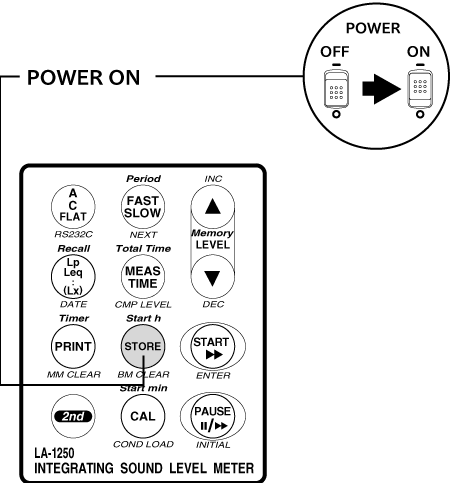
Erasure of block memory data
Data stored in block memory can be cleared (deleted) all at once by pressing the panel switch [STORE (BMCLEAR)] while turning on the power.
Notice
- It takes about 3 seconds to clear the data. Once the clearing is complete, the sound level meter will restart.
- Stored data cannot be cleared on an individual address basis. It will all be cleared at once.
- Before clearing the store data, please print out or save any necessary data by other means.
Last updated: June 18, 2007