List of names and functions of the power-on mode/settings switch.
Power On Mode (Composite Switch)
By pressing the related panel switch while turning on the power, the power-on mode function will be activated. The switch used to change selection items, set values, and confirm settings is called the setting switch. The function name is displayed in gray text at the bottom of the panel switch.
Please be careful.
*With the panel switch, pressing it continuously will increase or decrease the settings. Please be careful with the switch operation, as holding it down on some switches may activate a different function.
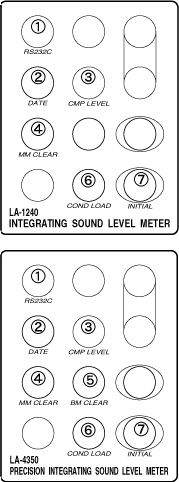 | | 1 | RC232C | Setting of RS232C communication conditions
Transmission speed (bps)... 01: 4800 / 02: 9600 / 03: 19200 / 04: 38400 / 05: 57600 / 06: 115200
Terminator... 01: CR + LF / 02: CR / 03: LA-200
Flow control... 01: Preformed / 02: Not performed
※Please set each item using the NEXT, INC, DEC, and ENTER setting switches. | | 2 | DATE | Setting the date and time of the built-in clock
Year: 00 to 99
Month: 01 to 12
Date: 01 to 31
Hour: 00 to 23
Minutes: 00 to 59
Seconds: 00 to 59
※ Please set each item using the NEXT, INC, DEC, and ENTER setting switches. | | 3 | CMPLEVEL | Settings for optional comparison output
CMP LVL>Comparison level: 40dB to 130dB (1dB STEP)
CMP MODE>Comparison output mode: 0 to 2
0: OFF (always high impedance)
1: Low level when exceeding CMP LVL
2: High impedance when exceeding CMP LVL
*Please set each item using the NEXT, INC, DEC, and ENTER setting switches. | | 4 | MM CLEAR | Clear the contents of the manual memory. | | 5 | BM CLEAR | LA-1250/1350/4350: Clears the contents of the block memory. | | 6 | COND LOAD | We will call up the configuration conditions stored in the conditional memory. Conditions > Panel Conditions: 1 to 9. *Please set each item using the NEXT, INC, DEC, and ENTER setting switches. | | 7 | INITIAL | Cancel the panel condition settings and revert the measurement conditions to the factory default state. *The contents of the panel condition memory remain unchanged. |
|
Power On Mode / Name and Function of Setup Switch
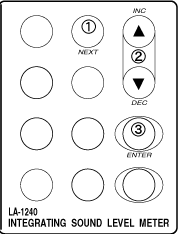 | | 1 | NEXT | Move selected items | | 2 | INC/DEC(▲·▼) | Pressing the INC switch increases the settings. Pressing the DEC switch decreases the settings. | | 3 | ENTER | Set the setup conditions and activate the sound level meter. |
|

