

sound level meter Frequently Asked Questions
Question number FAQ-1159
Name and function of the panel switch.
Panel switch mode
The panel switches of the LA-1240/1250/1350/4350 have three modes: primary, secondary, and power on.
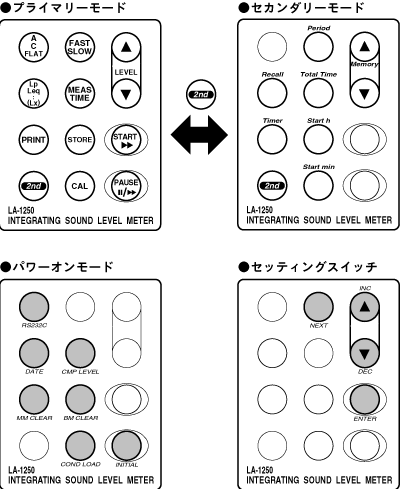
Primary Mode (Function 1 Switch)
This is the mode during normal panel switch operation. The functions indicated by the black text printed in the center of the panel switch will operate.
Secondary Mode (Function 2 Switch)
Press the panel switch [2nd] to activate the secondary mode when the 2nd mark is displayed on the LCD screen. The function is printed in blue text above the panel switch.
Power On Mode (Composite Switch)
When the power switch is turned ON, the power-on mode is activated by pressing it simultaneously. The key used for switching options and confirming setting values is referred to as the setting switch. The functions of the power-on mode are printed in gray text below the panel switch.
Notice
The panel switch typically changes the settings sequentially by being pressed continuously. Please note that some panel switches may have different functions when pressed continuously.
Last updated: 2002-01-09