

sound level meter Frequently Asked Questions
Question number FAQ-1156
Calendar function settings
Calendar function settings
The LA-1240/1250/1350/4350 models are equipped with a built-in calendar function (clock). This calendar function allows for the display of the current time and the measurement start time (during result display or memory recall) on the LCD screen, as well as printer output.
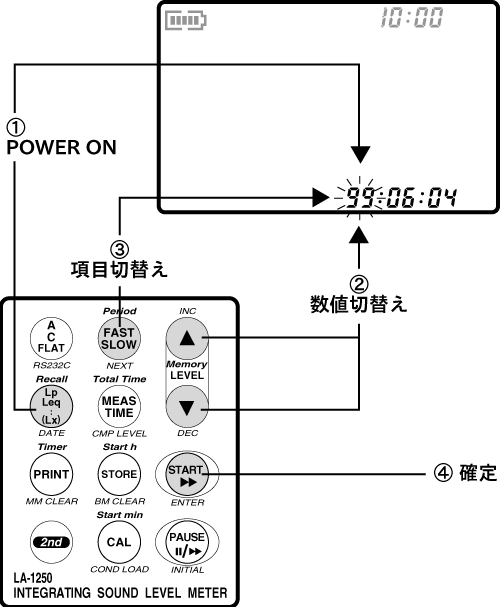
Procedure for Resetting the Date
Immediately after purchase, the date may not be set correctly. It is recommended to charge the internal battery and then reset the date (year/month/day/hour/minute/second) using the following steps.
- Press the panel switch [Lp/Leq (DATE)] while turning the power ON. The LCD screen will display the date (**:**:**) in a blinking format.
- Press the panel switch [LEVEL (▲・▼)] to switch the setting value.
- The setting items (blinking) can be switched in the order of year → month → day → hour → minute → second by pressing the panel switch [FAST/SLOW (NEXT)].
- After completing the setup, press the panel switch [START (ENTER)]. The date data will be reset and the sound level meter will be activated.
- The built-in clock has a deviation of ±1 minute per month under a temperature environment of 25°C.
- This sound level meter has a separate clock built in for the calendar and for measuring elapsed time. Therefore, there may be discrepancies between the measurement time and the calendar time, but this is not due to any malfunction. Thank you for your understanding.
Last updated: 2002-01-09