

sound level meter Frequently Asked Questions
Question number FAQ-1155
Operation of Block Memory
Block memory operation
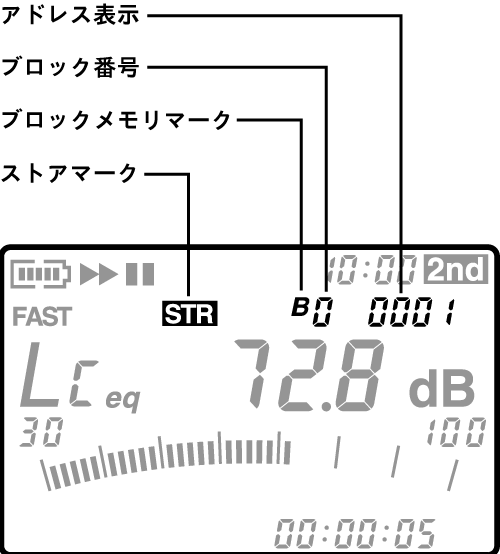
Data store to block memory.
Block memory is the memory used during timer measurements. Each time a measurement is completed by the timer measurement, the measurement data is automatically stored in the block memory. Immediately after clearing the block memory, data will always be stored starting from address 0001 of block B0 (specifying an arbitrary block is not allowed).
If all addresses of block B0 have data stored and measurements are still ongoing, data will continue to be stored in block B1, starting from address 0001.
If a new timer measurement is started, data will be stored from the next block memory address 0001 where data was stored at the end of the previous timer measurement. If measurements are repeated infinitely, data will be stored up to block B9, address 1440, and thereafter only timer measurements will continue.
Notice
- If data has been stored up to block B9 during the last timer measurement, the timer measurement will only be executed without saving any new data unless the already stored block memory data is erased. Furthermore, addresses of blocks without stored data will display "- - --".
- For details on timer measurement, please refer to the aforementioned 'Chapter 4: Measurement Data'.
Recall of block memory data
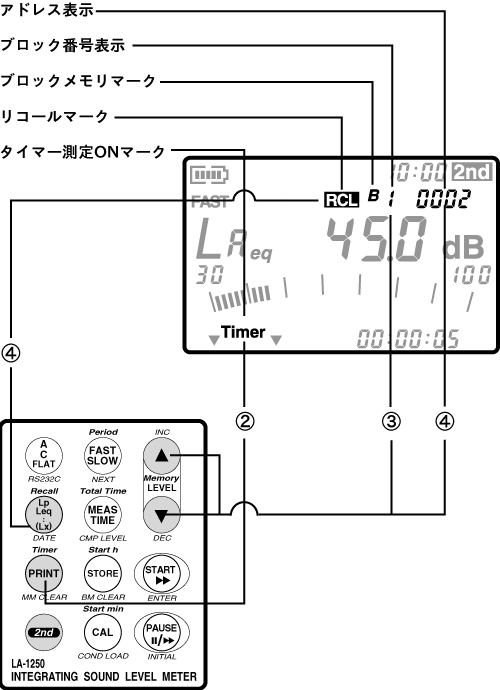
The procedure for recalling data stored in block memory is as follows.
- Complete the data store.
For more details, please refer to the previous section "3.1 Data Store to Block Memory." - Switch to timer mode.
After switching the panel switch mode to secondary, press the panel switch [Timer] to switch to timer mode.
When you switch the timer measurement to ON, the timer measurement ON mark (Timer) will be displayed, and the memory address will switch from manual memory to block memory. - Set the block number to recall. After switching the panel switch mode to secondary, press the panel switch [Memory (▲・▼)] to toggle the block number (B0~).
Addresses of blocks where data is not stored will display "- - - -", while addresses that already have data stored will display the address number. - Execute recall.
With the panel switch mode set to secondary, press the panel switch [Recall].
The data stored at the specified block address 0001 will be recalled. During recall, the recall mark will be displayed. At this time, by pressing the panel switch [Memory (▲・▼)], you can switch the address number.
Clear block memory data
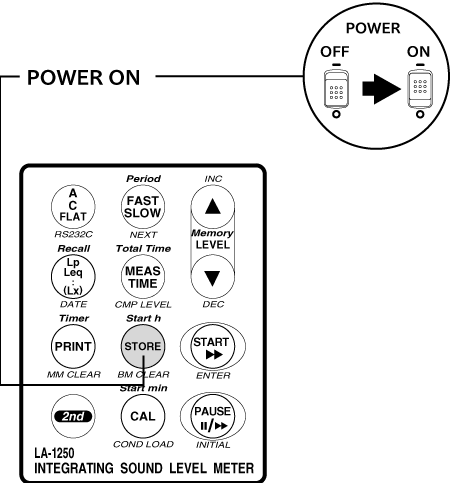
Data stored in block memory can be cleared (deleted) all at once by pressing the panel switch [STORE (BMCLEAR)] while turning on the power.
Notice
- It takes about 3 seconds to clear the data. Once the clearing is complete, the sound level meter will restart.
- Stored data cannot be cleared on an individual address basis. It will all be cleared at once.
- Before clearing the store data, please print out or save any necessary data by other means.
Last updated: 2002-01-09