

sound level meter Frequently Asked Questions
Question number FAQ-1152
Measurement of data using the timer measurement function.
Measurement of data using the timer measurement function.
Overview of the Timer Measurement Function
The sound level meter LA-1250/1350/4350 is equipped with a timer measurement function. The timer measurement function is a feature that automatically starts measurements at a pre-set start time.
- In addition to the start time of the measurement, you can set the measurement cycle and total measurement time, allowing for repeated measurements.
- The items to be measured are Leq/LE/LMAX/LX (LA-1250/1350) or Leq/LE/LMAX/LPK/LX (LA-4350), and all can be measured simultaneously.
- Once all measurements are completed, the data is automatically stored in block memory.
- The measurement start time in the timer measurement function is the time when the timer measurement begins.
It starts measuring when the time on the built-in clock first matches the set time after pressing the panel switch [START]. - Measurement time refers to the actual time taken for a single measurement, during which the measurement is conducted for a set duration.
- A measurement cycle refers to the time from the start of a measurement to the start of the next measurement, during which measurements are repeatedly executed at a set interval.
- Total measurement time refers to the entire duration of a series of repeated measurements, which continues until it exceeds the time set by 'measurement cycle × number of repetitions.'
Notice
- Please confirm that the current time is set correctly.
- If the measurement time, measurement cycle, or total measurement time is 000:00:00, a certain predetermined measurement will be executed as a special case of timer measurement. For more details, please refer to the later section '3.2 Constraints on Timer Measurement'.
- Immediately after clearing the block memory, data is always stored starting from address 0001 of block B0. In timer measurements, any block address cannot be specified. Additionally, if all address data in block B0 has been stored and the measurement is still ongoing, data will continue to be stored in block B1, starting from address 0001. Furthermore, if a new timer measurement is initiated, data will be stored starting from the next block address 0001 where data was stored at the end of the previous timer measurement.
- If data has already been stored up to block 9, data after block 9 will not be stored, and only timer measurements will be executed.
To store new data, please clear the block memory once. - For details on block memory and memory functions, please refer to 'Chapter 5: Operation of Memory Functions' mentioned later.
- The sound level meter LA-1250/1350/4350 has separate clocks built in for calendar use and measurement elapsed time. Therefore, there may be discrepancies between the measurement time and the calendar time. This is not a malfunction. Thank you for your understanding.
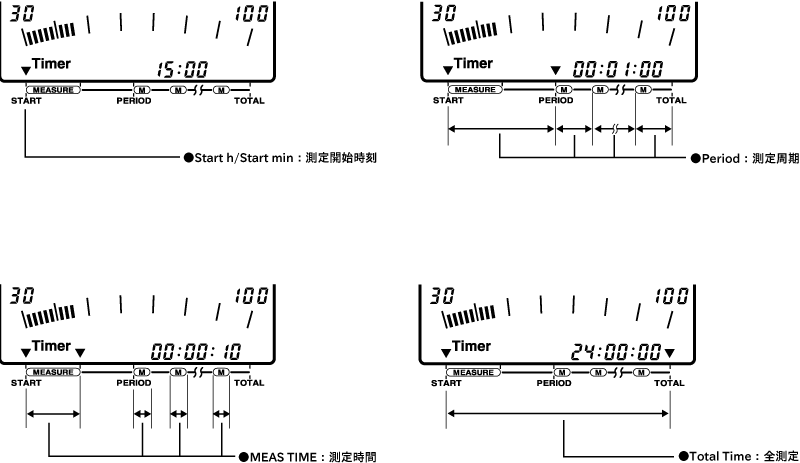
Constraints regarding timer measurement.
- Setting Measurement Time, Measurement Period, and Total Measurement Time
Generally, the size of the setting times for measurement time/measurement period/total measurement time follows the relationship below.
Measurement Time (MEAS TIME) ≦ Measurement Period (PERIOD) ≦ Total Measurement Time (TOTAL TIME)
If a setting that does not follow this relationship is made, it will automatically be prioritized from the measurement time, except for the following special cases.
That is, if a value greater than the measurement period is set for the measurement time, when the panel switch [START] is pressed, the measurement period will automatically change to the same value as the measurement time.
Similarly, if a value greater than the total measurement time is set for the measurement period.- Special Case (1): When the measurement time is set to 000:00:00
At the start of measurement, the measurement cycle and total measurement time are automatically changed to 000:00:00.
In this case, the setting of the measurement start time is valid, and the measurement time will be the duration until the panel switch [PAUSE] is pressed.
Note that data will not be stored in the block memory, but it is possible to store the calculated values in the manual memory by switching the timer measurement to OFF after the measurement is completed. - Special Case (2): When the measurement cycle is set to 000:00:00
At the start of measurement, the total measurement time is automatically changed to 000:00:00.
In this case, the setting of the measurement start time is valid, and the measurement will end after performing the measurement for the set measurement time once.
Note that no data is stored in the block memory, but by switching the timer measurement to OFF after the measurement ends, it is possible to store the calculated values in the manual memory. - Special Case (3): When 000:00:00 is set for the total measurement time
The measurements of the set measurement time and measurement cycle will be repeated infinitely until the timer measurement is forcibly turned OFF.
In this case, data will be stored up to the number of measurement times corresponding to the block memory address.
- Special Case (1): When the measurement time is set to 000:00:00
- About Pause and Data Deletion
Even during timer measurement, you can pause the measurement or delete data by pressing the panel switch [PAUSE]. While paused, the pause mark lights up, and during data deletion, the pause mark blinks. However, if the start time for the next measurement occurs while paused or during data deletion, the pause and data deletion will be canceled at that point, and the next measurement will start forcibly. At this time, the data from the previous measurement will be stored in block memory just before the next measurement begins. For details on the data deletion function, please refer to the aforementioned "Chapter 3 Setting Measurement Conditions / 11. Setting Data Deletion Function." - About Forced Termination of Timer Measurement
Normally, the timer measurement does not end until the entire measurement time has elapsed. However, if you press the panel switch [START] again while in "Waiting to Start Measurement" or during measurement, the timer measurement will be forcibly terminated. At this time, the data that has already been measured will remain in the block memory.
Power saving mode function
The timer measurement is linked to the power-saving mode function. The power-saving mode function automatically turns off part of the power supply within the sound level meter during measurement waiting times when measurements are not being taken, in order to reduce power consumption, and operates the sound level meter in a power-saving manner. Additionally, during the power-saving mode, a Sleep ON mark is displayed on the LCD screen.
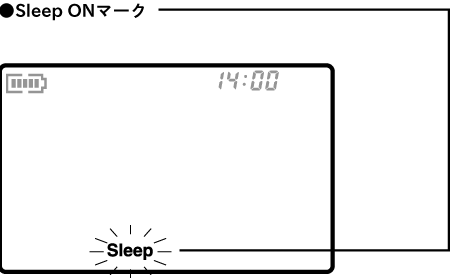
The device will automatically switch to power-saving mode after each timer measurement is completed, if there is a wait time of more than 30 seconds before the next measurement, and if there has been no key operation for 10 seconds. However, if the RS-232C ON indicator is lit, it will not switch to power-saving mode. Furthermore, even in power-saving mode, it will return to the normal measurement waiting state under certain conditions.
- Press any panel switch for more than 2 seconds.
- The time until the next actual measurement starts will be approximately 10 seconds before.
- The power consumption in power-saving mode operates at less than 1/3 of the normal consumption.
Therefore, the continuous operating time with dry batteries is extended beyond the time specified in the specifications. - Data communication via RS232C is not possible during power-saving mode.
Setting conditions and operating procedures for timer measurement.
Please perform the timer measurement by following the steps described below for setting conditions and conducting the measurement.
- Set general measurement conditions.
For details, please refer to the previous section of this chapter, "1. Measurement of Noise/Sound Pressure Level." - Set the measurement time.
Press the panel switch [MEAS TIME] and switch to the desired measurement time.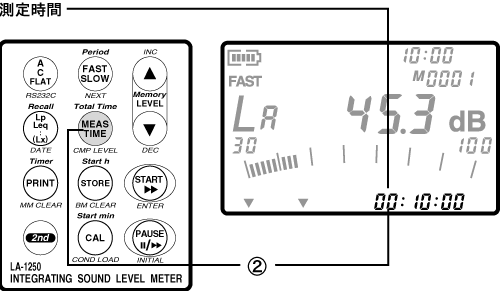
- Set the measurement start time (hour/minute).
First, switch the panel switch mode to secondary, then press the panel switch [Starth] to switch to the measurement start time (hour).
The position of the printed START text on the filter below the LCD display will light up the measurement time item mark (▼), and the measurement start time will be displayed in the measurement time display section. In this state, press the panel switch [Start h] again to set the measurement start time (hour). The measurement start time is preset and will switch in the following order each time the panel switch [Start h] is pressed.
00:XX→ 01:XX → 02:XX → … → 23:XX → - -:- -
Note that if you set the measurement start time to " - - : - -", the measurement will start as soon as you operate the panel switch [START]. Next, switch the panel switch mode to secondary, then press the panel switch [Startmin] to switch to the measurement start time (minute).
The measurement start time (minute) is preset in 10-minute increments and will switch in the following order each time the panel switch [Starth] is pressed.
XX:00 → XX:10 → XX:20 → … → XX:40 → XX:50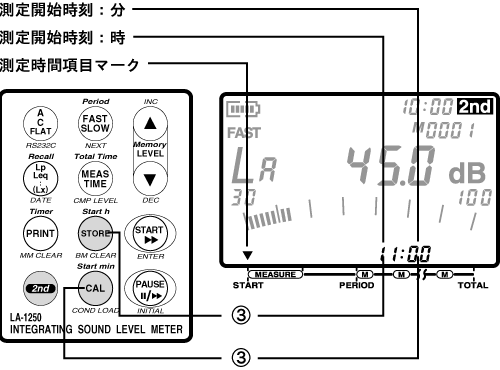
- Set the measurement cycle.
First, switch the panel switch mode to secondary, then press the panel switch [Period] to switch to the measurement cycle.
The measurement time item mark (▼) lights up at the positions of START and PERIOD printed on the filter below the LCD display, and the measurement cycle is displayed in the measurement time display section. In this state, press the panel switch [Period] again to set the measurement cycle. The measurement cycle is preset, and each time the panel switch [Period] is pressed, it switches in the following order.
000:00:00 → 000:00:1 → 000:00:03 → … →120:00:00→168:00:00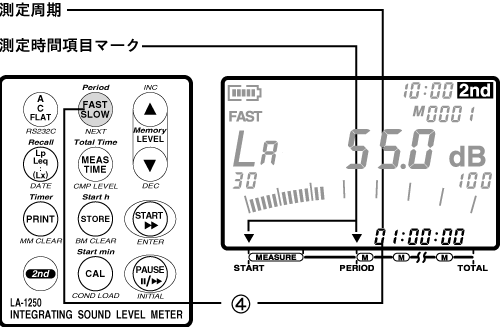
- Set the total measurement time.
First, switch the mode of the panel switch to secondary, then press the panel switch [TotalTime] to switch to the total measurement time.
The measurement time item mark (▼) lights up at the position of the printed START and TOTAL letters on the filter below the LCD display, and the total measurement time is displayed in the measurement time display section. In this state, press the panel switch [Total Time] again to set the total measurement time. The total measurement time is preset and switches in the following order each time the panel switch [Total Time] is pressed.
000:00:00 → 000:00:1 → 000:00:03 → … →120:00:00→168:00:00 - Start the timer measurement.
First, switch the panel switch mode to secondary, then press the panel switch [Timer] to switch to timer measurement ON.
When the timer measurement is switched ON, the timer measurement ON mark (Timer) will be displayed. Next, press the panel switch [START] to switch to the standby state for starting the timer measurement. In the standby state, both the calculation in progress and pause marks will light up simultaneously.
After pressing the panel switch [START], measurement will begin from the moment the built-in clock time first matches the set time. Additionally, if there is a waiting time of more than 30 seconds before the measurement starts and no key operation for 10 seconds, it will automatically switch to power-saving mode. Furthermore, at the end of all measurements, it will also switch to power-saving mode. If the measurement cycle setting is 10 seconds or more, by pressing the panel switch [PRINT] for more than 0.5 seconds after starting the timer measurement, the measurement results will be output as print data immediately after each measurement.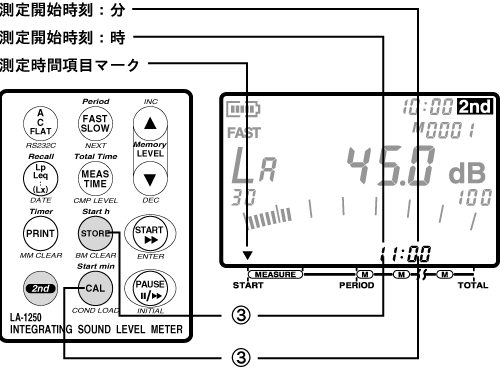
Last updated: 2002-01-09