

sound level meter Frequently Asked Questions
Question number FAQ-1151
Measurement of various calculation values
Measurement of various calculation values.
Overview of Calculation Values
The calculable values measured by the sound level meter LA-1240/1250/1350/4350 include five types: equivalent noise level (L eq), single event noise exposure level (L E), maximum level (L MAX), time-weighted noise level (L X), and peak level (L PK: only for LA-4350).
| Equivalent noise level (Leq) | The equivalent continuous noise level (Leq) is the noise level of a steady sound that has the same energy as the fluctuating noise level measured over a specified time period. |
|---|---|
| Single exposure noise level (LE) | The single event noise exposure level (LE) is the noise level of a continuous sound lasting one second that has the same energy as that of a single occurrence of noise. |
| Maximum Level (LMAX) | The maximum level (LMAX) refers to the maximum value of the noise level or sound pressure level sampled within the measurement time. |
| Time-weighted noise level (LX) | The time-weighted sound level (LX) is a representation of a level when the noise level fluctuates within a certain measurement time, and the time exceeding that level occupies X percent of the actual measurement time. The sound level meters LA-1240/1250/1350/4350 can perform five types of calculated measurements: L05/L10/L50/L90/L95. |
| Peak Level (LPK) (Only for LA-4350) | Peak Level (LPK) refers to the maximum value of a sound pressure waveform sampled at 20.8 microseconds during the measurement time, expressed in a leveled format. |
Precautions in Measurement of Calculated Values
Before performing measurements of each calculation value, please be sure to check the notes listed below.
- Press the panel switch [START] again during measurement to clear (erase) the data that was measured just before, and then start a new measurement.
Please be careful not to accidentally press the panel switch [START] during data measurement. - If you turn off the power during measurement, the measurement will be forcibly terminated. Please be careful.
- If you change the measurement conditions during a pause, the display will switch to show instantaneous values, and the measurement will end at that point.
- If an over-level or under-level warning is displayed during measurement, the measured data is not reliable.
Please reset the level range and perform the measurement again. Note that the warning will not disappear until a new measurement is started. - During measurement, the panel switches in the following table will be inoperable.
However, during a pause, the operation of the panel switches in the following table will be possible.
| panel switch | Function | Remarks |
|---|---|---|
| [A/C/FLAT] | Frequency switching | all models |
| [FAST/SLOW] | Switching of motion characteristics | all models |
| [LEVEL ▲ ▼] | Measurement Time Setting | all models |
| [MEAS TIME] | Internal calibration Signal Output | all models |
| [CAL] | Memory address switching | all models |
| [Memory] | Memory address switching | all models |
| [Recall] | recall | all models |
| [Period」 | Measurement Cycle Setting | LA-1250/1350/4350 |
| [TotalTime] | Total measurement time setting | LA-1250/1350/4350 |
| [Start h] | Setting of measurement start time (hour) | LA-1250/1350/4350 |
| [Start min] | Setting the measurement start time (minutes) | LA-1250/1350/4350 |
| [Timer] | Timer measurement on/off switch | LA-1250/1350/4350 |
Measurement Procedure for Calculated Values
Please perform the measurements according to the steps described next for each calculated value.
- Set the general measurement conditions.
For details, please refer to the aforementioned section "1. Measurement of Noise/Sound Pressure Level" in this chapter. - Set the measurement time.
Press the panel switch [MEAS TIME] to switch to the desired measurement time.
If the measurement time is set to 00:00:00, calculations will be performed from the time the panel switch [START] is pressed until the panel switch [PAUSE] is pressed.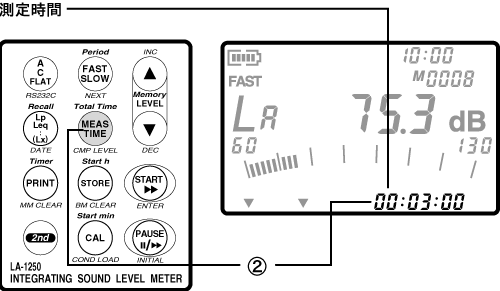
- Perform the measurement of the calculated value.
Press the panel switch [START] to begin the measurement of the calculation.
During the measurement, the calculation execution mark and the elapsed time of the measurement will be displayed respectively.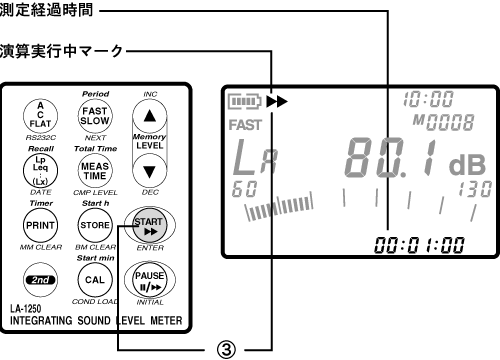
- Confirm the completion of the measurement of the calculated values.
When the measurement time elapses, the measurement will automatically end. The measured data will be retained until the panel switch [START] is pressed again to start the measurement. Additionally, the measured values will remain retained even if the power is turned OFF. - Displays the calculated values.
Each time the panel switch [Lp/Leq..(Lx)] is pressed, the display of the calculated values will switch. Even during calculation, pressing the panel switch [Lp/Leq..(Lx)] allows you to display the values of each calculation up to that point.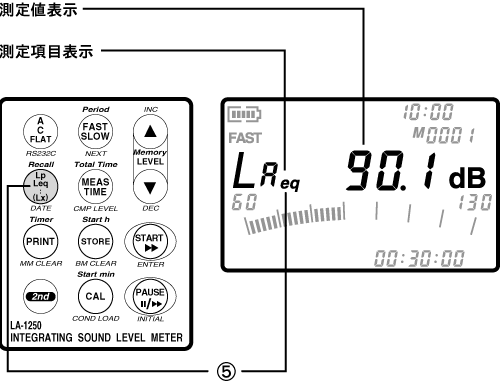
Pause and resume measurement
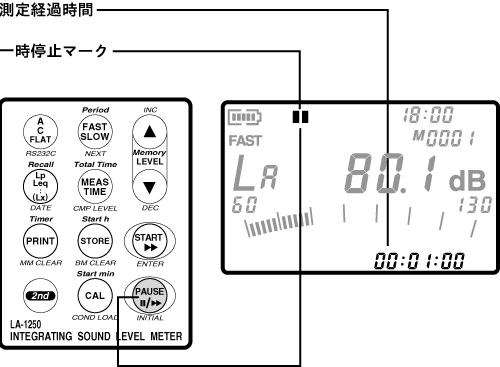
During the execution of the calculation value measurement, pressing the panel switch [PAUSE] will pause the measurement. While the measurement is paused, the running mark will change to a pause mark. To resume the measurement, press the panel switch [PAUSE] again.
Even during a pause in measurement, you can display the calculated values up to that point by pressing the panel switch [Lp/Leq..(Lx)].
Last updated: 2002-01-09