

DR-7100 Frequently Asked Questions
Question number FAQ-1127
About triggering via signal input to the external terminal (PULSE/TRIG terminal)
The DR-7100 has a trigger function that controls the start and stop of recording. There are two types of trigger signals as described below.
A. Trigger by signal input to the external terminal (PULSE/TRIG terminal)
Trigger based on the magnitude of the signal input to a specific recording channel.
There are two methods, A and B, but here we will explain method A, which is the 'trigger by signal input to the external terminal (PULSE/TRIG terminal)' (hereinafter referred to as 'external trigger').
Preparation for external trigger measurement.
1. Set "EXT" to "TRG" in the section "MENU "→" INPUT "→" CH_USE".
2. Select "ONESHOT" or "REPEAT" in the section "MENU "→" TRG "→" TRG_MODE".
"ONESHOT"… Once the trigger function operates, the trigger will be released.
"REPEAT"… The trigger function will be enabled repeatedly.
3. In the section "MENU "→" TRG "→" TRG_TYP".
Select one of the following: TTL+, TTL-, GATE+, GATE-.
4. Press the "TRG" button on the panel switch and press the record button to enter the trigger waiting state.
The 'external trigger' is divided into the following four parts.
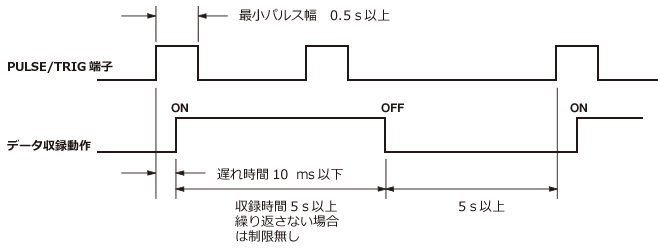
1.TTL+
When a TTL level voltage signal is input to the PULSE/TRIG terminal, recording starts at the rising edge of the signal. If the recording time is not set, recording will continue until manually stopped, regardless of whether TRG_MODE is set to ONESHOTO or REPEAT.
If only the recording time is set, the system will ignore any trigger signals during recording operation, according to the set value. If TRG_MODE is set to ONESHOTO, recording will stop when the set recording time is reached. If TRG_MODE is set to REPEAT, it will wait for the next trigger if the save mode is AUTO.
If both the recording time and interval time are set, the operation will follow the settings for recording time and interval, regardless of whether TRG_MODE is set to ONESHOTO or REPEAT.
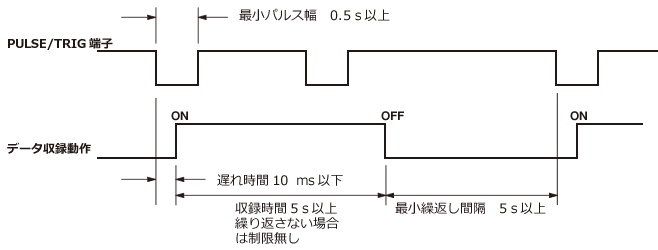
2.TTL-
When a TTL level voltage signal is input to the PULSE/TRIG terminal, recording starts at the timing of the signal's falling edge. The recording duration follows the set value, and during the recording operation, any signals corresponding to the trigger signal will be ignored. If the recording time is not set, recording will continue until manually stopped, regardless of whether TRG_MODE is set to ONESHOTO or REPEAT.
If only the recording time is set, it will operate according to the set value, and any signals corresponding to the trigger signal will be ignored during the recording operation. If TRG_MODE is set to ONESHOTO, recording will stop when the set recording time is reached. If TRG_MODE is set to REPEAT, it will wait for the next trigger if the save mode is AUTO.
If both the recording time and interval time are set, the operation will follow the set recording time and interval settings, regardless of whether TRG_MODE is set to ONESHOTO or REPEAT.
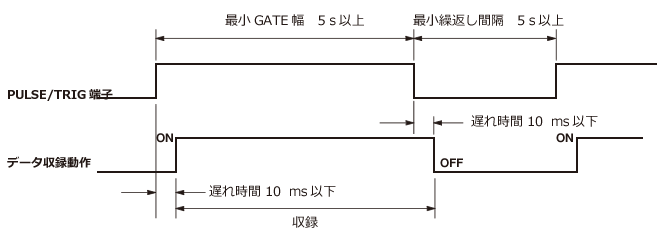
3.GATE+
When a HI level signal is input from the outside to the PULSE/TRIG terminal, recording will start. Recording continues while the HI level is continuously input, and stops when it becomes Low. (The recording time setting is ignored and follows the duration of the HI level signal)
If the "TRG_MODE" is set to "ONESHOT", the recording mode will end after one recording. If the "TRG_MODE" is set to "REPEAT" and the save mode is set to "AUTO", it will wait for the next trigger and repeat GATE recording until manually released from recording mode.
If the save mode is "MANUAL", even if the "TRG_MODE" is "REPEAT", the recording mode will be released after one recording. If you are recording with repeated trigger actions, please press the recording button.
GATE signal
HI level +2 V~5 V
LOW level 0 V~+0.8 V
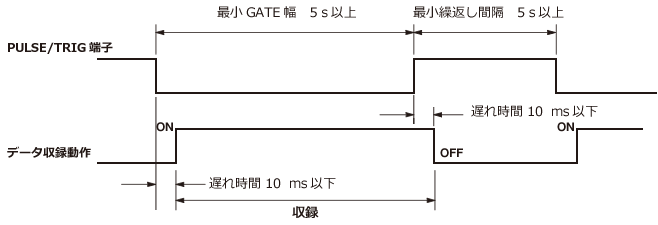
4.GATE-
When a LOW level signal is input from the outside to the PULSE/TRIG terminal, recording starts. Recording continues while the LOW level is continuously input, and stops when it becomes HI level. (The recording time setting is ignored and follows the duration of the LOW level signal.)
When the TRG_MODE is set to ONESHOT, the recording mode will end after one recording. If the TRG_MODE is set to REPEAT and the save mode is AUTO, it will wait for the next trigger and repeat GATE recording until manually released from recording mode.
If the save mode is MANUAL, even if the TRG_MODE is REPEAT, the recording mode will be released after one recording. If you are recording with repeated trigger actions, please press the recording button.
GATE signal
HI level +2 V~5 V
LOW level 0 V~+0.8 V
Last updated on: 2015-06-16