

DR-7100 Frequently Asked Questions
Question number FAQ-1121
(Regarding the initialization of the internal clock when the clock display is not functioning)
The DR-7100 has a clock that is backed up by a built-in battery.
When an AC adapter or AA batteries are installed, the built-in battery is charged, but if it has not been used for a long time, the built-in battery may discharge and the clock display may not function.
We apologize for the inconvenience, but please perform the initialization using the steps below.
Before initialization, please ensure that the built-in battery is sufficiently charged.
<Initialization Notice>
When you initialize the clock, the measurement conditions will also be reset.
Please back up the measurement conditions before initialization.
1. Measurement conditions can be backed up to an SD card. Press the “MENU” key to transition to the menu screen. Select “COND_R/W” → “WRITE” and enter the file number to write. After saving, please check on your PC if the condition setting file exists. The file is located on the saved SD card in "ONO_DR7100/COND".
2. Make sure that the power of the DR-7100 is turned OFF.
3. Start the DR-7100 in initialization mode. Press the PLAY key (bottom center) while pressing the POWER key to turn it on. Continue to hold the PLAY key until the normal measurement screen is displayed.
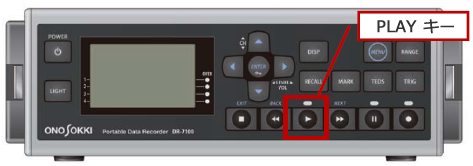
4. Once the DR-7100 main unit is powered on and the measurement screen is displayed, turn off the power once.
5. Please turn the power back on and set the time.
6. To return the measurement conditions to the state before initialization, read the condition setting file from the SD card.
Press the “ENU” key to transition to the menu screen. Select “COND_R/W” → “READ” and choose the file number written in step 1.
Thus, the clock initialization work is finished.
Last updated: 2017-02-16