

XN-8000 Frequently Asked Questions
Question number FAQ-1117
Method for calibration operations that combines an accelerometer with a vibration level meter to display vibration levels in dB.
■ How to calibration acceleration in dB using reference signals
This guide explains how to perform calibration to read the XN8000 in vibration level dB units using the CAL calibration signal from a vibration level meter.
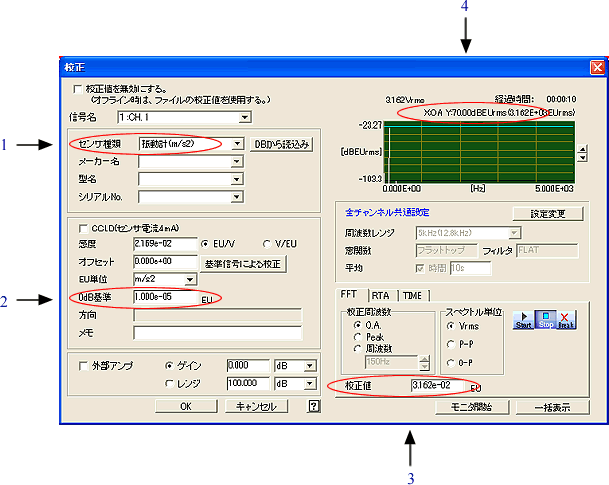
- Select either Accelerometer (m/s 2) or vibration meter by sensor type (see Figure 1 below).
- For the "calibration value" section (Figure 3 below), set the value not as dB but as dB as the true value. For example, if the calibration signal is "70dB," you need to set the calculated value (true number) as shown in the example below.
[Example of settings]
If a signal of 70dB is output from the vibration level meter.
- Select the sensor type as a vibration meter (m/s²). (See Figure 1 below)
- Set the reference value at 0dB (Figure 2) to 1.00E-5. (Since 10μm/s 2 is 0dB)
- calibration Calculate the value of calibration from the dB of the signal.
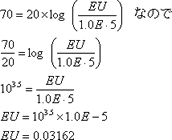
calibration Set the value to 0.03162. (Figure 3 below)
- Click the Start button. calibration After finishing, confirm that the value is 70 dBEU. (Figure 4 below)
Last updated: June 19, 2006