

XN-8000 Frequently Asked Questions
Question number FAQ-1100
The method to save only data is (export).
I will use the export function.
Operation Procedure
- Click on the graph you want to save to make it active. The active graph will have a green border.
- Right-click on the active graph to open the pull-up menu (Figure 1).
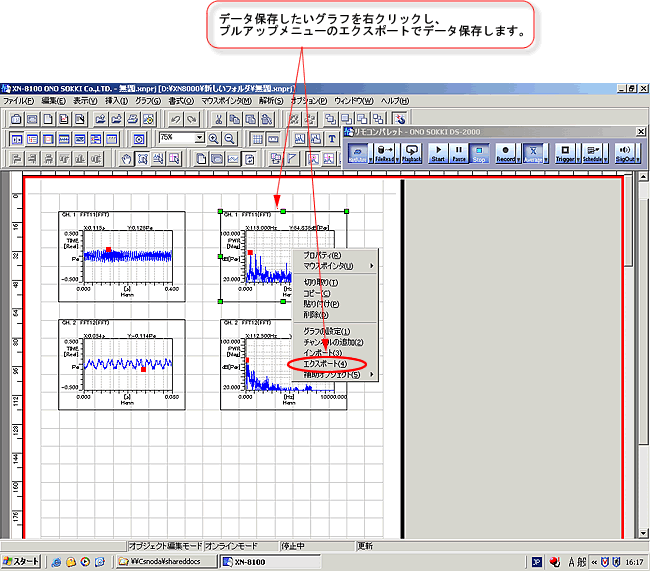
Figure 1 - Click on 'Export'. The 'Save As' dialog will open.
- When you select the file type CF Style File (.dat), it will be saved as a standard format file. If you select XN-StyleCsv File (*.csv), it will be saved as a CSV format text file.
Click the save button after giving a "file name" to save it (Figure 2).
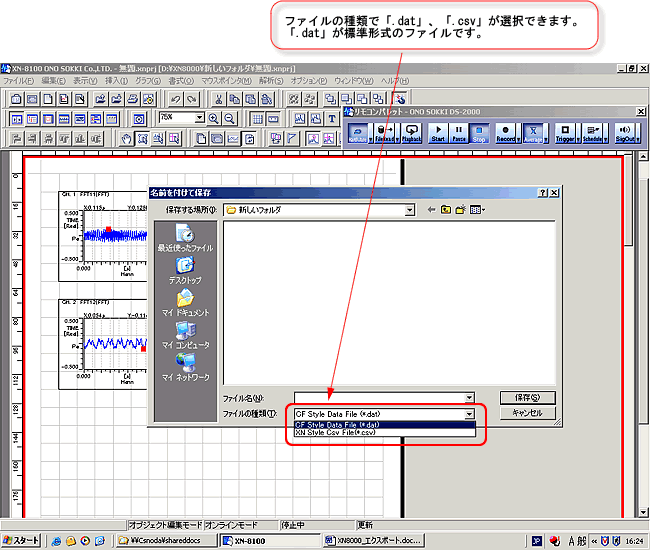
Figure 2
Last updated date: 2006-11-20