

XN-8000 Frequently Asked Questions
Question number FAQ-1095
How to change the orientation of measurement paper from vertical to horizontal?
To change the measurement paper from vertical to horizontal, perform the following operations.
- Click on File → Paper Properties to open the Paper Properties page (Figure 1).
- Click on 'Paper orientation: Landscape' and then click OK (Figure 1).
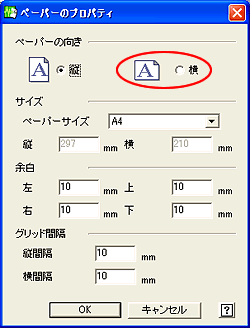
Figure 1
To set the default value to horizontal, perform the following operation.
- Open Options → Default Paper Values → Settings Page (Figure 2).
- After clicking on 'Paper orientation: Landscape', click OK (Figure 2).
- In the future, when a new project is opened, a landscape measurement paper will be displayed.
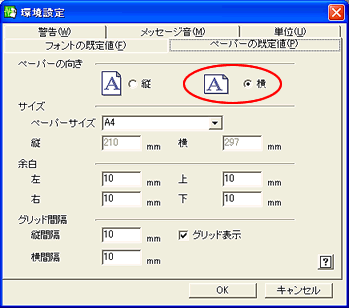
Figure 2
Last updated date: 2006-10-23