

OS-2000 series Frequently Asked Questions
Question number FAQ-1063
During sound quality evaluation, when executing the analysis, the message "Cannot analyze data above 130dB. Processing will stop" is displayed, and the analysis cannot proceed.
When the unit is calibration, it occurs in data with sound pressure level calibration without a 0 dB standard setting function.
The data is calculated by dividing the amplitude of the time waveform by 2.0 E-5.
The sound pressure level of 0dB and the reference value of 20 μPa (2.0 E-5) are reflected in the waveform itself.
In the OS-2000 series, if the waveform signal type is sound, the 0 dB reference value is automatically set to 2.0E-5, so
the resulting sound pressure level will be 93.98 dB larger than the original value.
For the corresponding procedure,
you can change it in the menu under "Data Editing" and "Channel Settings."
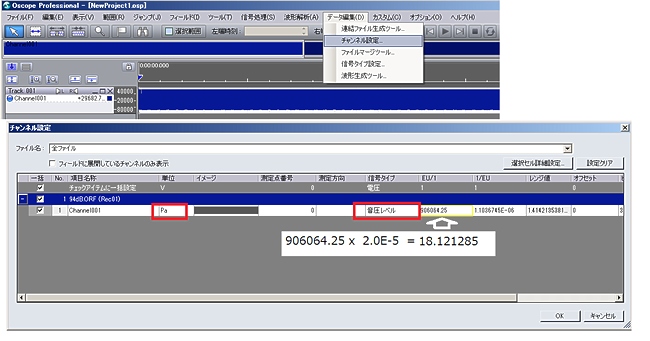
Unit name: Pa
Signal type: Sound pressure level
Recalculate and reset EU/1 value X 2.0E-5.
Last updated: 2019-07-22