

Frequently Asked Questions about the Tachometer
Question number FAQ-0935
How to reset to factory settings.
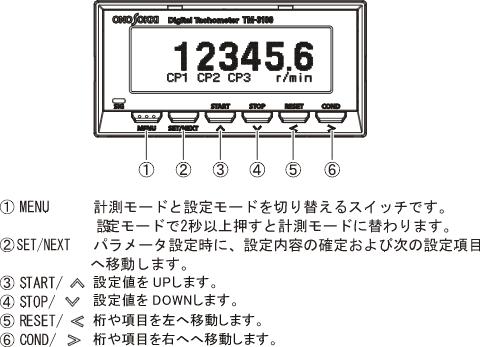
<Caution regarding operational instructions> The menu items in setting mode are "INPUT → MEASURE → FUNCTION → DISPLAY → OUTPUT → OTHER." The settings for each menu item are shown in a flowchart, with selections indicated by a □ red frame and setting values noted as subscripts. For items without a □ red frame, press the [SET/NEXT] button to pass. Please perform button operations following the arrows in the flow. The explanation of button operations is omitted, as you can refer to the section <Basic Button Operations> below. |
Basic Button Operations
-
Press the 'MENU' button to enter the settings mode.
Pressing the 'MENU' button briefly will return to the previous item.
By long-pressing the 'MENU' button, you can switch to measurement mode (display of measurement values) from any position.
Operation
- Press the [MENU] button and select the setting mode "OTHERS."
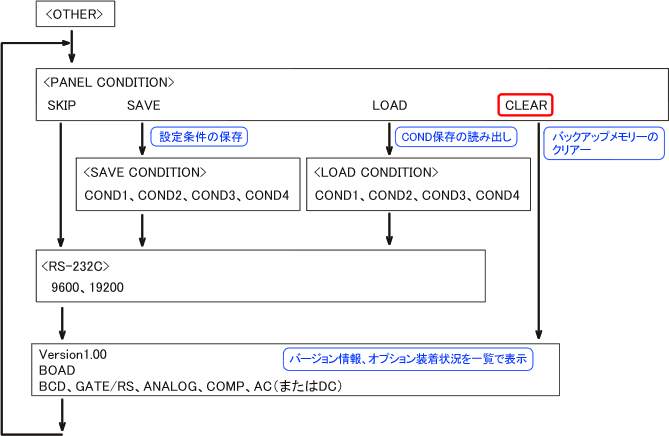
- Selecting 'CLEAR' on the panel condition setting screen <PANELCONDITION> will clear the backup memory and return it to its initial state.
- Long press the [MENU] button to return to measurement mode.
About saving settings. - Backup Memory
The menu settings are saved in the backup memory. When the power is ON, the settings from the backup memory are automatically read. - CLEAR
Restores the contents of the backup memory to the default settings (factory settings). - CONDITION
The settings of the backup memory can be stored (SAVE) to COND1.
You can read from the backup memory with the LOAD operation.
- Backup Memory
Capture
The measurement conditions used in standard measurements are stored in the backup memory. Additionally, it is possible to save measurement conditions in condition memory 1 to 4. The 'CLEAR' operation resets the settings in the backup memory to their initial state, but the condition memory remains unchanged. Condition memory cannot be cleared, and new measurement conditions will overwrite the existing ones through the 'SAVE' operation. To use the measurement conditions from condition memory, it is necessary to read them into the backup memory using the 'LOAD' operation found in the 'OTHER' menu.
Last updated: 2009-08-24