

Frequently Asked Questions about the Tachometer
Question number FAQ-0927
"Check the built-in functions (cards) of the TM-3100 series tachometer"
You can check the included features (cards) under the main menu item 'OTHER'.
<Caution regarding operational instructions> The menu items in setting mode are "INPUT → MEASURE → FUNCTION → DISPLAY → OUTPUT → OTHER." The settings for each menu item are shown in a flowchart, with selections indicated by a □ red frame and setting values noted as subscripts. For items without a □ red frame, press the [SET/NEXT] button to pass. Please perform button operations following the arrows in the flow. The explanation of button operations is omitted, as you can refer to the section <Basic Button Operations> below. |
Basic Button Operations
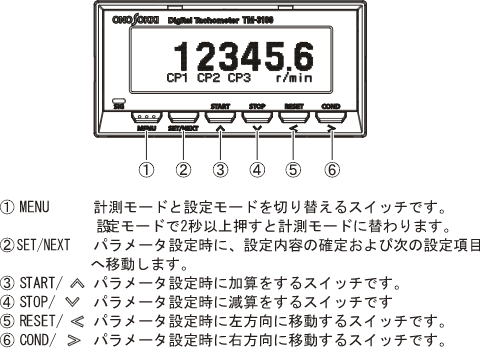
-
Press the 'MENU' button to enter the settings mode. The menu items in the settings mode include the main categories 'INPUT', 'MEASURE', 'FUNCTION', 'DISPLAY', 'OUTPUT', and 'OTHER', each of which has its own sub-items.
Pressing the 'MENU' button briefly will return to the previous item.
By long-pressing the 'MENU' button, you can switch to measurement mode (display of measurement values) from any position.
Operation Procedure
Press the "MENU" button to enter the settings mode. In the main menu that appears after activating the settings mode, press the "RESET (<)" or "COND (>)" button to select [OTHER] (move the cursor). After selecting [OTHER], press the [SET/NEXT] button to switch to the panel condition settings screen (PANEL CONDITION). Use the "RESET (<)" or "COND (>)" button to select [SKIP]. Pressing the [SET/NEXT] button will open the "Version" screen as shown below, displaying a list of the embedded BOARD (circuit board/card) components (if RS232C is embedded, it will display "<RS232C>9600").
After finishing the settings, press the [SET/NEXT] button.
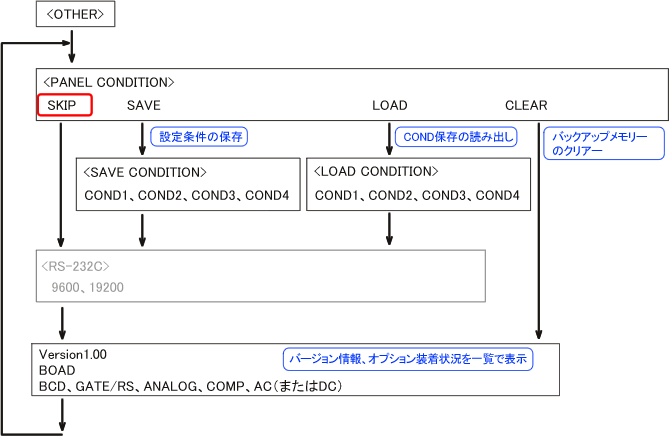
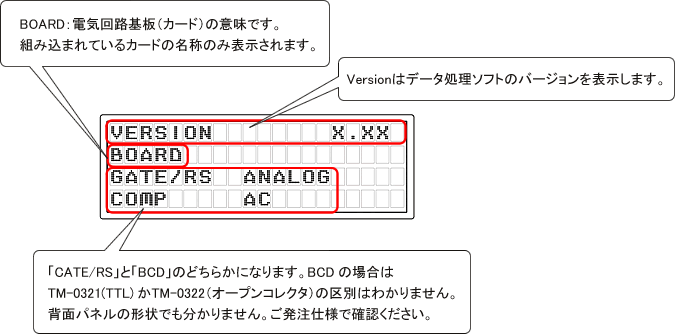
BOAD (card) name Card type GATE/RS
or
BCD (open collector)
BCD voltage outputTM-0350 RS232C / Gate Card TM-0322 BCD Open Collector Output Card TM-0321 BCD Voltage Output Card ANALOG TM-0330 Analog Output Card COMP Comparator Output Card AC
or
DCAC: AC power card DC: TM-0301 DC Power Supply Card The INPUT card is mandatory, so it will not be displayed on the Version screen.
Press and hold the 'MENU' button. You will return to the measurement screen.
Supplement
The positions of the embeddable cards are determined as shown in the figure below. We have prepared a basic set of TM-3110 (display only), TM-3120 (with open collector BCD output), TM-3130 (with analog output), and TM-3140 (with comparator output), but for example, the TM-3130 may have comparator output integrated.
Terminal Name 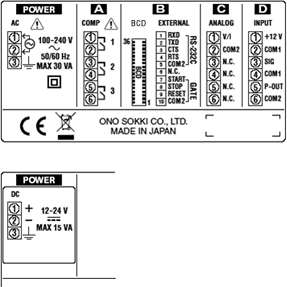 | Back Panel 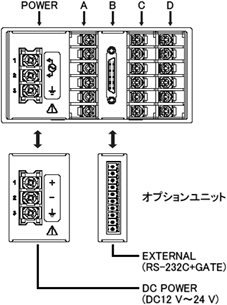 |
| installation position | BOAD (card) name | Card type | TM-3110 | TM-3120 | TM-3130 | TM-3140 |
|---|---|---|---|---|---|---|
| POWER | AC or DC | AC: AC power card DC: TM-0301 DC power card | AC | AC | AC | AC |
| A | COMP | TM-0340 Comparator output card | COMP | |||
| B | GATE/RS | TM-0350 Gate / RS232C card | BCD (TM-0322) | |||
| BCD (open collector or voltage output) | TM-0322 BCD open collector output card TM-0321 BCD voltage output card | |||||
| C | ANALOG | TM-0330 Analog output card | ANALOG | |||
| D | INPUT | Signal input, pulse output card | Available | Available | Available | Available |
The sections marked with a circle and name indicate the functions (cards) incorporated in the TM-3110, TM-3120, TM-3130, and TM-3140. The INPUT card is required to be installed.
Last updated: 2009-08-24