

Frequently Asked Questions about the Tachometer
Question number FAQ-0923
TM-3100 Series Tachometer "Menu Settings Button Operations"
The basic button operations for menu settings are as shown in the figure below.
Basic Button Operations
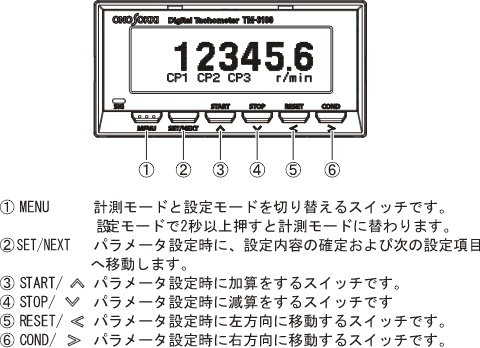
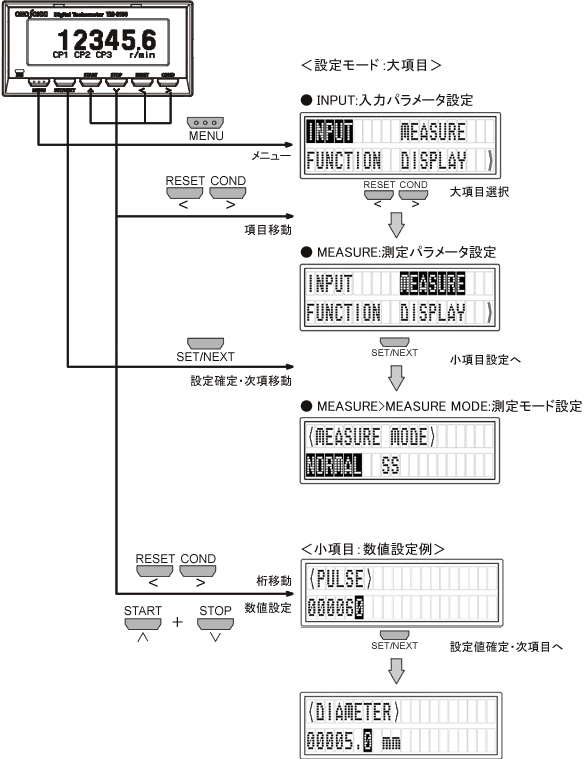
Press the 'MENU' button to enter the settings mode. The menu items in the settings mode include the main categories 'INPUT', 'MEASURE', 'FUNCTION', 'DISPLAY', 'OUTPUT', and 'OTHER', each of which has its own sub-items.
Pressing the 'MENU' button briefly will return to the previous item.
By long-pressing the 'MENU' button, you can switch to measurement mode (display of measurement values) from any position.
Button Operation for Menu Settings
Last updated: 2009-08-24