

Frequently Asked Questions about the Tachometer
Question number FAQ-0911
Example of setting up the TM-2100 series tachometer - 1: "Detect 60 teeth on the gear with the MP-9100 and display the rotational speed at ○○○○ r/min."
This is the method for setting up the MP-9100 to detect a gear with 60 teeth and display the rotation speed at ○○○○ r/min.
The TM-2100 series (TM-2110, TM-2120, TM-2130, TM-2140) is set up by pulling out the internal components as shown in Figure 2. First, please complete the setup of the TM-2100 series. The connection of the power cable and signal lines should be done after the setup.
■Signal cable connection with MP-9100
Connect using the signal cable MX-505 (5m) as shown in the next figure. If a longer cable is needed, it can be manufactured to the specified length.
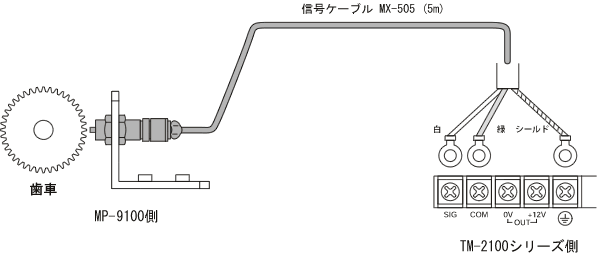
Figure 1
Settings of the TM-2100 series tachometer.
Refer to Figure 2 and set parameters 1 to 4. Additional explanations regarding the meaning of the settings will be provided. For detailed descriptions of the functions, please refer to the user manual.
To display "○○○○r/min" with 60 gear teeth + MP-9100 + TM-2100 series, set the multiplier and exponent to "1.0000×1" with no decimal point. The measurement range is approximately 100r/min or more.
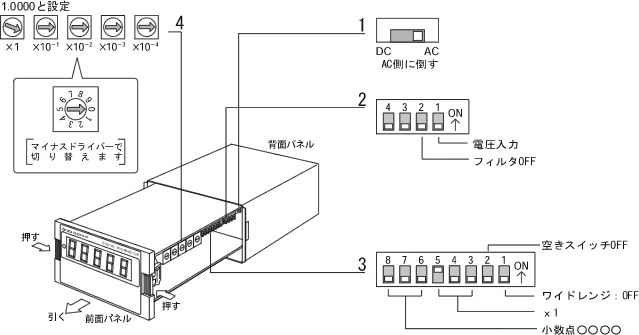
Figure 2
- AC-DC settings
The signal from the MP-9100 will be a sine wave, so set it to "AC." Generally, if the signal is a square wave, set it to "DC," and if it is a sine wave, set it to "AC." - Voltage input, filter
The signal of the MP-9100 is a square wave voltage, so set "Bit 1: OFF (voltage input side)" and "Bit 2: OFF (filter OFF)". Please set "Bits 3 and 4: OFF" (these are unused switches). For open collector signals, set "Bit 1: ON (contact input side)" and also set "Bit 2: OFF (no filter)". In the case of contact input, set "Bit 1: ON (contact input side)" and to prevent contact chattering, set "Bit 2: ON (with filter)". - How to find coefficients (multipliers × exponents)
- Wide range
For the MP-9100, when below approximately 100r/min, the signal becomes weak and falls outside the measurement range, so set 3 to "Bit 1: OFF". When "Bit 1: ON", it becomes a wide range and the minimum measurement range starts from 0.1Hz. During stop, it may take up to about 20s of measurement time until the display reaches 0 to determine 0.1Hz. When "Bit 1: OFF", the minimum measurement range starts from 1Hz or more, and during stop, the display reaches 0 in about 1s.
Please also set "Bit 2: OFF" (this is an unused switch).
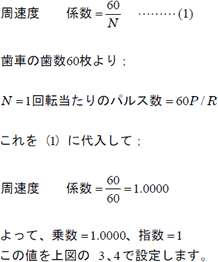
Set "Bit 3, 4: OFF" and "Bit 5: ON" (exponent = 1). Also, set "Bit 6, 7, 8: OFF" (no decimal point ○○○○). It is possible to set up to 3 decimal places. Set the rotary switch 4 to "10000" (multiplier = 1.0000).
Last updated: March 26, 2013