

Frequently Asked Questions about the Tachometer
Question number FAQ-0901
Measurement range of HT-3200
The HT-3200 digital handheld tachometer allows you to switch measurement ranges to select the measurement range for use.
To change the measurement range, press the switch in the diagram below for more than 2 seconds to enter the measurement range setting mode,
and the current range will be displayed in the MAIN display section. In that state, pressing the MEMORY/COND switch will
alternately switch the measurement range between "Hi" → "Lo" → "Hi", so please select the range you wish to use.
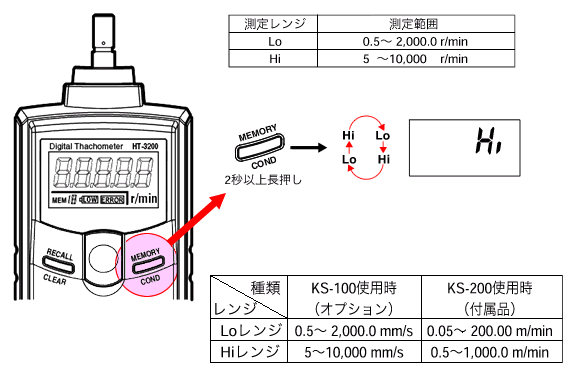
By pressing the power switch and returning to the measurement mode, the currently displayed measurement range is set.
If no switch operation is performed for 30 seconds while in the setting mode, the measurement range displayed just before the power turns off will be set as is.
If you are using the KS-2000 speed ring, the decimal point position cannot be changed automatically, so please read the displayed value as "1/10". (Think of it as the value divided by 10 in your head)
(For example) When displaying "123", the actual speed is read as "12.3 m/min"
When displaying "523", the actual speed is read as "52.3 m/min"
When displaying "12.3", the actual speed is read as "1.23 m/min"
Last updated date: 2013-06-01