

Frequently Asked Questions about FV Converters
Question number FAQ-0844
The relationship between the frequency range and voltage output of the FV-5300 F/V converter is
The meanings of the input range, output range, factor, and monitor display settings, as well as their relationships, are as follows.
| input range | Set the maximum value to be measured (maximum value displayed on the monitor). For example, set the maximum measurement value to 500 r/min, 100 m/min, etc. |
|---|---|
| output range | Set the maximum values of output voltage and output current in percentage.
|
| factor | This is a conversion factor for units. It is used when converting frequency into rotational speed (r/min) or speed (m/min). |
| Monitor display | The value converted by dividing the frequency of the input signal by a factor will be displayed. |
Furthermore, the following relationship holds.
 |
(1) |
The factor can also be obtained from the following equation.
 |
(2) |
The relationship between input frequency and output voltage is illustrated in the following diagram.
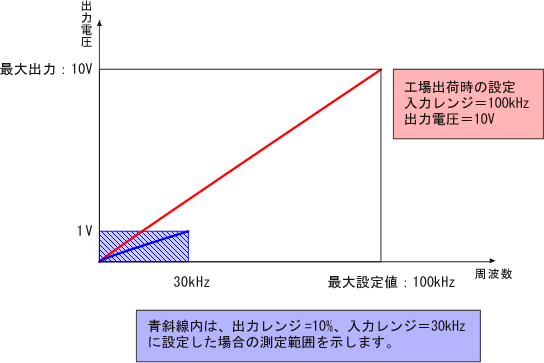 |
Example 1: Set the input range in terms of rotation speed <r/min>.
| measurement conditions | set value |
|---|---|
| RP series rotary encoder: 360 P/R Maximum measurement rotation speed: 5000 r/min Output voltage: 0 to 1 V / 0 to 5000 r/min Set the input range in rotation speed r/min |
Input range: 5.00 k Factor: 6 Output range: 10 % Measurement range: Monitor display 0 ~ 5.00 k |
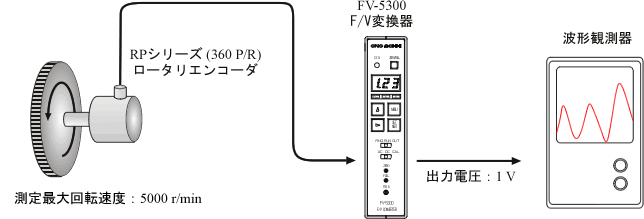
1. Method using equation (1)
factor
We will calculate the factor from equation (1). The measurement unit r/min indicates that the display units are r (revolutions) and min (minutes). Additionally, there are 360 pulses per revolution, and the time in the display unit for 1 minute is 60 seconds.
 |
Monitor display
When set to a factor of 6, it will automatically be displayed in r/min according to the following formula. The display will show 3 digits. Please use it as a simple monitor.
 |
input range
The maximum rotational speed to be measured is 5000 according to the conditions, but since the setting will be in three digits, it will be set to 5.00k (where k means a multiplication by 1000). If a signal exceeding this setting value is input, it will result in an input overflow. In this case, it is necessary to review the input range setting, such as increasing it. There are limitations to the input range settings, and if these limits are exceeded, an error will be displayed. For details, please refer to the user manual "5.1 About Input Range."
output range
The output range sets the maximum output voltage. If the connected device, such as a recorder, has a 1V input, there is a function to limit the maximum output voltage to prevent it from exceeding 1V. The measurement condition is set to 10% above 1V. The obtained values are summarized in the table above under the 'set values' column for your reference.
Method using equation (2)
Maximum rotational speed = 5000 r/min, pulse count of the rotary encoder is 360 P/R;
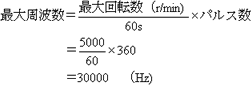 |
Input range = 5000 according to measurement conditions, and the factor for transforming equation (3) is;
 |
The output range is the same as in section 1.
Example 2: Set the input range to frequency <Hz>.
| measurement conditions | set value |
|---|---|
| RP Series Rotary Encoder: 360 P/R Maximum measurement rotation speed: 5000 r/min Output voltage: 0 to 5 V / 0 to 5000 r/min Set input range in frequency Hz |
Input range: 30.0 k (30,000) Factor: 1 Output range: 50 % Measurement range: Monitor display 0 ~ 30.0 k |
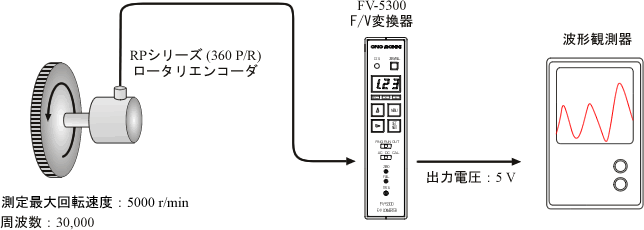
- input range
- We will determine the maximum frequency using the method from Example 1-2. The maximum rotational speed is 5000 r/min.
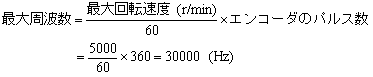 |
- factor
- The input range is set to a maximum frequency of 30000, so the factor is;
 |
- output range
- From the measurement condition of 5 V, the output range is set to 50%.
- The values obtained have been summarized in the table above in the 'set values' column, so please refer to it.
Example 3: Set the input range to speed <m/min>.
| measurement conditions | set value |
|---|---|
| RP-721 Roller Encoder: 120 P/R Roller Diameter: πD = 0.2 m Maximum Measurement Speed: 100 m/min Output Voltage: 0 ~ 10 V / 0 ~ 100 m/min Set the input range in speed m/min |
Input range: 100 Factor: 10 Output range: 100 % Measurement range: Monitor display 0 ~ 100 m/min |
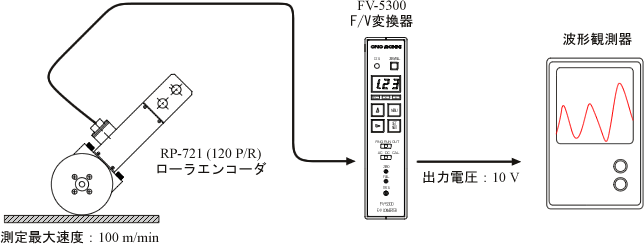
- factor
- From the specifications of RP-721, the measurement unit is m/min;
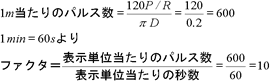 |
- input range
- Set the input range to 100, corresponding to the maximum speed of 100 m/min that you want to measure. If a signal exceeding this setting is input, it will result in an input over condition, so a review of the settings is necessary.
- output range
- The output voltage is set to 100% as it is 10 V according to the output conditions. The values obtained have been summarized in the table above under the 'set values' column, so please refer to it.
Last updated: July 13, 2018