

O-Solution DS-5000 Frequently Asked Questions
Question number FAQ-0785
In O-Solution, even if I set a different sound in [Edit] > [Preferences] > [User Notifications] under 'Notification Sound', the same sound plays. What should I do to make a different sound play?
You need to change the sound settings of Windows using the following steps.
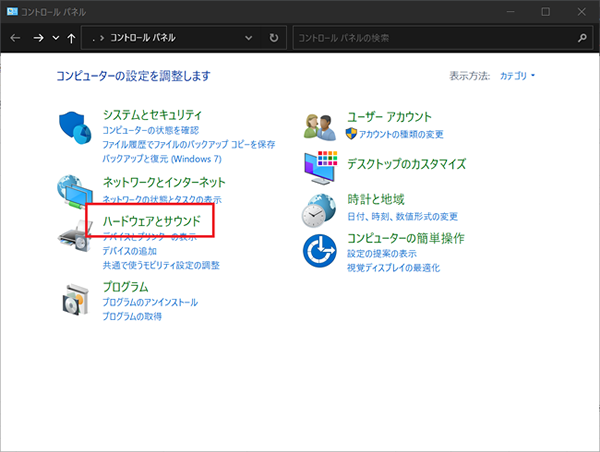
- Open the Control Panel and click on [Hardware and Sound].
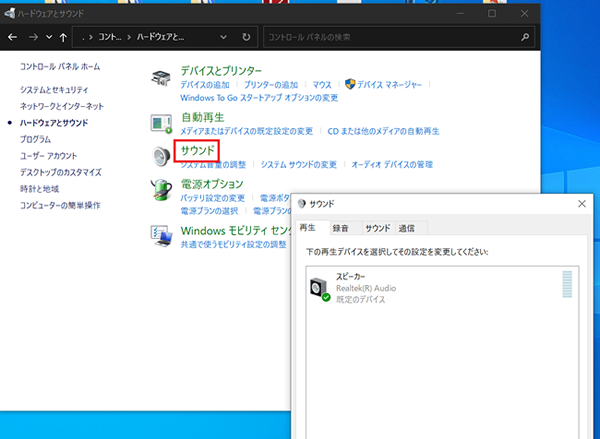
- Click on [Sound] to open the 'Sound' settings.
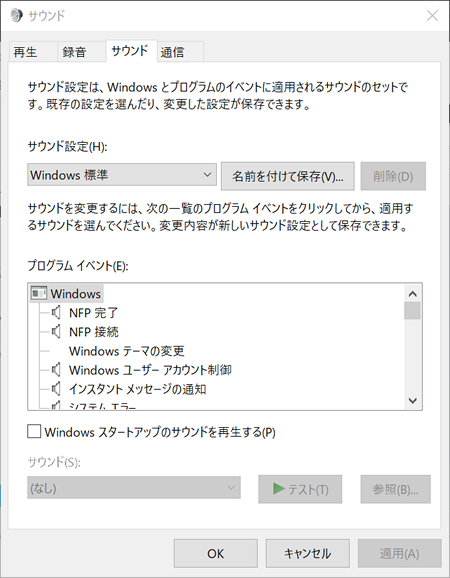
- Open the [Sound] tab
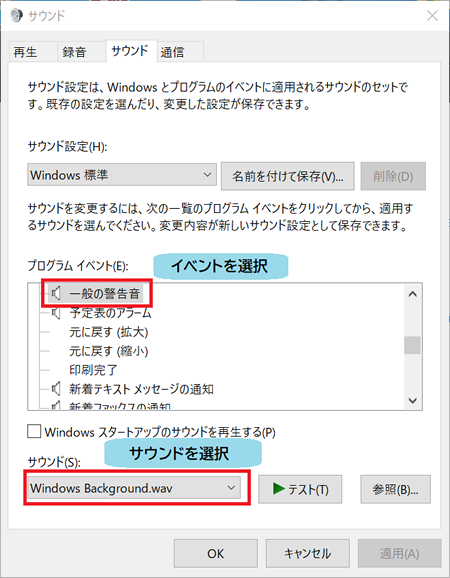
- Select program events and set the corresponding sounds for each.
Furthermore, the names of Windows program events correspond to the notification sounds of O-Solution as follows.
| O-Solution Notification Sound | Windows program event |
|---|---|
| general beep sound | - ※ |
| information sound | Message (Information) |
| warning sound | Message (Warning) |
| system error sound | System Error |
| inquiry sound | Message (Inquiry) |
| general warning sound | general warning sound |
The sound to be played can be set to your preferred sound for each program event.
For a general beep sound, a beep at 262 Hz is sounded for 0.8 seconds.
Last updated: 2021-06-11